Main Switch: Integra
- Remove main switch from instrument panel. Ensure main switch is off. Using a DVOM, check for continuity between main switch terminals "B" and "C" and terminals "D" and "E". See Fig 1
. Continuity should be present. If continuity is present, go to next step. If continuity is not present, replace defective bulb inside main switch. Locate bulb on left side of main switch and rotate bulb 1/2 turn to remove from switch. After replacing bulb inside main switch, if main switch continuity readings are not as specified, replace malfunctioning main switch.
- Ensure main switch is on. Using a DVOM, check for continuity between main switch terminals "A" and "B", "B" and "C", and "D" and "E". See Fig 1
. Continuity should be present. If continuity is present, main switch is okay. If continuity is not present, between main switch terminals "A" and "B", replace malfunctioning main switch. If continuity is not present between main switch terminals "B" and "C" and terminals "D" and "E", go to next step.
- Replace defective bulb inside main switch. Locate bulb on left side of main switch and rotate bulb 1/2 turn to remove from switch. After replacing bulb inside main switch, if main switch continuity readings are not as specified, replace malfunctioning main switch.
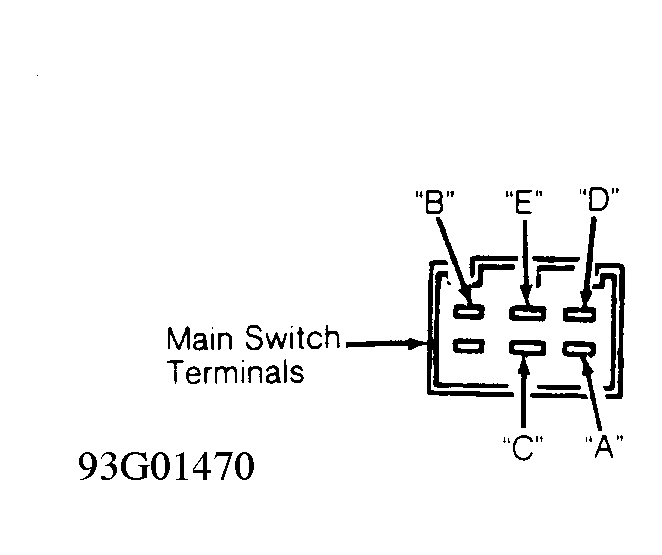 Courtesy of AMERICAN HONDA MOTOR CO., INC.