Charging System Light
- Perform PRELIMINARY INSPECTION
. Repair or replace any components as required. Disconnect generator 4-pin connector. Ground terminal No. 3 (White/Blue wire). See Fig 1
. Turn ignition on. If charging system light comes on, go to next step. If charging system light does not come on, check for faulty light bulb or open in White/Blue wire. Repair or replace as necessary.
- Remove White/Blue wire from generator connector terminal No. 3. See Fig 1
. If charging system light does not go off, go to next step. If charging system light goes off, charging system light circuit is functioning properly.
- Turn ignition off. Disconnect Integrated Control Unit (ICU) 22-pin connector, locate behind underdash fuse/relay box. Turn ignition on. If charging system light does not come on, go to next step. If charging system light comes on, repair short to ground in White/Blue wire. See WIRING DIAGRAMS
. After making repairs, reconnect ICU connector.
- Reconnect ICU connector. Turn ignition on and recheck charging system light. If charging system light did not come on, go to next step. If charging system light came on, replace ICU and retest system.
- Measure voltage at generator harness connector terminal No. 1 (Black/Yellow wire). See Fig 1
. If battery voltage exists, go to next step. If battery voltage does not exist, repair open in Black/Yellow wire.
- Ensure generator 4-pin harness connector is connected. Turn ignition on. If charging system light comes on, go to next step. If charging system light does not come on, perform GENERATOR/REGULATOR OUTPUT TEST
.
- Start engine. If charging system light goes off, system is operating normally. If charging system light remains on, perform GENERATOR/REGULATOR OUTPUT TEST
.
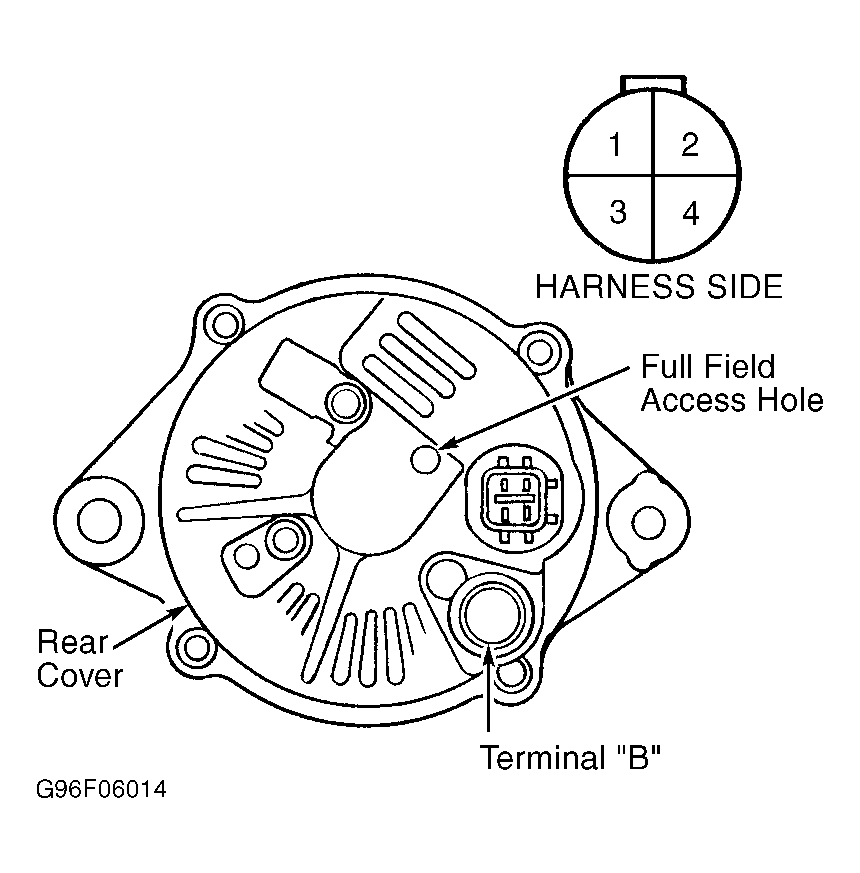 Courtesy of AMERICAN HONDA MOTOR CO., INC.