Charging System Light
- Start engine. Charging system light should turn off. If charging system light remains on, go to next step. If charging system light turns off, charging system light circuit is functioning properly.
- Turn ignition off. Disconnect generator 4-pin harness connector. Connect a fused jumper wire between ground and generator 4-pin harness connector White/Blue wire (terminal No. 4). See Fig 1
. Turn ignition on. If charging system light turns on, go to next step. If charging system light does not turn on, check for blown charging system light bulb and replace as necessary. If bulb is okay, repair open in White/Blue wire.
- With ignition on, remove jumper wire from generator 4-pin harness connector terminal No. 4. If charging system light turns off, go to step 6). If charging system light remains on, go to next step.
- Turn ignition off. Disconnect integrated control unit connector, located behind right kick panel. Disconnect Anti-lock Brake System (ABS) 26-pin connector, located behind right kick panel. Turn ignition on. If charging system light remains on, turn ignition off, and repair short to ground in White/Blue wire. If charging system light remains off, go to next step.
- Turn ignition off and reconnect ABS 26-pin connector. Turn ignition on, if charging system light remains off, replace integrated control unit. If charging system light remains on, replace ABS control unit.
- With ignition on and generator 4-pin harness connector disconnected, check voltage at generator 4-pin harness connector Black/Yellow wire (terminal No. 3). If battery voltage does not exist, turn ignition off and repair open in Black/Yellow wire. If battery voltage exists, go to next step.
- Turn ignition off. Reconnect generator 4-pin harness connector. Turn ignition switch on. If charging system light turns on, start engine. If charging system light turns off, charging system is okay. If charging system light remains on, replace voltage regulator.
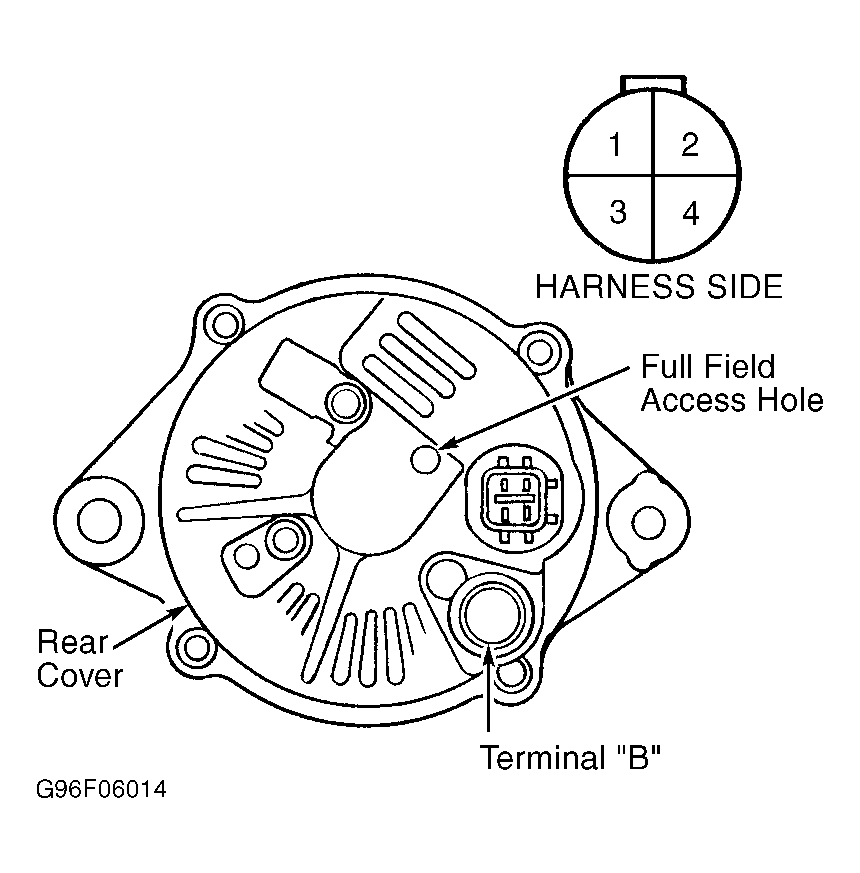 Courtesy of AMERICAN HONDA MOTOR CO., INC.