Driver's Position Memory Switch
Remove driver's door panel. See DOOR PANEL
under REMOVAL & INSTALLATION. Disconnect memory switch 10-pin connector. Using an ohmmeter, verify continuity is as specified in DRIVER'S POSITION MEMORY SWITCH CONTINUITY
table. See Fig 1
. If memory switch fails any test, replace faulty switch.
DRIVER'S POSITION MEMORY SWITCH CONTINUITY
| Position |
Continuity Between Terminals No. |
| Memo Button |
| Off |
No Continuity |
| On |
7 & 10 |
| Position 1 Button |
| Off |
No Continuity |
| On |
9 & 10 |
| Position 2 Button |
| Off |
No Continuity |
| On |
8 & 10 |
| Indicator |
| 1 |
2 & 4 |
| 2 |
2 & 3 |
| Illumination |
5 & 6 |
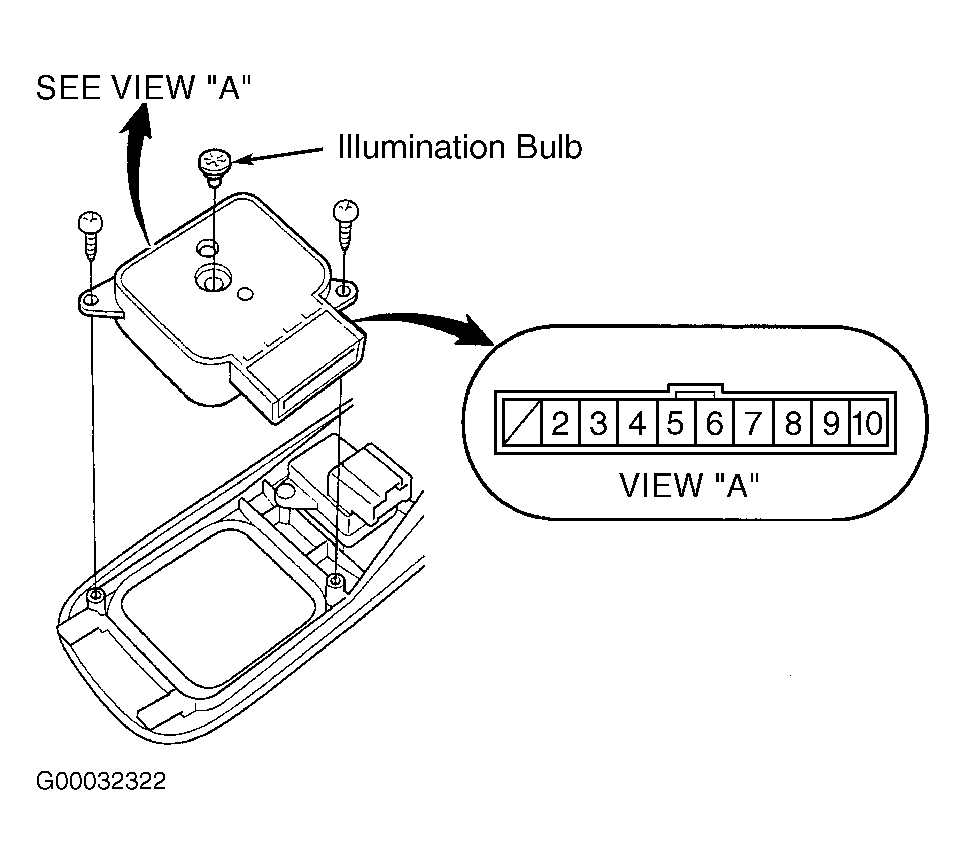 Courtesy of AMERICAN HONDA MOTOR CO., INC.