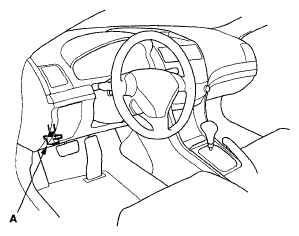
- Connect the HDS to the data link connector (DLC) (A) located under the driver's side of the dashboard.
 Courtesy of AMERICAN HONDA MOTOR CO., INC.
- Turn the ignition switch ON (II).
- Make sure the HDS communicates with the ECM/PCM and other vehicle systems. If it doesn't, go to the DLC circuit troubleshooting; '06 model (see DLC CIRCUIT TROUBLESHOOTING
), '07-08 models (see '07-08 MODELS
). If you are returning from DLC circuit troubleshooting, skip steps 4 through 7, 17 through 19, and 22 through 23, and do the following procedures after replacing the ECM/PCM;
- Select the PGM-FI system with the HDS.
- Select the INSPECTION MENU with the HDS.
- Select the ETCS TEST, then select the TP POSITION CHECK, and follow the screen prompts.
NOTE:
If the TP POSITION CHECK indicates FAILED, continue with this procedure.
- Select the REPLACE ECM/PCM MENU, then READ DATA and follow the screen prompts.
NOTE:
- Doing this step copies (READS) the engine oil life data from the original ECM/PCM so you can later download (WRITES) it into the new ECM/PCM.
- If READ DATA indicates FAILED, continue with this procedure.
- Turn the ignition switch OFF.
- Jump the SCS line with the HDS.
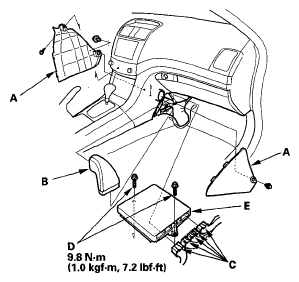
- Remove the center lower covers (A).
 Courtesy of AMERICAN HONDA MOTOR CO., INC.
- Remove the duct (B).
- Disconnect ECM/PCM connectors (C).
- Remove the bolts (D), then remove the ECM/PCM (E),
- Install the parts in the reverse order of removal.
- Turn the ignition switch ON (II).
- Manually input the VIN to the ECM/PCM with the HDS.
NOTE:
DTC P0630 "VIN Not Programmed or Mismatch" may be stored because the VIN has not been programmed into the ECM/PCM; ignore it, and continue this procedure.
- If the READ DATA (engine oil life) failed in step 7, go to step 20. Otherwise, go to step 18.
- Select the PGM-FI system with the HDS.
- Select the REPLACE ECM/PCM MENU, then WRITE DATA and follow the screen prompts.
NOTE:
If the WRITE DATA indicates FAILED, continue with this procedure.
- Select IMMOBI system with the HDS.
- Enter the immobilizer code with the ECM/PCM replacement procedure in the HDS; it allows you to start the engine.
- If the TP POSITION CHECK failed in step 6 clean the throttle body (see
THROTTLE BODY CLEANING
), then go to step 23.
- If the READ DATA failed in step 7 or the WRITE DATA failed instep 19, replace the engine oil (see
ENGINE OIL REPLACEMENT
) and engine oil filter (see
ENGINE OIL FILTER REPLACEMENT
), then go to step 24.
- Select PGM-FI system and reset the ECM/PCM with the HDS.
- Update the ECM/PCM if it does not have the latest software (see
UPDATING THE ECM/PCM
).
- Do the ECM/PCM idle learn procedure (see
ECM/PCM IDLE LEARN PROCEDURE
).
- Do the CKP pattern learn procedure (see
CRANK (CKP) PATTERN CLEAR/CRANK (CKP) PATTERN LEARN
).