Ignition Tinning Inspection
- Connect the Honda Diagnostic System (HDS) to the data link connector (DLC) (see step 2 under HOW TO USE THE HDS (HONDA DIAGNOSTIC SYSTEM)
).
- Turn the ignition switch ON (II).
- Make sure the HDS communicates with the vehicle and the powertrain control module (PCM). If it doesn't, troubleshoot the DLC circuit (see
DLC CIRCUIT TROUBLESHOOTING
).
- Start the engine. Hold the engine speed at 3,000 rpm without load (in P or N position) until the radiator fan comes on, then let it idle.
- Check the idle speed (see
IDLE SPEED INSPECTION
).
- Jump the SCS line with the HDS.
- Connect the timing light to the service loop (white tape).
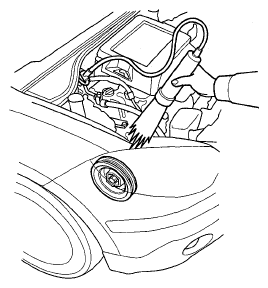 Courtesy of AMERICAN HONDA MOTOR CO., INC.
- Aim the light toward the pointer (A) on the cam chain case. Check the ignition timing under a no load condition (headlights, blower fan, rear window defogger, and air conditioner are turned off).
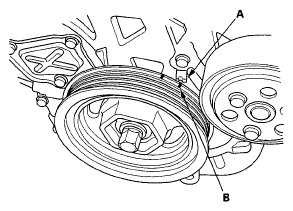 Courtesy of AMERICAN HONDA MOTOR CO., INC.
- If the ignition timing differs from the specification, check the cam timing. If the cam timing is OK, update the PCM if it does not have the latest software (see
PCM UPDATE
), or substitute a known-good PCM (see
SUBSTITUTING THE PCM
), then recheck. If the system works properly, and the PCM was substituted, replace the original PCM (see
PCM REPLACEMENT
).
- Disconnect the HDS and the timing light.