Basic Setting Diagnostic Test Mode (Function 04): Testing
- Press -0- button twice to select basic setting display group 00.
- Display will read - "INITIATE BASIC SETTING" "INSERT DISPLAY GROUP NUMBER 00".
- Press -Q- button to confirm input.
- Display will read - "SYSTEM IN BASIC SETTING 1 2 3 4 5 6 7 8 9 10".
- After a minimum of 5 seconds: Compare values in display fields with chart. See Fig 1
.
- After test driving and checking DTC memory, (within 5 minutes) compare values in display field 9 with specified values. If the vehicle idles longer than 5 minutes, the specified value can be exceeded without a malfunction being present.
- Display field 10 shows the ignition timing as calculated by the Motronic Engine Control Module (ECM). If there is a power loss, check the basic mechanical settings of the engine.
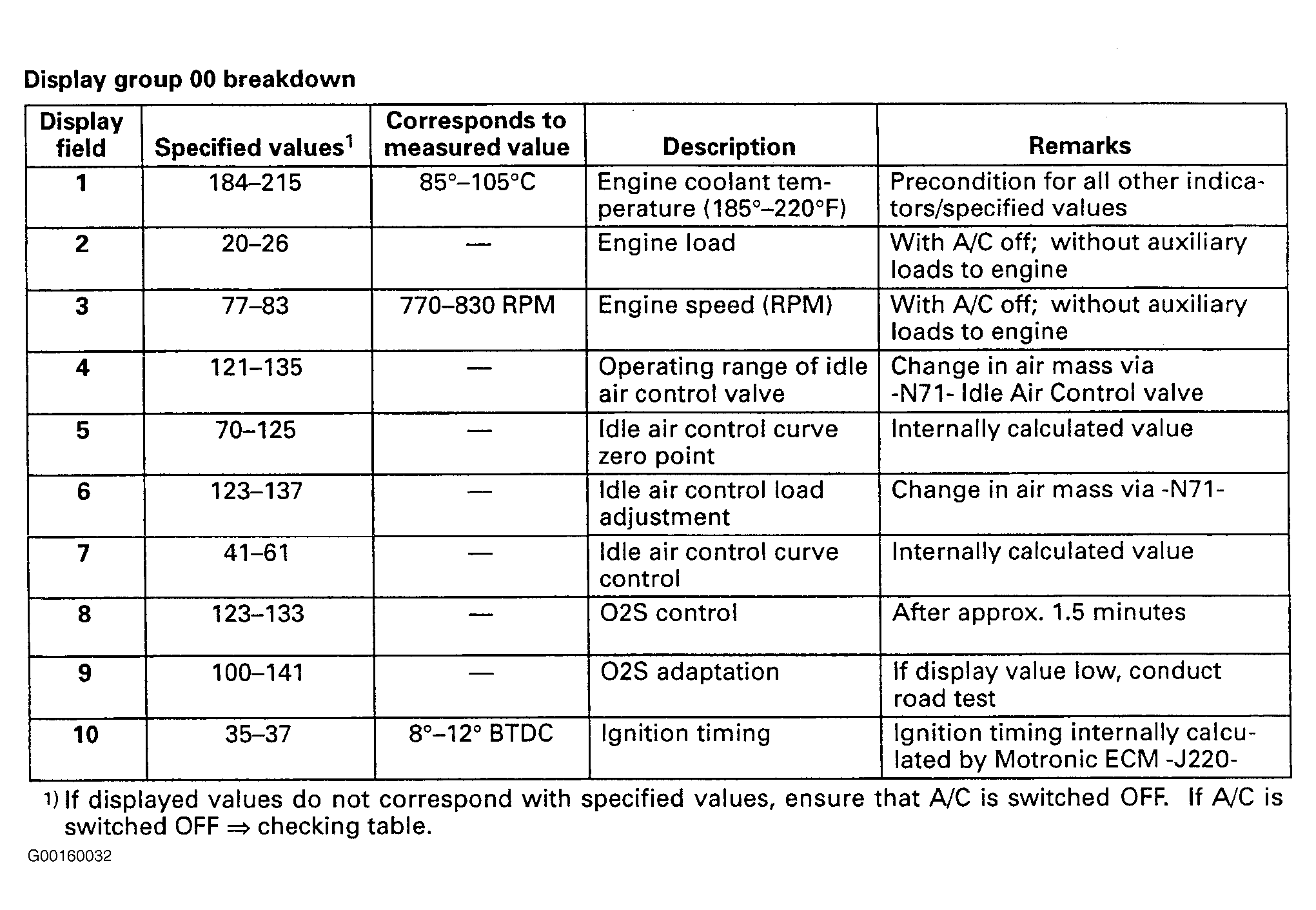 Courtesy of AUDI OF AMERICA, INC.
- Press buttons -0- and -1- to select basic setting display group 01.
- Display will read - "INITIATE BASIC SETTING" "INSERT DISPLAY GROUP NUMBER 01".
- Press -Q- button to confirm input. Display will read - "SYSTEM IN BASIC SETTING 1" "1 2 3 4".