Scan Tool Does Not Communicate With Class 2 Data Line: Testing
- Using DVOM to check voltage, backprobe between ground and Data Link Connector (DLC) terminal No. 16 (Orange wire). If reading is 11-14 volts, go to next step. If reading is not 11-14 volts, go to step 18).
- Backprobe between battery voltage and DLC terminal No. 5 (Black wire). If reading is 11-14 volts, go to next step. If reading is not 11-14 volts, go to step 19).
- Backprobe between battery voltage and DLC terminal No. 4 (Black wire). If reading is 11-14 volts, go to next step. If reading is not 11-14 volts, go to step 20).
- Disconnect bus bar from splice pack SP205. See COMPONENT LOCATIONS
. Using DVOM, check for continuity between splice pack SP205 terminal "A" (Purple wire) and DLC terminal No. 2 (Purple wire). See Fig 1
. If continuity exists, go to next step. If continuity does not exist, go to step 6).
- Connect scan tool to DLC. Reconnect bus bar on splice pack SP205. Using scan tool, attempt to establish communication with modules on splice pack SP205. See DATA LINK CONNECTORS in WIRING DIAGRAMS
. If communications can be established, go to step 7). If communication cannot be established, go to step 8).
- Repair poor connection or open in Purple wire between splice pack SP205 terminal "A" and DLC. Recheck system operation.
- Using Connector Test Adapter Kit (J-35616-A), individually jumper between splice pack SP205 terminal "A" (Purple wire) and each module terminal on splice pack SP205. Using scan tool, attempt to establish communications with modules on splice pack SP205. If communication can be established, system is operating properly. If communication cannot be established, go to step 13).
- Disconnect bus bar from splice pack SP205. Disconnect scan tool. Using DVOM, check resistance between DLC terminals No. 2 (Purple wire) and No. 5 (Black wire). If resistance is infinite, go to next step. If resistance is not infinite, go to step 10).
- Turn ignition to RUN position. Using DVOM, check voltage between DLC terminals No. 2 (Purple wire) and No. 5 (Black wire). If any voltage exists, go to step 11). If no voltage exists, go to step 12).
- Repair short to ground in Purple wire to DLC terminal No. 2. Recheck system operation.
- Repair short to voltage in Purple wire to DLC terminal No. 2. Recheck system operation.
- Reconnect scan tool. Using Connector Test Adapter Kit (J-35616-A), individually jumper between splice pack SP205 terminal "A" (Purple wire) and each module terminal on splice pack SP205. Using scan tool, attempt to establish communications with modules on splice pack SP205. If communications can be established, system is operating properly. If communication cannot be established, go to next step.
- Disconnect module that is not responding. Using DVOM, check resistance between ground and respective module terminal on splice pack SP205. If resistance is infinite, go to next step. If resistance is not infinite, go to step 15).
- Using DVOM, check voltage between ground and respective module terminal on splice pack SP205. If any voltage exists, go to step 16). If no voltage exists, go to step 17).
- Repair short to ground in appropriate wire between unresponsive module and splice pack SP205. Recheck system operation.
- Repair short to voltage in appropriate wire between unresponsive module and splice pack SP205. Recheck system operation.
- Replace appropriate module. Recheck system operation.
- Repair poor connection or open in Orange wire between DLC terminal No. 16 and instrument panel fuse block. Recheck system operation.
- Repair poor connection or open in Black wire between DLC terminal No. 5 and splice. Recheck system operation.
- Repair poor connection or open in Black wire between DLC terminal No. 4 and splice. Recheck system operation.
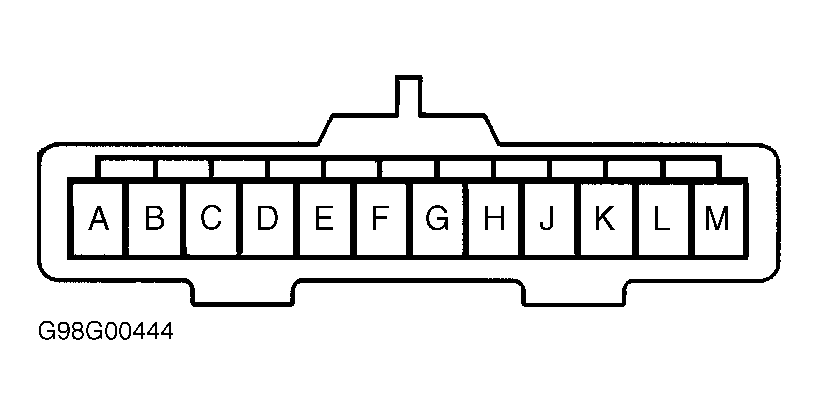 Courtesy of GENERAL MOTORS CORP.