Test B: Left Front Window Inoperative
- If power window system check was performed, go to next step. If power window system check was not performed, perform system check. See SYSTEM CHECK
under TROUBLE SHOOTING.
- Disconnect the driver power window regulator motor. With test light, probe between window regulator connector terminal No. 2 (Gray/Green wire) and ground. Press driver window switch to UP position while observing test light. With test light, probe between window regulator connector terminal No. 3 (Blue/Red wire) and ground. Press driver window switch to DOWN position while observing the test light. See Fig 1
. If test light was on when the switch was pressed to UP position and DOWN position, go to next step. If test light was off when the switch was pressed to UP position or DOWN position, go to step 8
.
- If test light did not stay on for either of circuits, go to next step. If test light stayed on for either circuit, go to step 14
.
- Check Black wire between power window regulator motor and ground for open. If problem was not found, go to next step. If problem was found, repair as necessary, and then go to step 15
.
- Check Yellow wire between power window regulator motor and power accessory switch panel for open. If problem was not found, go to next step. If problem was found, repair as necessary, and then go to step 15
.
- Check Yellow wire between power window regulator motor and power accessory switch panel for short to ground. If problem was not found, go to next step. If problem was found, repair as necessary, and then go to step 15
.
- Check Red wire between power window regulator motor and fuse No. 1 for open. If problem was not found, go to step 10
. If problem was found, repair as necessary, and then go to step 15
.
- Check appropriate power window regulator motor switch signal circuit to driver power window regulator motor for open. If problem was not found, go to next step. If problem was found, repair as necessary, and then go to step 15
.
- Check appropriate power window regulator motor switch signal circuit to driver power window regulator motor for short to ground. If problem was not found, go to step 11
. If problem was found, repair as necessary, and then go to step 15
.
- Inspect for poor connections at driver power window regulator motor. If problem was not found, go to step 12
. If problem was found, repair as necessary, and then go to step 15
.
- Inspect for poor connections at power accessory switch panel. If problem was not found, go to step 13
. If problem was found, repair as necessary, and then go to step 15
.
- Replace driver power window regulator motor. See WINDOW REGULATOR & MOTOR
under REMOVAL & INSTALLATION. Go to step 15
.
- Replace power accessory switch panel. See POWER ACCESSORY SWITCH PANEL
under REMOVAL & INSTALLATION. Go to step 15
.
- Repair short to voltage in appropriate power window regulator motor switch signal circuit. Go to step 15
.
- Reprogram any window regulators if any were disconnected. See PROGRAMMING
. Operate system in order to verify repair.
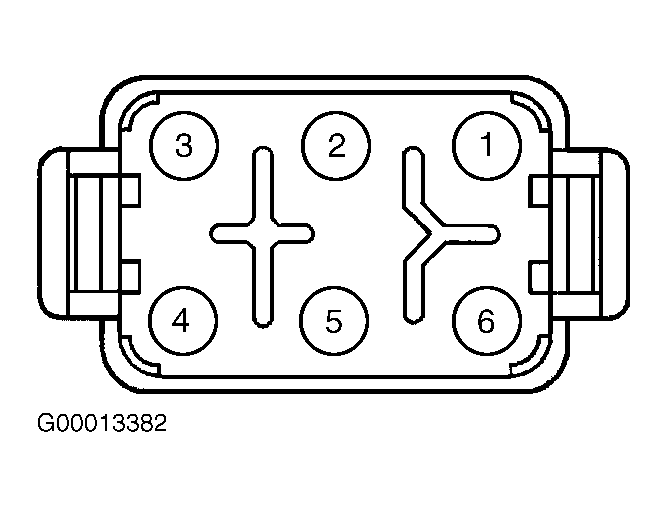 Courtesy of GENERAL MOTORS CORP.