Scan Tool Does Not Communicate With Class 2 Device: Testing
- Connect scan tool to Data Link Connector. See Figure
. If scan tool powers up, go to next step. If scan tool does not power up, go to SCAN TOOL DOES NOT POWER UP
.
- Turn ignition on. Attempt to communicate with each module on class 2 serial data line. If using a Tech 2, use CLASS 2 MESSAGE MONITOR feature. If scan tool communicates with any module, go to next step. If scan tool does not communicate with any modules along class 2 serial data line, go to step 6
.
- Using scan tool select display DTC function for each module. If using a Tech 2, use the CLASS 2 DTC CHECK feature to determine which modules have set DTCs. Record all displayed DTCs, DTC status and module which DTC is set. If any DTCs between U1000 and U1255 are set, go to next step. If no DTCs between U1000 and U1255 are set, go to step 5
.
- If only DTC U1000 and U1255 are displayed, go to DTC U1000 & DTC U1255 CLASS 2 COMMUNICATION MALFUNCTION
. If DTC U1000 and U1255 are not displayed, go to DTC U1001-U1254 LOSS OF COMMUNICATIONS WITH XXX
.
- Go to DTC U1001-U1254 LOSS OF COMMUNICATIONS WITH XXX
and diagnose module which is not communicating. After repairs, go to BODY CONTROL SYSTEM DIAGNOSTIC SYSTEM CHECK
. If referred from another article, return to that article and perform diagnostic system check.
- Turn ignition off. Disconnect scan tool. Check for poor connections at DLC terminals No. 2 and 5. If connections are okay, go to next step. If faulty connections are found and repaired, go to BODY CONTROL SYSTEM DIAGNOSTIC SYSTEM CHECK
. If referred from another article, return to that article and perform diagnostic system check.
- Check for open in Black/White wire between DLC terminal No. 5 and ground. If circuit is okay, go to next step. If faulty circuit is found and repaired, go to BODY CONTROL SYSTEM DIAGNOSTIC SYSTEM CHECK
. If referred from another article, return to that article and perform diagnostic system check.
- Check for open in Purple wire between DLC terminal No. 2 and connector C200. C200 is located under left side of instrument panel near park brake pedal. If circuit is okay, go to next step. If faulty circuit is found and repaired, go to BODY CONTROL SYSTEM DIAGNOSTIC SYSTEM CHECK
. If referred from another article, return to that article and perform diagnostic system check.
- Turn ignition off. Disconnect splice pack SP300. SP300 is located under left side of rear seat cushion. See Figure
. Turn ignition on. Attempt to communicate with any module still connected to the DLC through the class 2 serial data line. If scan tool does not communicate with any module, go to next step. If scan tool communicates with any module, go to step 11
.
- Turn ignition off. Disconnect splice pack SP304. SP304 is located in right rear of passenger compartment, taped to body harness, approximately 9.5" (24 cm) from cross car channel. Turn ignition on. Attempt to communicate with any module still connected to the DLC through the class 2 serial data line. If scan tool communicates with any module, go to step 34
. If scan tool does not communicate with any module, go to step 60
.
- Turn ignition off. Using the correct terminal adapter from terminal kit J35616-A, connect a jumper wire between splice pack SP300 Purple wire terminals "A" and "C". Turn ignition on. Attempt to communicate with Passenger's Front Door Module (PFDM). If scan tool does not communicate with PFDM, go to next step. If scan tool communicates with PFDM, go to step 17
.
- Turn ignition off. Remove passenger's door panel. Disconnect PFDM connectors. PFDM is located at front of passenger's door. Turn ignition on. Attempt to communicate with any module still connected to the DLC through the class 2 serial data line. If scan tool communicates with any module, go to next step. If scan tool does not communicate with any module, go to step 16
.
- If this is a factory armored vehicle (B05), go to next step. If this is not a factory armored vehicle, go to step 76
.
- Turn ignition off. Reconnect PFDM connectors. Disconnect passenger front power window switch connector. Turn ignition on. Attempt to communicate with PFDM. If scan tool does not communicate with PFDM, go to next step. If scan tool communicates with PFDM, go to step 76
.
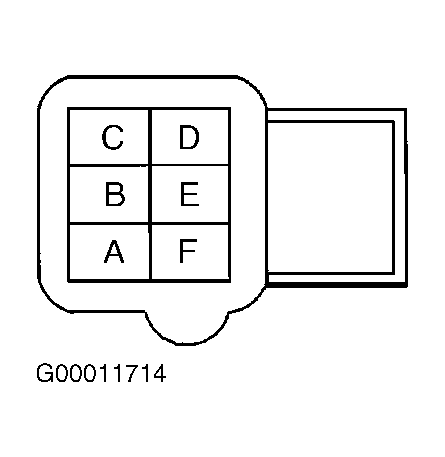
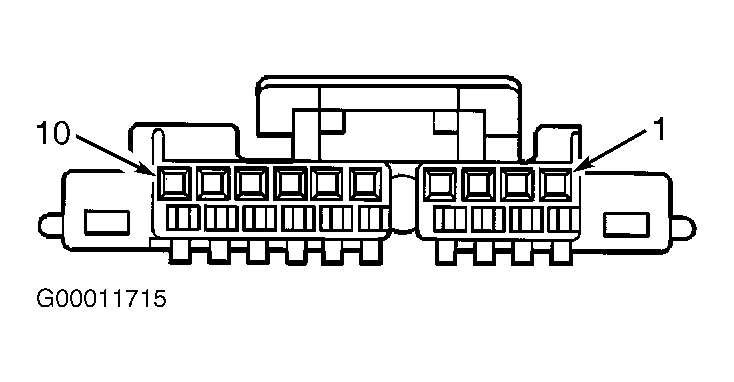
- Turn ignition off. Disconnect PFDM connectors. Turn ignition on. Check for short to ground or short to voltage in Purple wire between PFDM connector C2 terminal "F" and passenger's front window switch connector terminal No. 10. See Fig 1
and Fig 2
. If circuit is okay, go to step 76
. If faulty circuit is found and repaired, go to step 78
.
- Turn ignition on. Check for short to ground or short to voltage in Purple wire between PFDM connector C2 terminal "F" and SP300 terminal "A". See Fig 1
. If circuit is okay, go to DIAGNOSTIC AIDS
. If faulty circuit is found and repaired, go to step 78
.
- Turn OFF the ignition. Disconnect jumper wire from terminal "A" (Purple wire) of splice pack SP300 and connect to terminal "B" (Purple wire). Turn ignition on. Attempt to communicate with Right Rear Door Module (RRDM). If scan tool does not communicate with RRDM, go to next step. If scan tool communicates with RRDM, go to step 19
.
- Turn ignition off. Remove right rear door panel. Disconnect RRDM connectors. Turn ignition on. Check for short to ground or short to voltage in Purple wire between RRDM connector C2 terminal "G" and SP300 terminal "B". See Fig 3
. If circuit is okay, go to step 76
. If faulty circuit is found and repaired, go to step 78
.
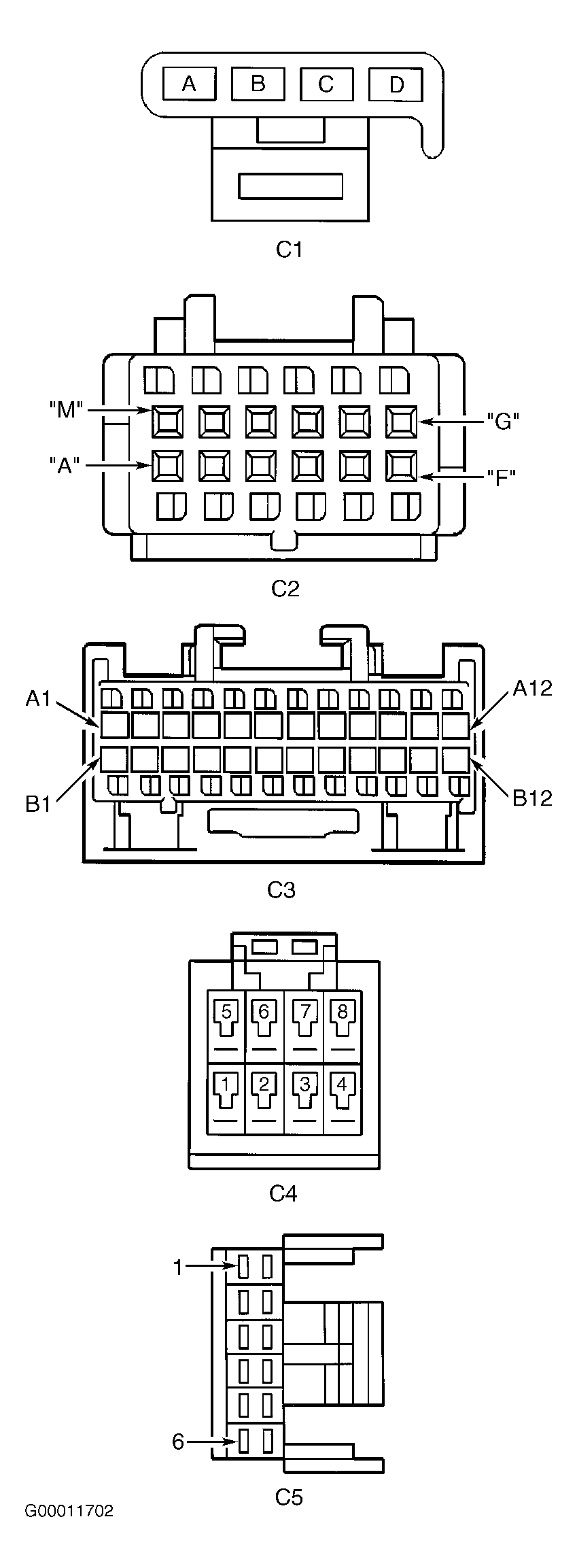 Courtesy of GENERAL MOTORS CORP.
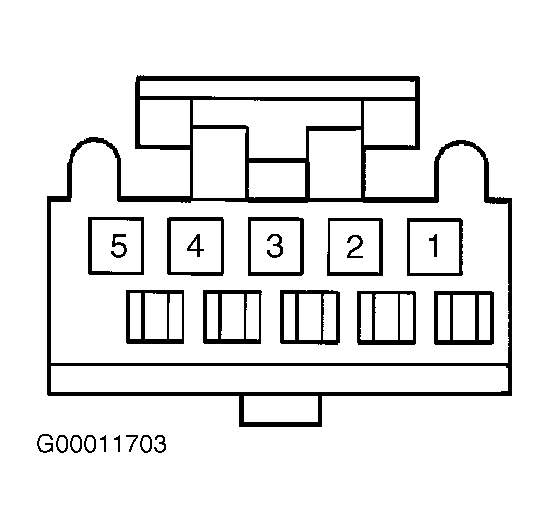 Courtesy of GENERAL MOTORS CORP.
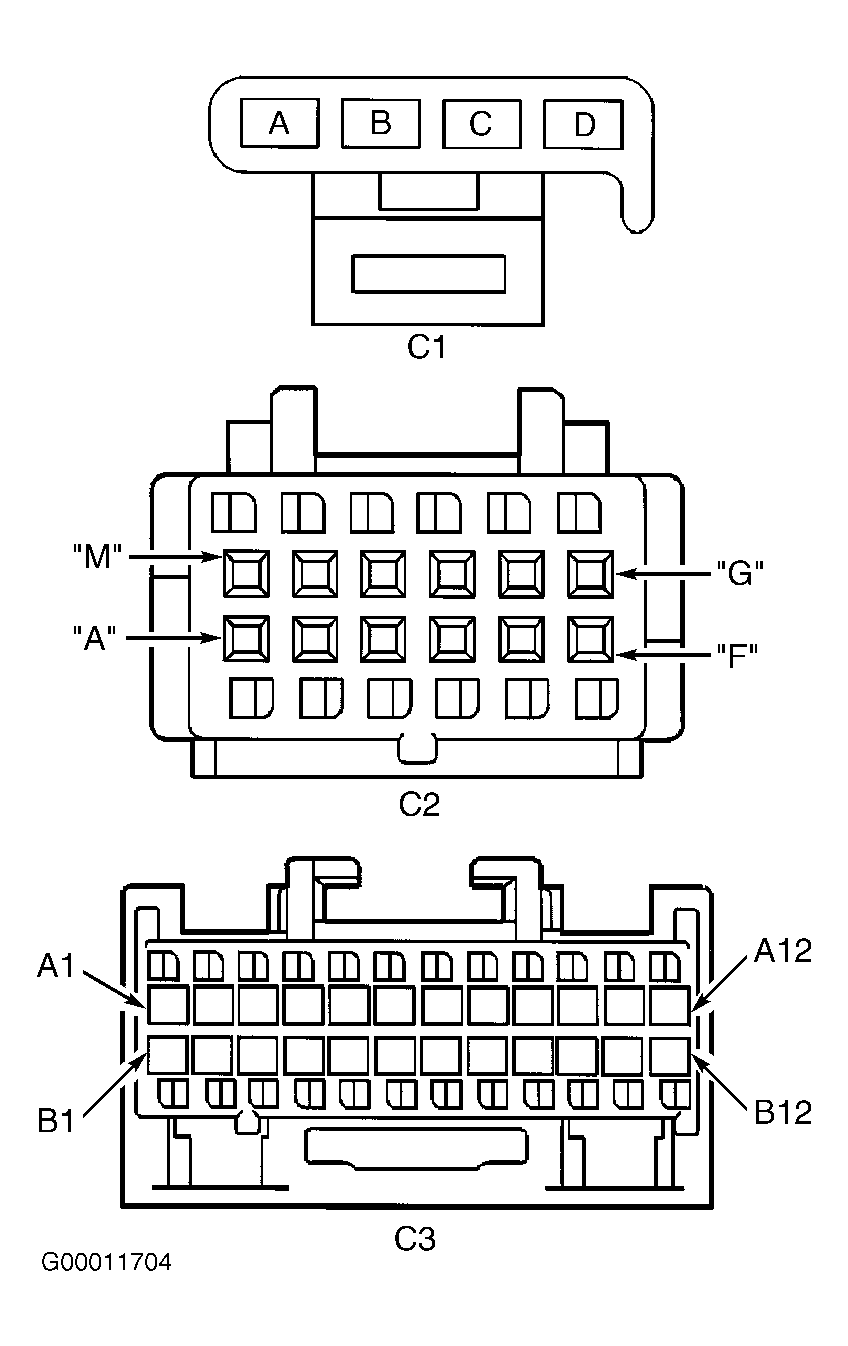 Courtesy of GENERAL MOTORS CORP.
- Turn ignition off. Disconnect jumper wire from terminal "B" of splice pack SP300 and connect to terminal "D". Turn ignition on. Attempt to communicate with Sensing and Diagnostic Module (SDM) located under rear of center console, mounted to floor. If scan tool does not communicate with SDM, go to next step. If scan tool communicates with SDM, go to step 21
.
- Turn ignition off. Remove center console. Disconnect SDM connector. Turn ignition on. Check for short to ground or short to voltage in Purple wire between SDM connector terminal A4 and SP300 terminal "D". See Fig 4
. If circuit is okay, go to step 76
. If faulty circuit is found and repaired, go to step 78
.
- Turn ignition off. Disconnect jumper wire from terminal "D" of splice pack SP300 and connect to terminal "E". Turn ignition on. Attempt to communicate with Rear Integration Module (RIM). If scan tool does not communicate with RIM, go to next step. If scan tool communicates with RIM, go to step 23
.
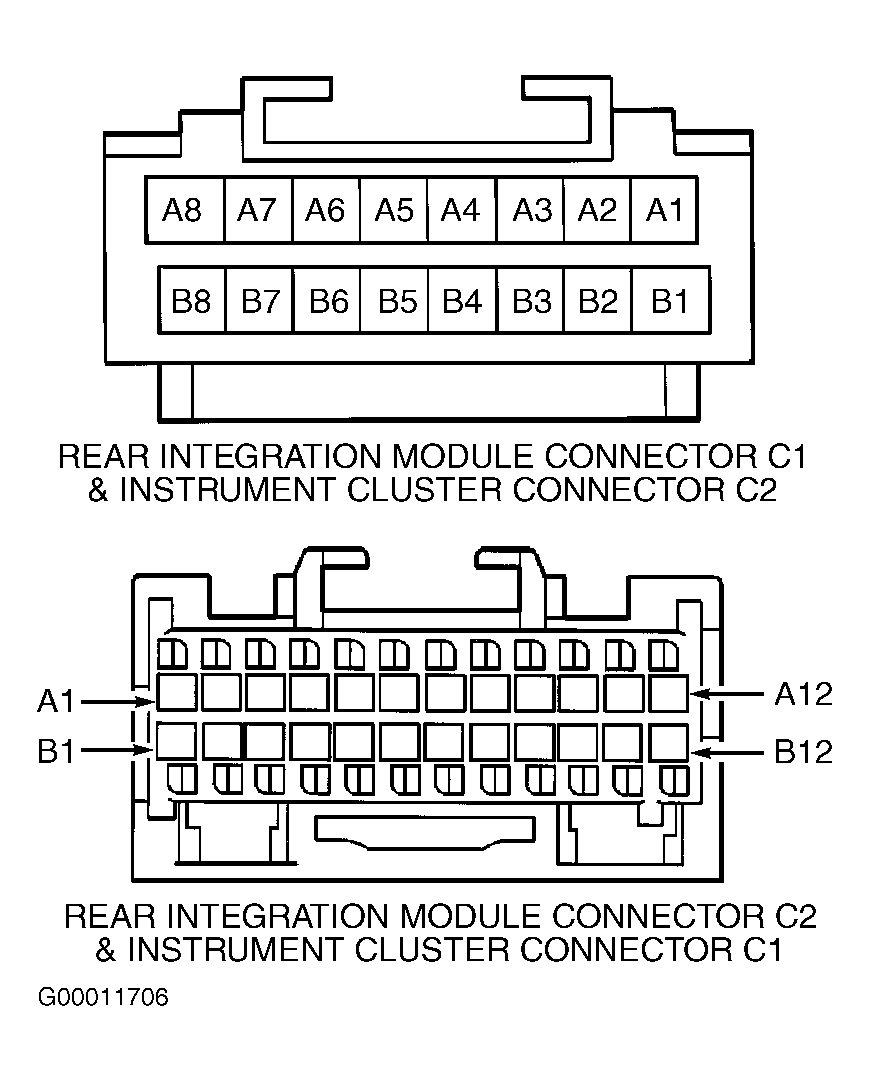
- Turn ignition off. Disconnect RIM connectors. See Figure
. Turn ignition on. Check for short to ground or short to voltage in Purple wire between RIM connector C2 terminal A12 and SP300 terminal "E". See Fig 5
. If circuit is okay, go to step 76
. If faulty circuit is found and repaired, go to step 78
.
- Turn ignition off. Disconnect jumper wire from terminal "E" of splice pack SP300 and connect to terminal "G". Turn ignition on. Attempt to communicate with Electronic Suspension Control (ESC) module. If scan tool does not communicate with ESC, go to next step. If scan tool communicates with ESC, go to step 26
.
- Turn ignition off. Disconnect ESC module connectors. ESC module is located behind rear seat back on right side of bay board. Turn ignition on. Check for short to ground or short to voltage in Purple wire between ESC module connector C2 terminal D4 and SP300 terminal "G". See Fig 6
. If circuit is okay, go to step 76
. If faulty circuit is found and repaired, go to step 78
.
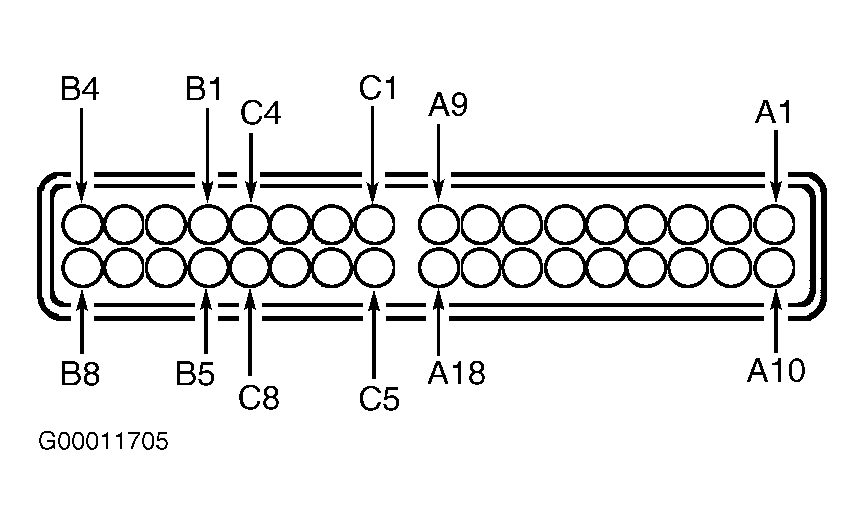 Courtesy of GENERAL MOTORS CORP.
 Courtesy of GENERAL MOTORS CORP.
 Courtesy of GENERAL MOTORS CORP.
- If vehicle is equipped with cellular phone or On-Star(R) system, go to next step. If vehicle is not equipped with cellular phone or On-Star(R) system, go to step 28
.
- Turn ignition off. Disconnect jumper wire from terminal "G" of splice pack SP300 and connect to terminal "H". Turn ignition on. Attempt to communicate with cellular telephone module and/or Vehicle Interface Unit (VIU) if equipped. If scan tool does not communicate with cellular telephone module and/or VIU, go to next step. If scan tool communicates with cellular telephone module and/or VIU, go to step 29
.
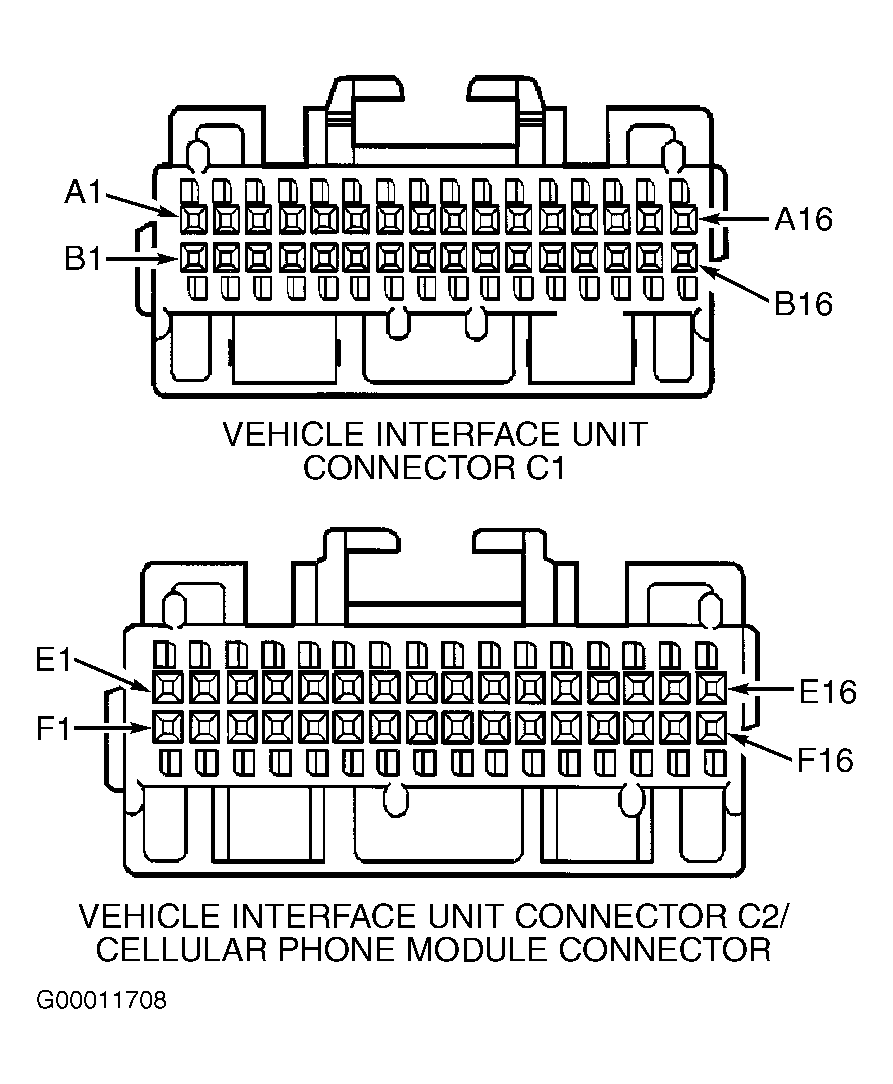
- Turn ignition off. Disconnect cellular telephone module and/or VIU located behind rear seat, if equipped. See Figure
. Turn ignition on. Check for short to ground or short to voltage in Purple wire between cellular telephone module connector terminal E2 and SP300 terminal "H". See Fig 7
. Check for short to ground or short to voltage in Purple wire between VIU connector C2 terminal A2 and SP300 terminal "H". If circuit is okay, go to step 76
. If faulty circuit is found and repaired, go to step 78
.
- If vehicle is equipped with navigation system (w/UY4), go to next step. If vehicle is not equipped with navigation system, go to step 31
.
- Turn ignition off. Disconnect jumper wire from terminal "H" of splice pack SP300 and connect to terminal "J". Turn ignition on. Attempt to communicate with navigation data processor. If scan tool does not communicate with navigation data processor, go to next step. If scan tool communicates with navigation data processor, go to step 32
.
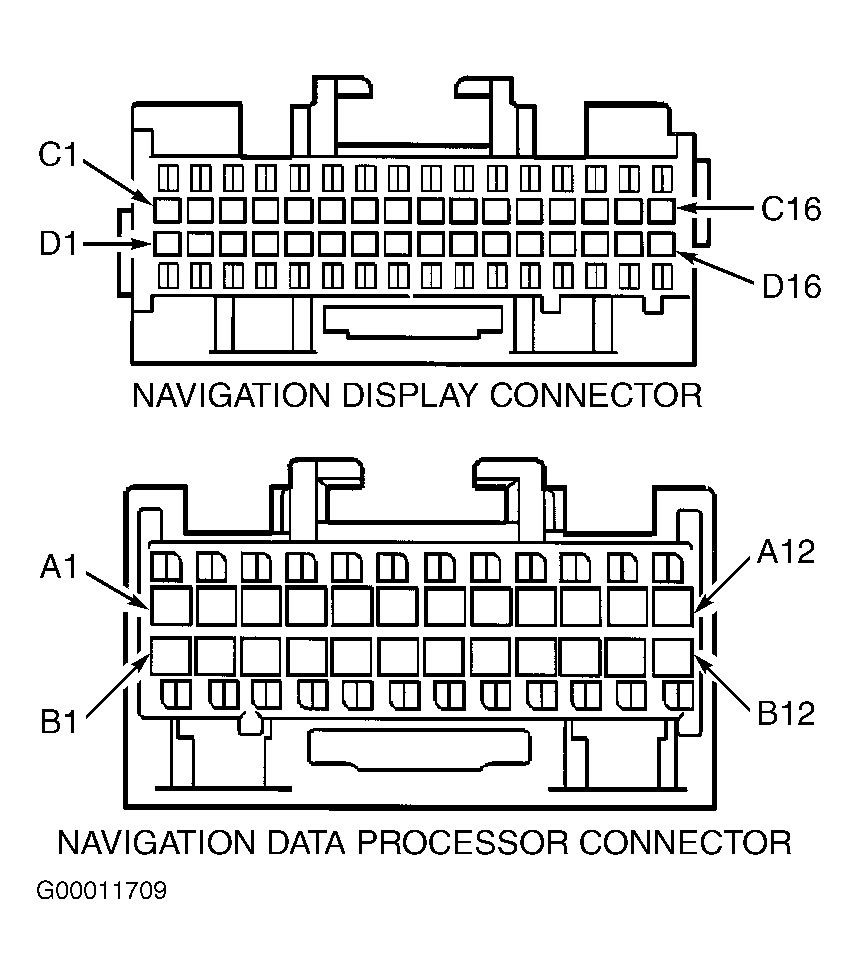
- Turn ignition off. Disconnect navigation data processor connector located in center of instrument panel, above IPM. See Figure
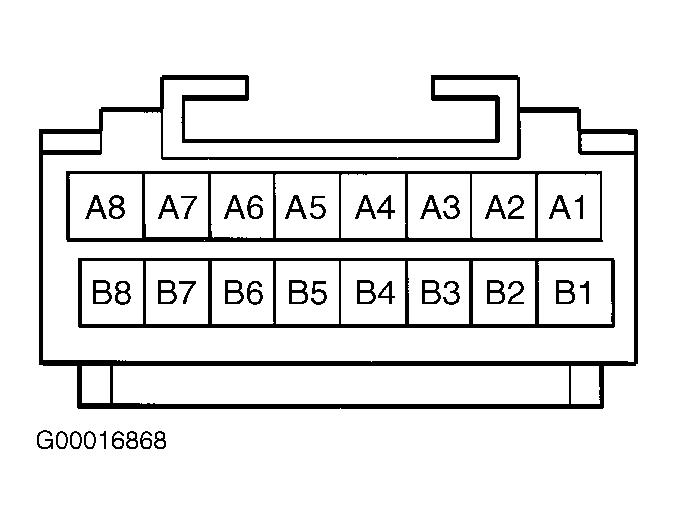
. Turn ignition on. Check for short to ground or short to voltage in Purple wire between navigation data processor connector terminal A3 and SP300 terminal "J". See Fig 8
. If circuit is okay, go to step 76
. If faulty circuit is found and repaired, go to step 78
.
 Courtesy of GENERAL MOTORS CORP.
 Courtesy of GENERAL MOTORS CORP.
- If vehicle is a factory limousine, go to next step. If vehicle is not a factory limousine, go to step 34
.
- Turn ignition off. Disconnect jumper wire from terminal "J" of splice pack SP300 and connect to terminal "K". Turn ignition on. Attempt to communicate with Right Middle Door Module (RMDM). If scan tool does not communicate with RMDM, go to next step. If scan tool communicates with RMDM, go to step 34
.
- Turn ignition off. Remove right middle door panel. Disconnect RMDM connector located in right middle door. Turn ignition on. Check for short to ground or short to voltage in Purple wire between RMDM connector C2 terminal "G" and SP300 terminal "K". See Fig 3
. If circuit is okay, go to step 76
. If faulty circuit is found and repaired, go to step 78
.
- Turn ignition off. Using correct terminal adapter from terminal kit J35616-A, connect a jumper wire between splice pack SP304 terminals "A" and "B". See Figure
. Turn ignition on. Attempt to communicate with radio amplifier. If scan tool does not communicate with radio amplifier, go to next step. If scan tool communicates with radio amplifier, go to step 36
.
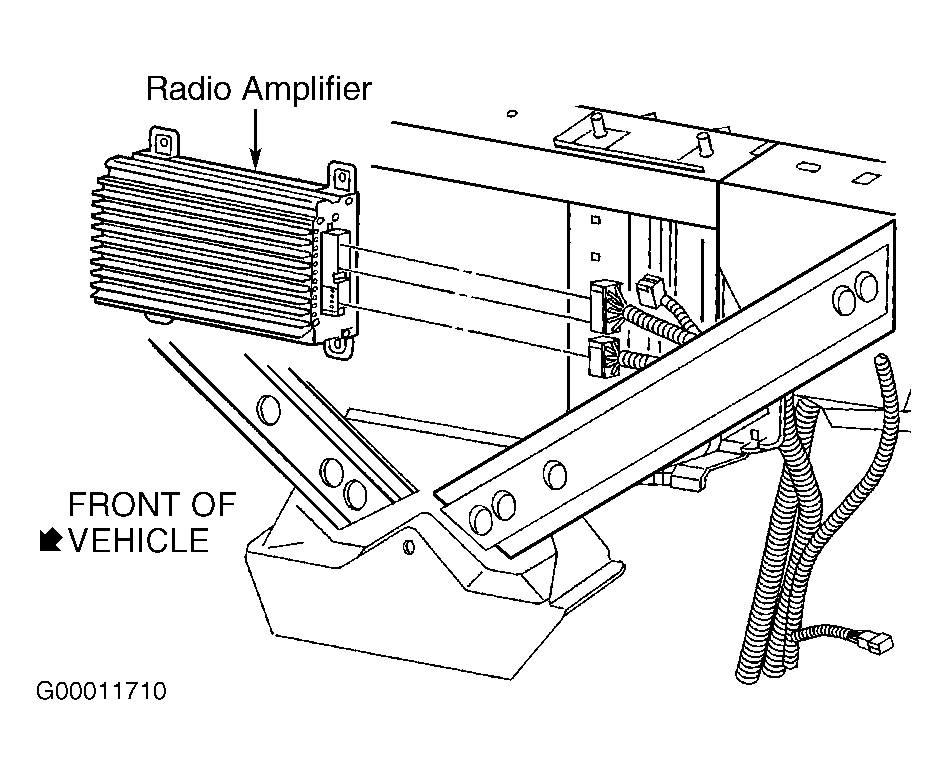
- Turn ignition off. Disconnect radio amplifier connector. See Fig 9
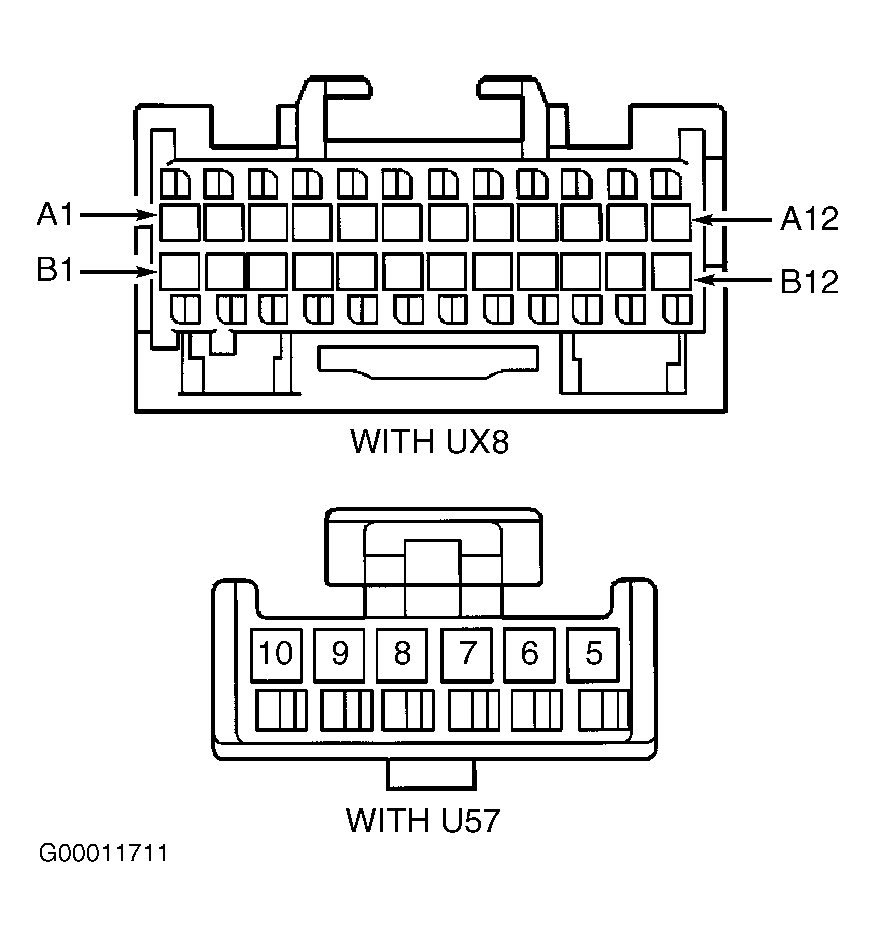
. Turn ignition on. Check for short to ground or short to voltage in Purple wire between radio amplifier connector C3 terminal No. 5 (U57) or terminal B11 (UX8) and SP304 terminal "B". See Fig 10
. If circuit is okay, go to step 76
. If faulty circuit is found and repaired, go to step 78
.
- Turn ignition off. Disconnect jumper wire from terminal "B" of splice pack SP304 and connect to terminal "C". Turn ignition on. Attempt to communicate with Remote Function Actuator (RFA). If scan tool does not communicate with RFA, go to next step. If scan tool communicates with RFA, go to step 38
.
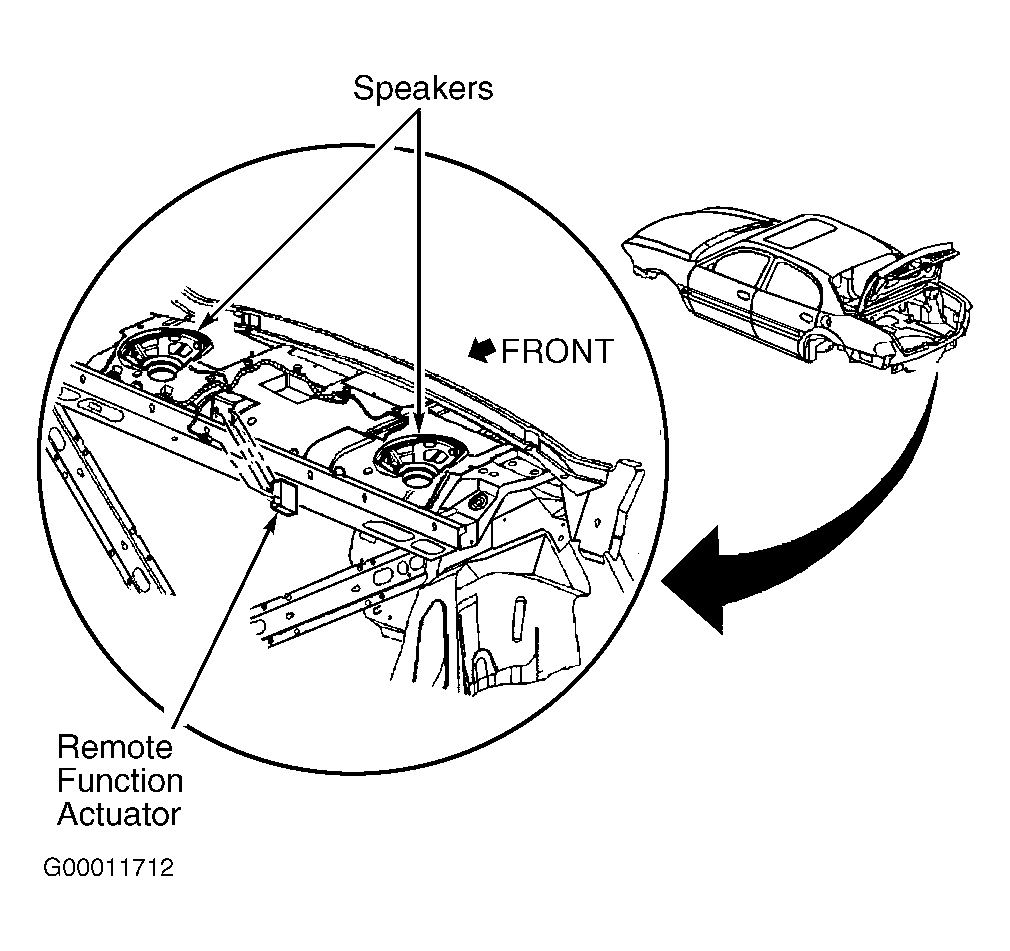
- Turn ignition off. Disconnect RFA connector. See Fig 11
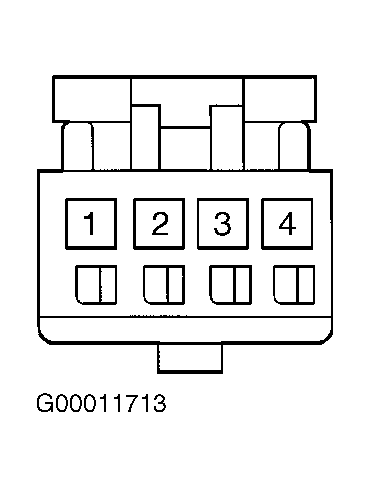
. If vehicle is a hearse (BQ9), RFA is located in left rear corner of vehicle, above left rear wheel well. Turn ignition on. On all vehicles, check for short to ground or short to voltage in Purple wire between RFA connector terminal No. 2 (sedan) or 3 (BQ9) and SP304 terminal "C". See Fig 12
. If circuit is okay, go to step 76
. If faulty circuit is found and repaired, go to step 78
.
- Turn ignition off. Disconnect jumper wire from terminal "C" of splice pack SP304 and connect to terminal "D". Turn ignition on. Attempt to communicate with the theft deterrent module. If scan tool does not communicate with theft deterrent module, go to next step. If scan tool communicates with theft deterrent module, go to step 40
.
- Turn ignition off. Disconnect theft deterrent module connector. See Figure
. Turn ignition on. Check for short to ground or short to voltage in Purple wire between theft deterrent module connector terminal "C" and SP304 terminal "D". See Fig 13
. If circuit is okay, go to step 76
. If faulty circuit is found and repaired, go to step 78
.
 Courtesy of GENERAL MOTORS CORP.
 Courtesy of GENERAL MOTORS CORP.
 Courtesy of GENERAL MOTORS CORP.
 Courtesy of GENERAL MOTORS CORP.
 Courtesy of GENERAL MOTORS CORP.
- Turn ignition off. Disconnect jumper wire from terminal "D" of splice pack SP304 and connect to terminal "E". Turn ignition off. Attempt to communicate with Left Rear Door Module (LRDM). If scan tool does not communicate with LRDM, go to next step. If scan tool communicates with LRDM, go to step 42
.
- Turn ignition off. Remove left rear door panel. Disconnect LRDM connectors. Turn ignition on. Check for short to ground or short to voltage in Purple wire between LRDM connector C2 terminal "G" and SP304 terminal "E". See Fig 3
. If circuit is okay, go to step 76
. If faulty circuit is found and repaired, go to step 78
.
- Turn ignition off. Disconnect jumper wire from terminal "E" of splice pack SP304 and connect to terminal "F". Turn ignition on. Attempt to communicate with Driver's Door Module (DDM). If scan tool does not communicate with DDM, go to next step. If scan tool communicates with DDM, go to step 48
.
- Turn ignition off. Remove driver's door panel. Disconnect DDM connectors. Turn ignition on. Attempt to communicate with any module still connected to DLC through class 2 serial data line. If scan tool communicates with any module, go to next step. If scan tool does not communicate with any module, go to step 46
.
- Turn ignition off. Reconnect DDM connectors. Disconnect Driver's Door Switch Assembly (DDSA). Turn ignition on. Attempt to communicate with DDM. If scan tool does not communicate with DDM, go to next step. If scan tool communicates with DDM, go to step 76
.
- Turn ignition off. Disconnect DDM connectors. Turn ignition on. Check for short to ground or short to voltage in Purple wire between DDM connector C2 terminal "F" and DDSA connector terminal No. 10. See Fig 1
and Fig 14
. If circuit is okay, go to step 76
. If faulty circuit is found and repaired, go to step 78
.
- Turn ignition on. Check for short to ground or short to voltage in Purple wire between DDM connector C2 terminal "G" and splice pack SP304 terminal "F". If faulty circuit is found and repaired, go to step 78
. If circuit is okay, go to DIAGNOSTIC AIDS
.
- If vehicle is equipped with navigation system (w/UY4), go to next step. If vehicle is not equipped with navigation system, go to step 50
.
- Turn ignition off. Disconnect jumper wire from terminal "F" of splice pack SP304 and connect to terminal "G". Turn ignition on. Attempt to communicate with radio (w/UY4). If scan tool does not communicate with radio, go to next step. If scan tool communicates with radio, go to step 50
.
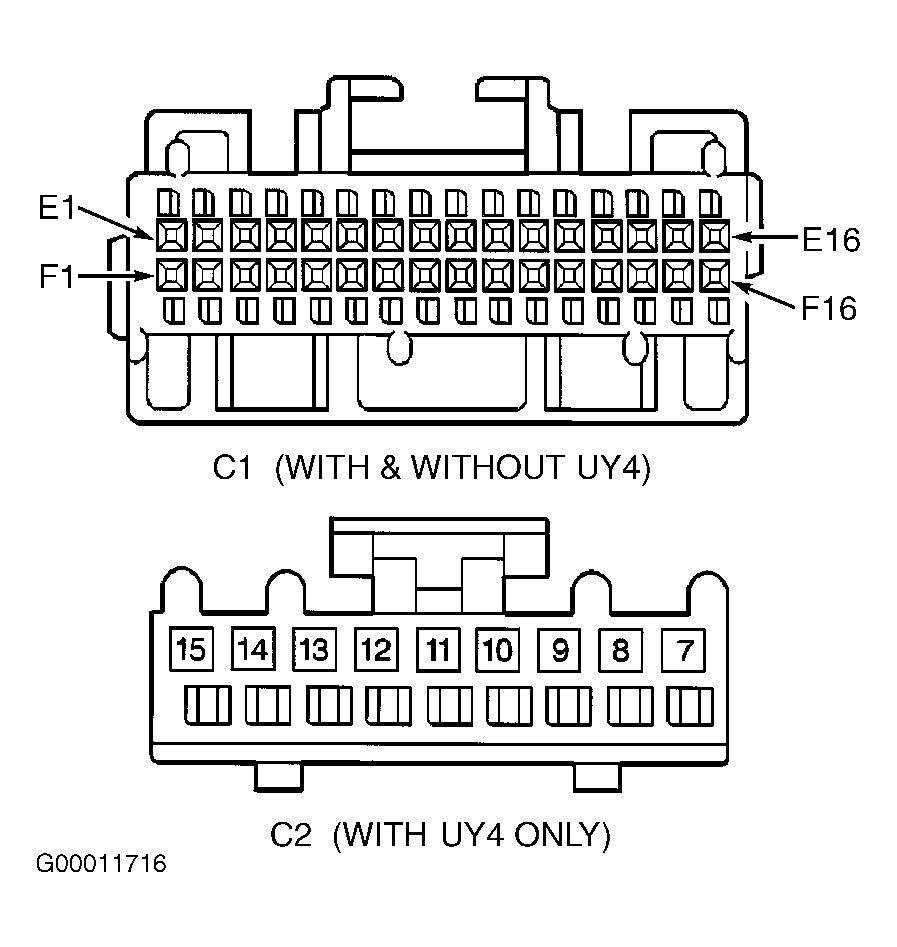
- Turn ignition off. Remove radio and disconnect radio connectors (w/UY4). Turn ignition on. Check for short to ground or short to voltage in Purple wire between radio connector C1 terminal E6 and splice pack SP304 terminal "G". See Fig 15
. If circuit is okay, go to step 76
. If faulty circuit is found and repaired, go to step 78
.
- Turn ignition off. Disconnect jumper wire from terminal "G" of splice pack SP304 and connect to terminal "H". Turn ignition on. Attempt to communicate with rear A/C-heater control. If scan tool does not communicate with rear A/C-heater control, go to next step. If scan tool communicates with rear A/C-heater control, go to step 53
.
- Turn ignition off. Disconnect rear A/C-heater control panel connector. Turn ignition on. Check for short to ground or short to voltage in Purple wire between rear A/C-heater control panel connector terminal A2 and splice pack SP304 terminal "H". See Fig 16
. If circuit is okay, go to step 76
. If faulty circuit is found and repaired, go to step 78
.
 Courtesy of GENERAL MOTORS CORP.
 Courtesy of GENERAL MOTORS CORP.
 Courtesy of GENERAL MOTORS CORP.
- If vehicle is equipped with memory seats (A45) or if vehicle is a factory limousine (V4U), go to next step. If vehicle is not equipped with memory seats or is not a factory limousine, go to step 55
.
- Turn ignition off. Disconnect jumper wire from terminal "H" of splice pack SP304 and connect to terminal "K". Turn ignition on. Attempt to communicate with Memory Seat Module (MSM) if equipped w/A45 or Left Middle Door Module (LMDM) if equipped w/V4U. If scan tool does not communicate with MSM or LMDM, go to next step. If scan tool communicates with MSM or LMDM, go to step 56
.
- Turn ignition off. Disconnect MSM located under the left front seat or LMDM connectors. Turn ignition on. Check for short to ground or short to voltage in Purple wire between MSM connector C2 terminal C2 and splice pack SP304 terminal "K". See Fig 17
. Check for short to ground or short to voltage in Purple wire between LMDM connector C2 terminal "G" and splice pack SP304 terminal "K". See Fig 3
. If circuit is okay, go to step 76
. If faulty circuit is found and repaired, go to step 78
.
- If vehicle is equipped with power tilt/telescoping steering column (w/N37), go to next step. If vehicle is equipped with power tilt/telescoping steering column, go to step 58
.
- Turn ignition off. Disconnect jumper wire from terminal "K" of splice pack SP304 and connect to terminal "L". Turn ignition on. Attempt to communicate with steering column module (w/N37). If scan tool does not communicate with steering column module, go to next step. If scan tool communicate with steering column module, go to step 58
.
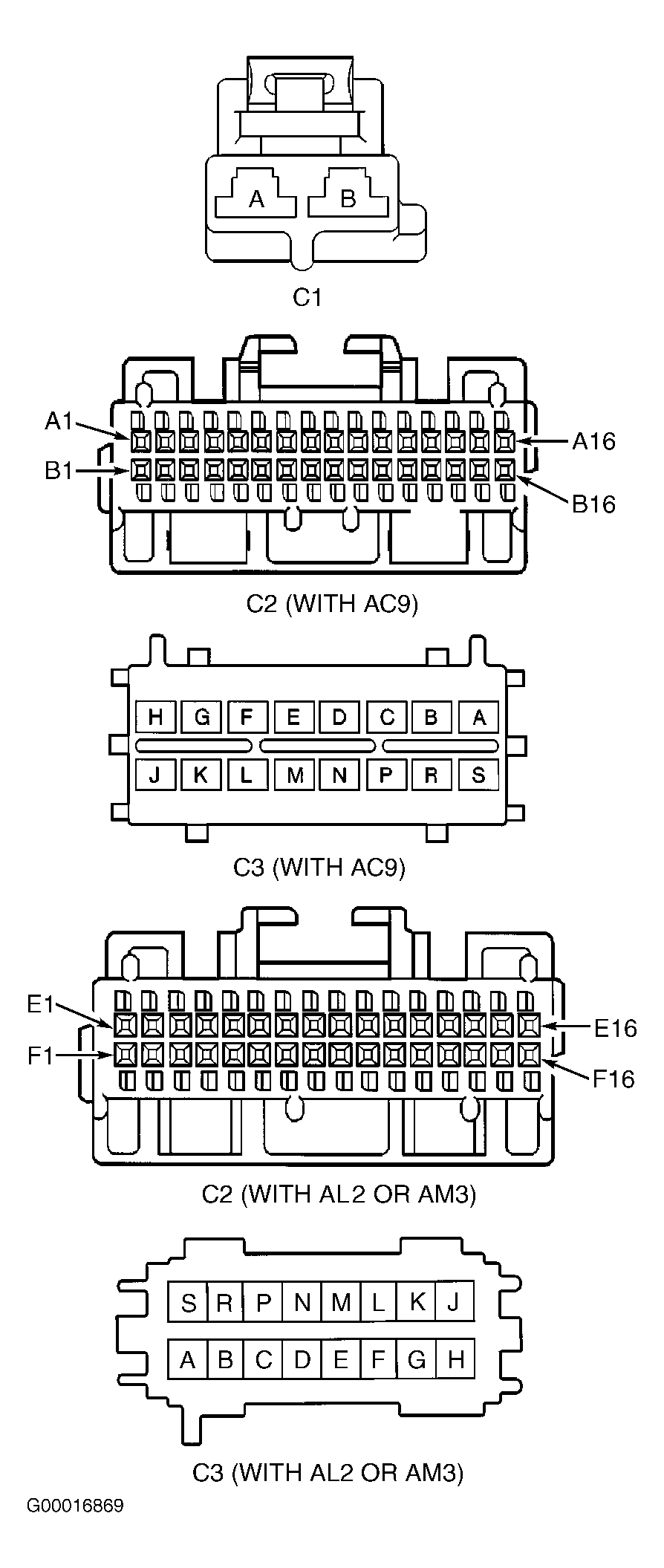
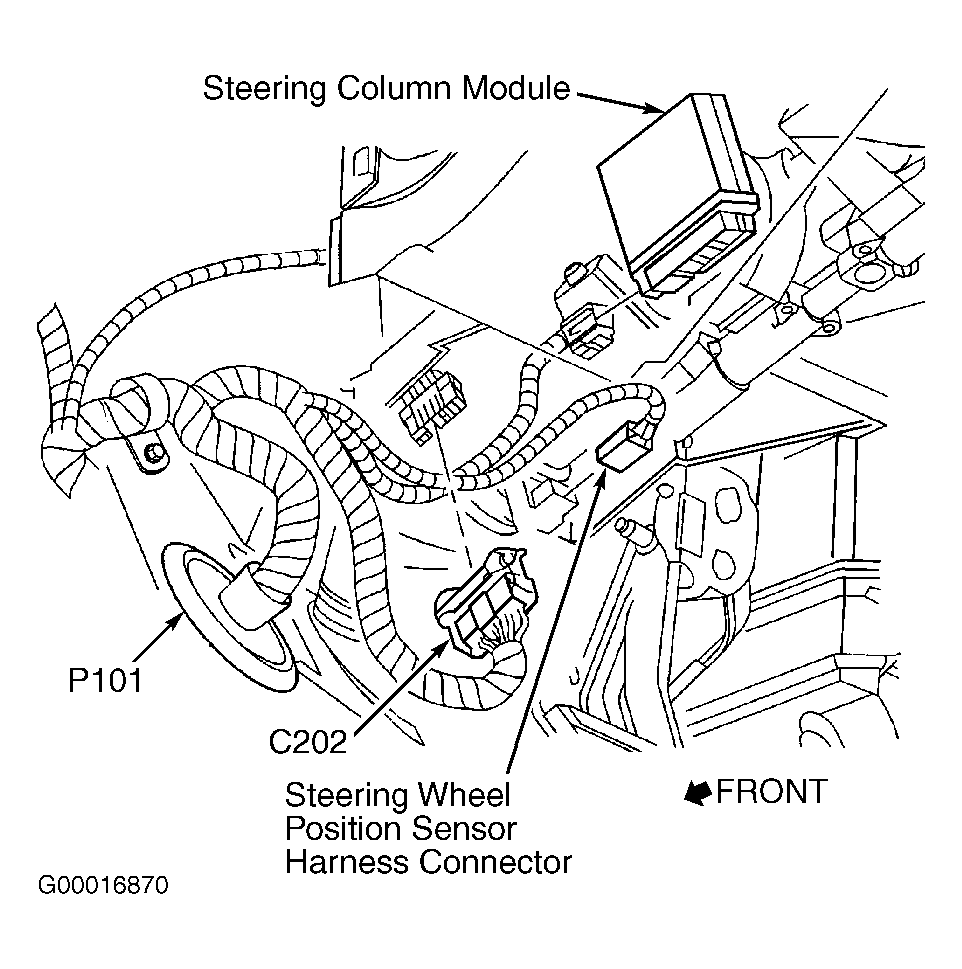
- Turn ignition off. Disconnect the steering column module connectors. See Fig 18
. Turn ignition on. Check for short to ground or short to voltage in Purple wire between steering column module connector C1 terminal "A" and splice pack SP304 terminal "L". See Fig 19
. If circuit is okay, go to step 76
. If faulty circuit is found and repaired, go to step 78
.
- Turn ignition off. Disconnect Sensing and Diagnostic Module (SDM) connector. SDM is located under rear of center console, mounted to floor. Turn ignition on. Check for short to ground or short to voltage in Purple wire between SDM connector terminal A5 and splice pack SP304 terminal "J". See Fig 4
. If circuit is okay, go to next step. If faulty circuit is found and repaired, go to step 78
.
- Check for short to ground or short to voltage in Purple wire between splice pack SP300 terminal "M" and splice pack SP304 terminal "M". If circuit is okay, go to DIAGNOSTIC AIDS
. If faulty circuit is found and repaired, go to step 78
.
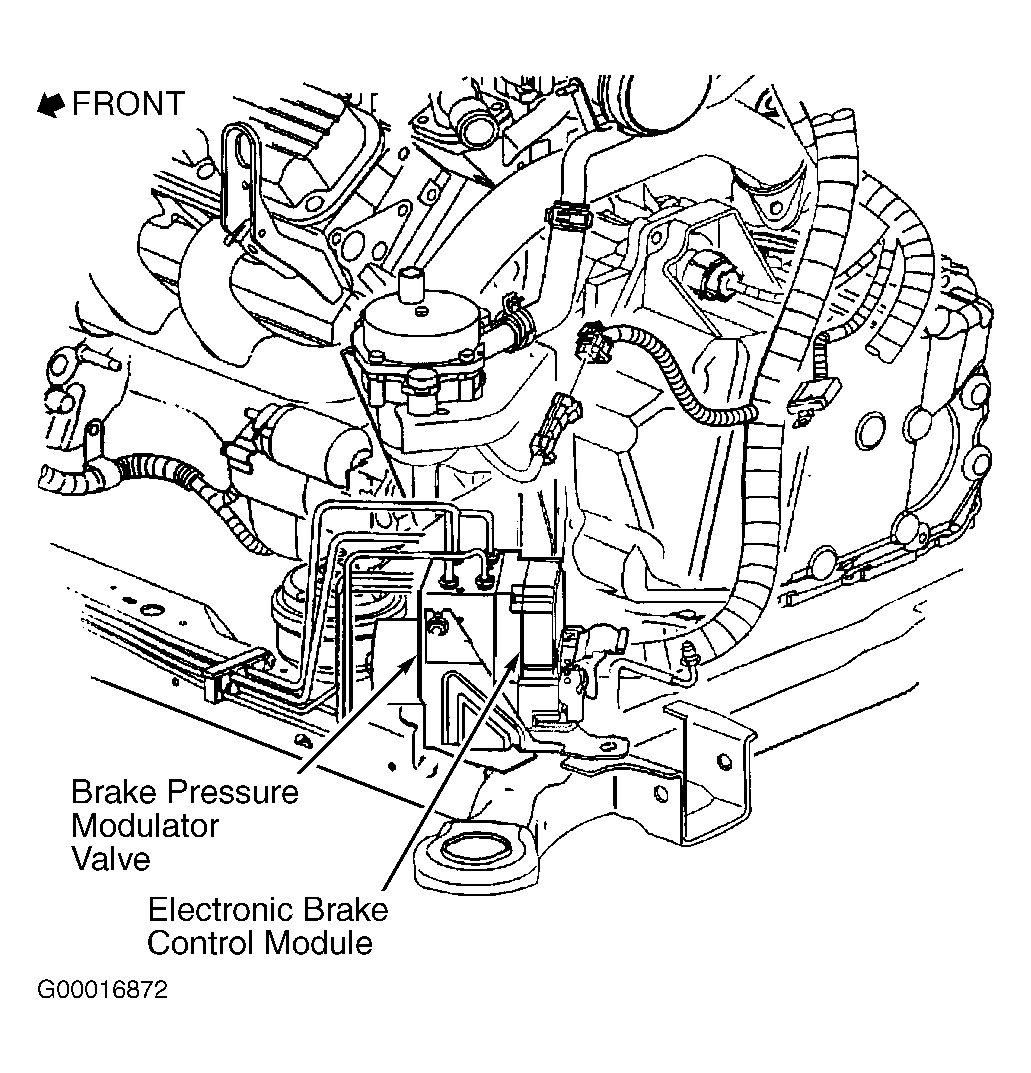
- Turn ignition off. Disconnect Electronic Brake Control Module (EBCM) connector. See Fig 20
. Turn ignition on. Attempt to communicate with any module still connected to DLC through the class 2 serial data line. If scan tool communicates with any module, go to next step. If scan tool does not communicate with any module, go to step 62
.
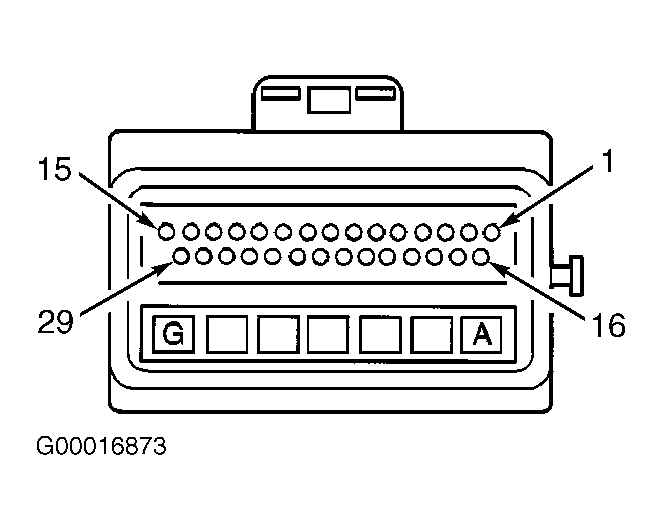
- Turn ignition on. Check for short to ground or short to voltage in Purple wire between EBCM connector terminal No. 7 and splice pack SP304 terminal "A". See Fig 21
. If circuit is okay, go to step 76
. If faulty circuit is found and repaired, go to step 78
.
 Courtesy of GENERAL MOTORS CORP.
 Courtesy of GENERAL MOTORS CORP.
 Courtesy of GENERAL MOTORS CORP.
 Courtesy of GENERAL MOTORS CORP.
 Courtesy of GENERAL MOTORS CORP.
- Turn ignition off. Disconnect Powertrain Control Module (PCM) connectors located in left front of engine compartment, below air cleaner. Turn ignition on. Attempt to communicate with any module still connected to DLC through the class 2 serial data line. If scan tool communicates with any module, go to next step. If scan tool does not communicate with any module, go to step 64
.
- Turn ignition on. Check for short to ground or short to voltage in Purple wire between EBCM connector terminal No. 21 and PCM connector C1 terminal No. 18. See Fig 22
. If circuit is okay, go to step 76
. If faulty circuit is found and repaired, go to step 78
.
- Turn off the ignition. Disconnect Instrument Panel Cluster (IPC) connectors. Turn ignition on. Check for short to ground or short to voltage in Purple wire between PCM connector C1 terminal No. 59 and DLC terminal No. 2. If circuit is okay, go to next step. If faulty circuit is found and repaired, go to step 78
.
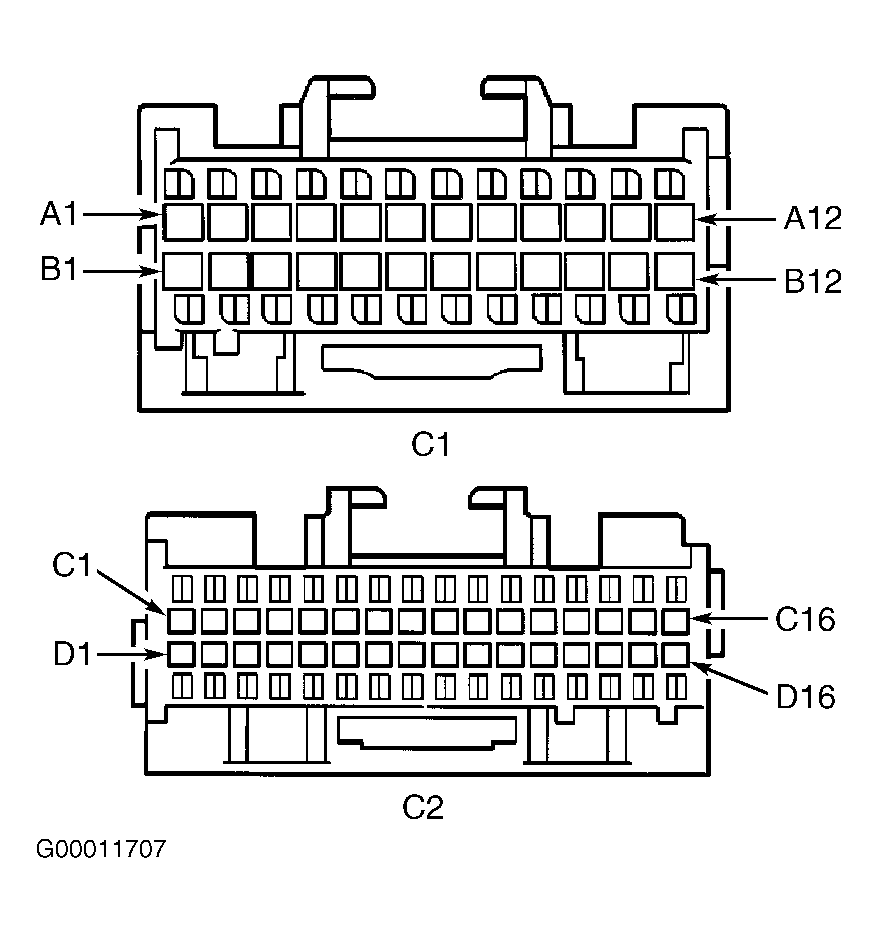
- Turn ignition off. Reconnect PCM, EBCM, splice pack SP300, and splice pack SP304. Disconnect Dash Integration Module (DIM) connectors. See Figure
. Turn ignition on. Attempt to communicate with PCM. If scan tool does not communicate with PCM, go to next step. If scan tool communicates with PCM, go to step 67
.
- Turn ignition on. Check for short to ground or short to voltage in Purple wire between DIM connector C2 terminal A11 and splice pack SP300 terminal "C". See Fig 23
. If circuit is okay, go to DIAGNOSTIC AIDS
. If faulty circuit is found and repaired, go to step 78
.
- Turn ignition off. Reconnect DIM connectors. Disconnect Instrument Panel Module (IPM) connectors. See Figure
. Turn ignition on. Attempt to communicate with any module still connected to DLC through class 2 serial data line. If scan tool does not communicate with any module, go to next step. If scan tool communicates with any module, go to step 69
.
- Turn ignition off. Disconnect DIM connectors. Turn ignition on. Check for short to ground or short to voltage in Purple wire between IPM connector C1 terminal B10 and DIM connector C2 terminal A12. See Fig 24
. If circuit is okay, go to step 76
. If faulty circuit is found and repaired, go to step 78
.
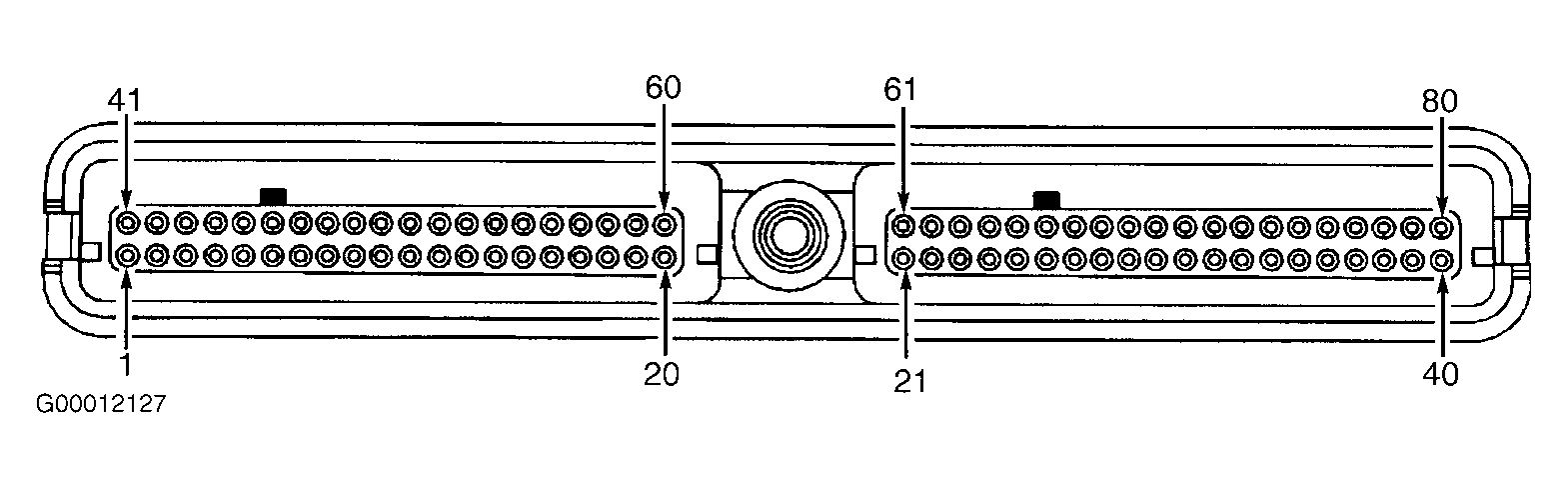 Courtesy of GENERAL MOTORS CORP.
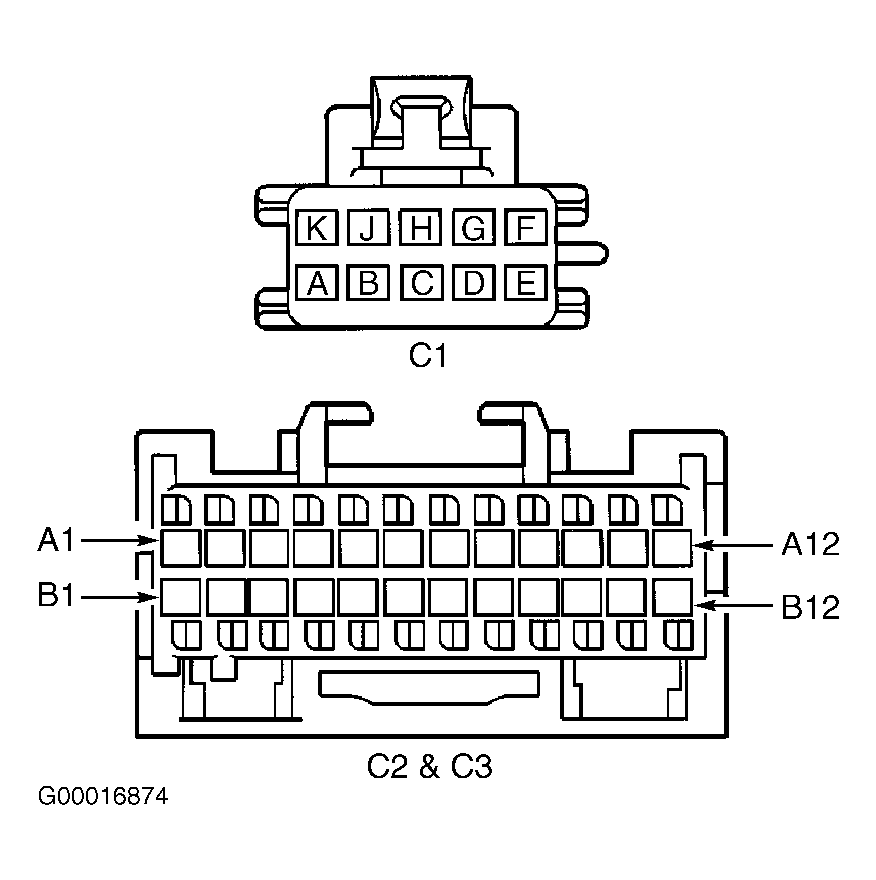 Courtesy of GENERAL MOTORS CORP.
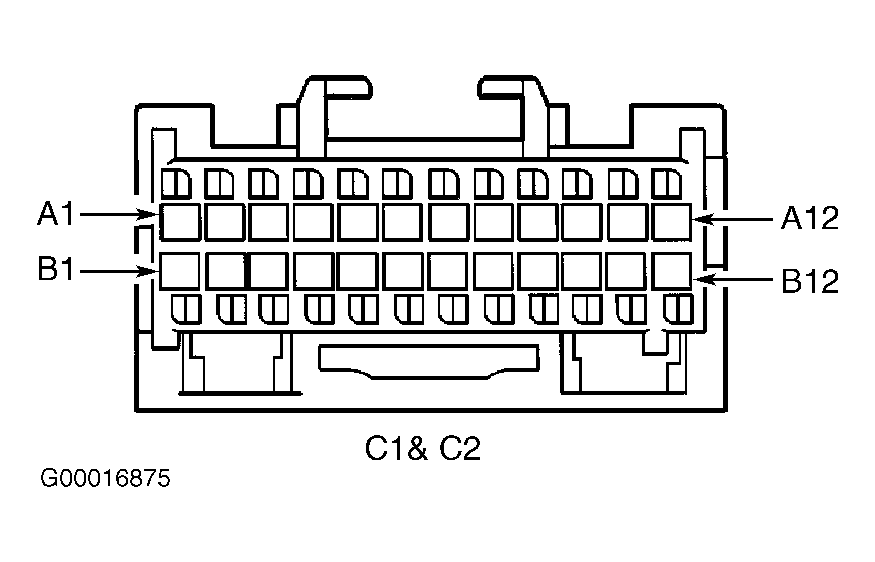 Courtesy of GENERAL MOTORS CORP.
- Turn ignition off. Reconnect IPM connectors. Disconnect navigation data processor (if equipped w/UY4) connector or radio (if not equipped w/UY4) connectors. See Figure
. Turn ignition on. Attempt to communicate with any module still connected to DLC through the class 2 serial data line. If scan tool does not communicate with any module, go to next step. If scan tool communicates with any module, go to step 71
.
- Turn ignition off. Disconnect IPM connectors. Turn ignition on. Check for short to ground or short to voltage in Purple wire between navigation data processor connector terminal C13 (if equipped w/UY4) or radio connector terminal E6 (if not equipped w/UY4) and IPM connector C1 terminal B10. See Fig 8
or Fig 15
. If circuit is okay, go to step 76
. If faulty circuit is found and repaired, go to step 78
.
- Turn ignition off. Reconnect navigation data processor or radio connectors. Disconnect rear A/C-heater control panel. Turn ignition on. Attempt to communicate with any module still connected to DLC through class 2 serial data line. If scan tool does not communicate with any module, go to next step. If scan tool communicates with any module, go to step 73
.
- Turn ignition off. Disconnect navigation data processor or radio connector. Turn ignition on. Check for short to ground or short to voltage in Purple wire between instrument cluster connector C1 terminal B8, rear A/C-heater control panel connector terminal A2 (if not equipped w/B9Q or V4U) and navigation data processor connector terminal D13 (if equipped w/UY4) or radio connector terminal F6 (if not equipped w/UY4). See Fig 5
, Fig 8
, Fig 15
or Fig 16
. If circuit is okay, go to step 76
. If faulty circuit is found and repaired, go to step 78
.
- Turn ignition off. Reconnect rear A/C-heater control panel connector. Turn ignition on. Attempt to communicate with any module still connected to DLC through class 2 serial data line. If scan tool communicates with any module, go to next step. If scan tool does not communicate with any module, go to step 77
.
- Check for poor connections at IPC connector C1 terminal B8 and C2 terminal B8. If connection is okay, go to next step. If faulty connection is found and repaired, go to step 78
.
- Replace IPC. See ANALOG & ELECTRONIC INSTRUMENT PANELS - DEVILLE article. After repairs, go to step 78
.
- Check for poor connections at class 2 serial data line terminal of most recently disconnected module. If connection is okay, go to next step. If faulty connection is found and repaired, go to step 78
.
- Replace most recently disconnected or reconnected module. See appropriate procedure under REMOVAL & INSTALLATION
. After repairs, go to next step.
- Reconnect all disconnected modules and connectors. Connect scan tool to DLC. Turn ignition on. Wait 10 seconds. Select display DTCs function for each module. If using Tech 2, use CLASS 2 DTC CHECK feature to determine which modules have not set DTCs. If no DTCs are set current that begin with "U", go to next step. If any DTCs are set current that begin with "U", go to step 80
.
- If any DTCs are set that do not begin with "U", go to next step. If no additional DTCs are set, go to step 81
.
- Diagnose set DTCs. See BODY CONTROL SYSTEM DIAGNOSTIC TROUBLE CODE IDENTIFICATION
table. If referred from another article, return to that article and diagnose DTC. After repairs, go to next step.
- If all DTCs have been diagnosed and repaired, go to next step. If all DTCs have not been diagnosed and repaired, go to step 80
.
- Clear DTCs using scan tool. Recheck system operation. Go to BODY CONTROL SYSTEM DIAGNOSTIC SYSTEM CHECK
. If referred from another article, return to that article and perform diagnostic system check.