Scan Tool Does Not Communicate With Class 2 Device: Testing
- Disconnect scan tool from Data Link Connector (DLC). Turn ignition switch to RUN position. Connect DVOM between DLC connector terminals No. 2 (Purple wire) and 4 (Black wire). See Fig 1
. If 7 volts or more exists, go to next step. If less than 7 volts exists, go to step 9
.
- Turn ignition switch to OFF position. Disconnect Light Gray 36-pin engine-to-instrument panel harness connector, located in left rear corner of engine compartment. Turn ignition switch to RUN position. Observe voltage reading with DVOM still connected between DLC connector terminals No. 2 (Purple wire) and 4 (Black wire). If 7 volts or more exists, go to step 5
. If less than 7 volts exists, go to next step.
- Turn ignition switch to OFF position. Reconnect Light Gray 36-pin engine-to-instrument panel harness connector. Disconnect Black 10-pin Electronic Brake Control Module (EBCM) connector, located in left rear corner of engine compartment near master cylinder. Turn ignition switch to RUN position. Observe voltage reading with DVOM still connected between DLC connector terminals No. 2 (Purple wire) and 4 (Black wire). If 7 volts or more exists, go to next step. If less than 7 volts exists, go to step 17
.
- Turn ignition switch to OFF position. On models equipped with diesel engine, disconnect Powertrain Control Module (PCM) connectors located under right side of instrument panel behind glove box. On models equipped with gasoline engine, disconnect Vehicle Control Module (VCM) connectors located underhood on left inner fenderwell. On all models, turn ignition switch to RUN position. Observe voltage reading with DVOM still connected between DLC connector terminals No. 2 (Purple wire) and 4 (Black wire). If 7 volts or more exists, go to step 7
. If less than 7 volts exists, go to step 17
.
- Turn ignition switch to OFF position. Disconnect Green 16-pin Electronic Variable Orifice/Passlock (EVO/Passlock) module connector, located under center of instrument panel. Turn ignition switch to RUN position. Observe voltage reading with DVOM still connected between DLC connector terminals No. 2 (Purple wire) and 4 (Black wire). If 7 volts or more exists, go to next step. If less than 7 volts exists, go to step 17
.
- Turn ignition switch to OFF position. Disconnect Natural 32-pin Transfer Case Control Module (TCCM) connector, located behind left side of instrument panel on steering column support bracket. Turn ignition switch to RUN position. Observe voltage reading with DVOM still connected between DLC connector terminals No. 2 (Purple wire) and 4 (Black wire). If 7 volts or more exists, go to step 8
. If less than 7 volts exists, go to step 17
.
- Repair short to voltage in Purple wire between PCM (diesel) or VCM (gasoline), EBCM and Light Gray 36-pin engine-to-instrument panel harness connector. See appropriate wiring diagram in DATA LINK CONNECTORS article in WIRING DIAGRAMS. After repairs, go to step 18
.
- Repair short to voltage in Purple wire between DLC, EVO/Passlock module, TCCM and Light Gray 36-pin engine-to-instrument panel harness connector. See appropriate wiring diagram in DATA LINK CONNECTORS article in WIRING DIAGRAMS. After repairs, go to step 18
.
- Turn ignition switch to OFF position. Connect DVOM between ground and DLC connector terminal No. 2 (Purple wire). If continuity exists, go to next step. If continuity does not exist, go to step 18
.
- Disconnect Light Gray 36-pin engine-to-instrument panel harness connector, located in left rear corner of engine compartment. Observe reading with DVOM still connected between ground and DLC connector terminal No. 2 (Purple wire). If continuity exists, go to step 13
. If continuity does not exist, go to next step.
- Reconnect Light Gray 36-pin engine-to-instrument panel harness connector. Disconnect Black 10-pin Electronic Brake Control Module (EBCM) connector, located in left rear corner of engine compartment near master cylinder. Observe reading with DVOM still connected between ground and DLC connector terminal No. 2 (Purple wire). If continuity exists, go to next step. If continuity does not exist, go to step 17
.
- On models equipped with diesel engine, disconnect Powertrain Control Module (PCM) connectors located under right side of instrument panel behind glove box. On models equipped with gasoline engine, disconnect Vehicle Control Module (VCM) connectors located underhood on left inner fenderwell. On all models, observe reading with DVOM still connected between ground and DLC connector terminal No. 2 (Purple wire). If continuity exists, go to step 15
. If continuity does not exist, go to step 17
.
- Disconnect Green 16-pin Electronic Variable Orifice/Passlock (EVO/Passlock) module connector, located under center of instrument panel. Observe reading with DVOM still connected between ground and DLC connector terminal No. 2 (Purple wire). If continuity exists, go to next step. If continuity does not exist, go to step 17
.
- Disconnect Natural 32-pin Transfer Case Control Module (TCCM) connector, located under left side of instrument panel on steering column support bracket. Observe reading with DVOM still connected between ground and DLC connector terminal No. 2 (Purple wire). If continuity exists, go to step 16
. If continuity does not exist, go to step 17
.
- Repair short to ground in Purple wire between and Light Gray 36-pin engine-to-instrument panel harness connector, located in left rear corner of engine compartment. See appropriate wiring diagram in DATA LINK CONNECTORS article in WIRING DIAGRAMS. After repairs, go to step 18
.
- Repair short to ground in Purple wire between DLC, EVO/Passlock module, TCCM and Light Gray 36-pin engine-to-instrument panel harness connector, located in left rear corner of engine compartment. See appropriate wiring diagram in DATA LINK CONNECTORS article in WIRING DIAGRAMS. After repairs, go to step 18
.
- Replace the last control module that was disconnected. See appropriate procedure under REMOVAL & INSTALLATION
. Go to next step.
- Clear DTCs using scan tool. Operate vehicle under conditions for running specific DTC. If DTC resets, go to step 1
.
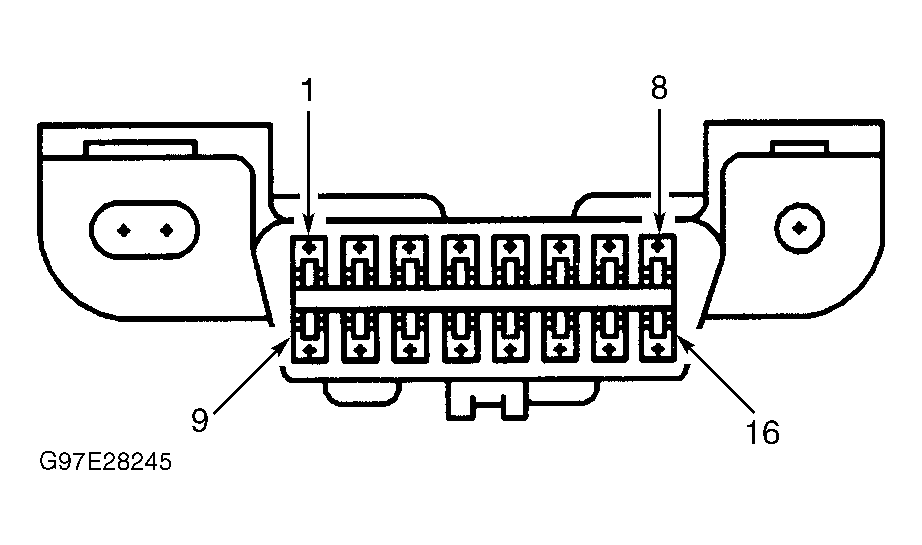 Courtesy of GENERAL MOTORS CORP.