Scan Tool Does Not Communicate With Class 2 Device: Testing
- Connect scan tool to Data Link Connector (DLC). If scan tool powers up, go to next step. If scan tool does not power up, go to SCAN TOOL DOES NOT POWER UP
.
- Turn ignition on. Attempt to communicate with each module on class 2 serial data circuit. If scan tool communicates with one or more modules, go to next step. If scan tool does not communicate with any module, go to step 6
.
- Retrieve DTCs for each module. Record DTCs, DTC status and which module set the DTC(s). If any DTCs between DTC U1000 and U1255 are set, go to next step. If any DTCs between DTC U1000 and U1255 are not set, go to step 5
.
- If only DTC U1000 is set, go to DTC U1000 OR U1255: CLASS 2 COMMUNICATION MALFUNCTION
under DIAGNOSTIC TESTS. If DTC U1000 is not the only DTC set, go to DTC U1001-U1254 LOSS OF COMMUNICATIONS WITH XXX
under DIAGNOSTIC TESTS.
- Diagnose fault. See DTC U1001-U1254: LOSS OF COMMUNICATIONS WITH XXX
under DIAGNOSTIC TESTS.
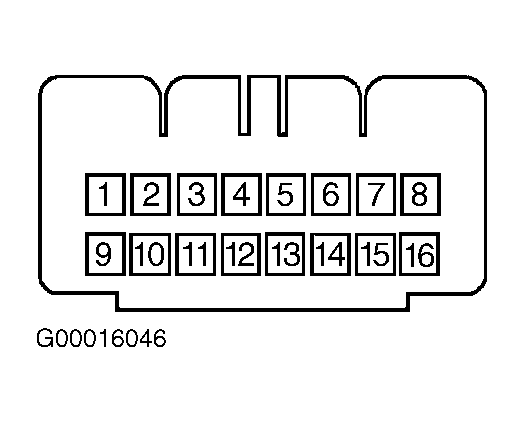
- Turn ignition off. Disconnect scan tool from DLC. Inspect DLC terminals No. 2 and 5 for poor connections and terminal tension. See Fig 1
. If terminals are okay, go to next step. If any problem is found, repair as necessary and go to BODY CONTROL SYSTEM DIAGNOSTIC SYSTEM CHECK
.
- Check for open circuit between DLC terminal No. 5 (Black/White wire) and ground point G102, located on steering column support. See DATA LINK CONNECTORS article in WIRING DIAGRAMS. If circuit is okay, go to next step. If any problem is found, repair as necessary and go to BODY CONTROL SYSTEM DIAGNOSTIC SYSTEM CHECK
.
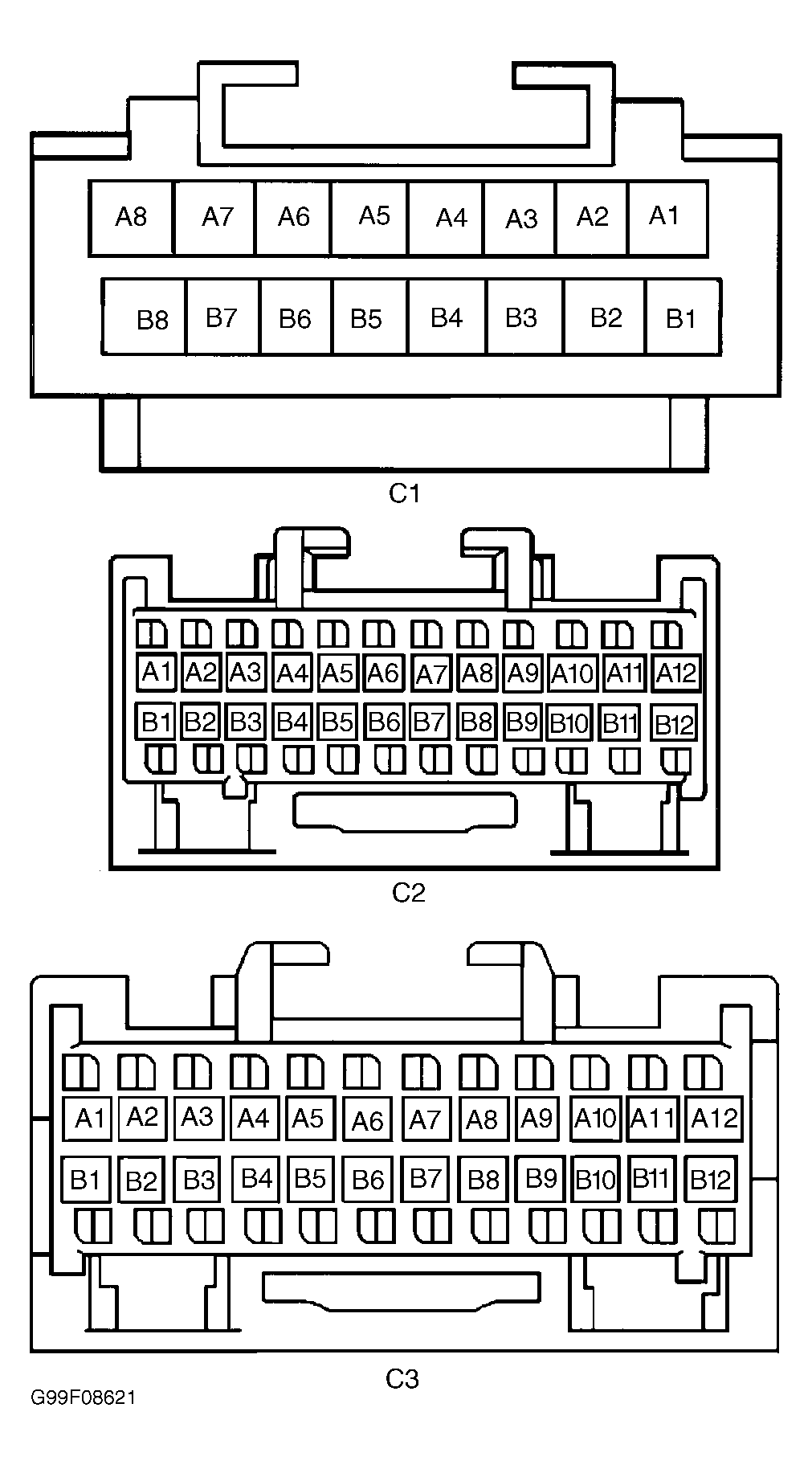
- Check for open in Purple wire between DLC terminal No. 2 and BCM harness connector C2 terminal B7. If circuit is okay, go to next step. If any problem is found, repair as necessary and go to BODY CONTROL SYSTEM DIAGNOSTIC SYSTEM CHECK
.
- Disconnect Powertrain Control Module (PCM) harness connector C1. Disconnect radio harness connector C1. Disconnect Instrument Panel Cluster (IP) harness connector C1. Connect scan tool to DLC. Turn ignition on. Attempt to communicate with BCM on class 2 serial data circuit. If scan tool communicates with BCM, go to next step. If scan tool does not communicate with BCM, go to step 11
.
- Turn ignition off. Disconnect Electronic Brake Control Module (EBCM) harness connector. Connect PCM connector C1. Turn ignition on. Attempt to communicate with BCM or PCM on class 2 serial data circuit. If scan tool communicates with BCM or PCM, go to step 12
. If scan tool does not communicate with BCM and PCM, go to step 13
.
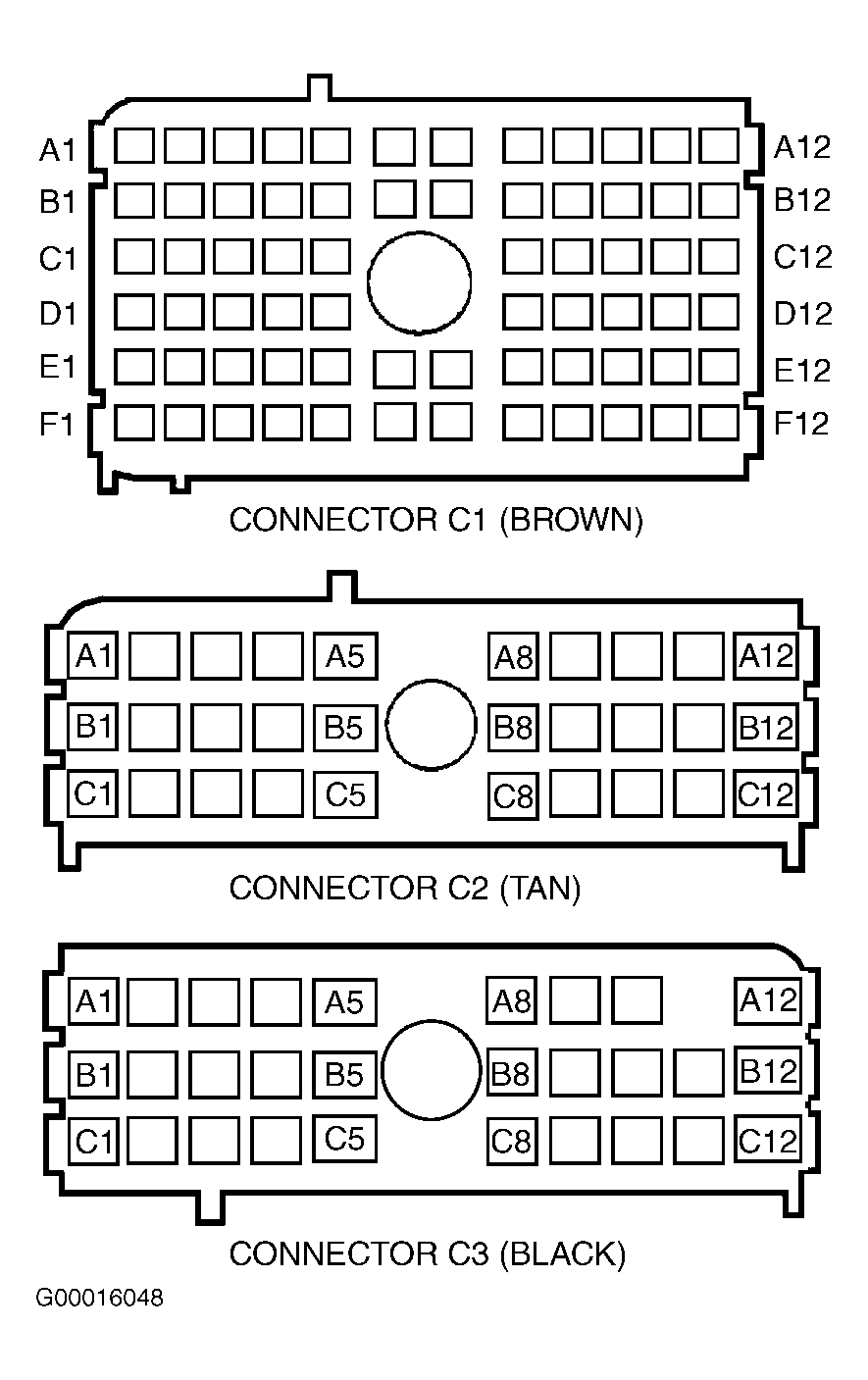
- Turn ignition off. Check for short to ground and short to voltage in Purple wire between DLC connector terminal No. 2 and BCM harness connector C2 terminal B7. Check for short to ground and short to voltage in Purple wire between IPC harness connector terminal "L" and BCM harness connector C2 terminal B9. Check for short to ground and short to voltage in Purple wire between IPC harness connector terminal "K" and SDM harness connector terminal A5. Check for short to ground and short to voltage in Purple wire between SDM harness connector terminal A4 and EBCM harness connector C1 terminal B7. Check for short to ground and short to voltage in Purple wire between EBCM harness connector C1 terminal C8 and PCM harness connector C1 terminal No. 58. Check for short to ground and short to voltage in Purple wire between BCM harness connector C2 terminal B8 and PCM harness connector C1 terminal No. 59. Check for short to ground and short to voltage in Purple wire between BCM harness connector C1 terminal B8 and radio harness connector C1 terminal A1. If no shorts are found on class 2 serial data circuits, go to step 16
. If any problem is found, repair as necessary and go to BODY CONTROL SYSTEM DIAGNOSTIC SYSTEM CHECK
.
- Turn ignition off. Connect IPC connector. Disconnect Sensing and Diagnostic Module (SDM) harness connector. Turn ignition on. Attempt to communicate with BCM, IPC or PCM on class 2 serial data circuit. If scan tool communicates with BCM, IPC or PCM, go to step 14
. If scan tool does not communicate with BCM and PCM, go to step 15
.
- Turn ignition off. Check for short to ground and short to voltage in Purple wire between EBCM harness connector C1 terminal C8 and PCM harness connector C1 terminal No. 58. If any problem is found, repair as necessary and go to BODY CONTROL SYSTEM DIAGNOSTIC SYSTEM CHECK
. If no problems are found, go to step 17
.
- Turn ignition off. Connect SDM harness connector. Turn ignition on. Attempt to communicate with BCM, IPC, PCM or SDM on class 2 serial data circuit. If scan tool communicates with BCM, IPC, PCM or SDM, go to step 21
. If scan tool does not communicate with BCM, IPC, PCM or SDM, go to step 19
.
- Turn ignition off. Check for short to ground and short to voltage in Purple wire between IPC harness connector terminal "K" and SDM harness connector terminal A5. If any problem is found, repair as necessary and go to BODY CONTROL SYSTEM DIAGNOSTIC SYSTEM CHECK
. If no problems are found, go to step 18
.
- Check BCM connectors for poor connections and terminal tension. If terminals are okay, go to step 24
. If any problem is found, repair as necessary and go to BODY CONTROL SYSTEM DIAGNOSTIC SYSTEM CHECK
.
- Check PCM connectors for poor connections and terminal tension. If terminals are okay, go to step 25
. If any problem is found, repair as necessary and go to BODY CONTROL SYSTEM DIAGNOSTIC SYSTEM CHECK
.
- Check IPC connectors for poor connections and terminal tension. If terminals are okay, go to step 26
. If any problem is found, repair as necessary and go to BODY CONTROL SYSTEM DIAGNOSTIC SYSTEM CHECK
.
- Turn ignition off. Check for short to ground and short to voltage in Purple wire between SDM harness connector terminal A4 and EBCM harness connector C1 terminal B7. If no problems are found, go to next step. If any problem is found, repair as necessary and go to BODY CONTROL SYSTEM DIAGNOSTIC SYSTEM CHECK
.
- Check SDM connectors for poor connections and terminal tension. If terminals are okay, go to step 27
. If any problem is found, repair as necessary and go to BODY CONTROL SYSTEM DIAGNOSTIC SYSTEM CHECK
.
- Turn ignition off. Connect EBCM harness connector. Turn ignition on. Attempt to communicate with BCM, EBCM, IPC, PCM or SDM on class 2 serial data circuit. If scan tool communicates with BCM, EBCM, IPC, PCM or SDM, go to next step. If scan tool does not communicate with BCM, EBCM, IPC, PCM or SDM, go to step 23
.
- Check radio connectors for poor connections and terminal tension. If terminals are okay, go to step 28
. If any problem is found, repair as necessary and go to BODY CONTROL SYSTEM DIAGNOSTIC SYSTEM CHECK
.
- Check EBCM connectors for poor connections and terminal tension. If terminals are okay, go to step 29
. If any problem is found, repair as necessary and go to BODY CONTROL SYSTEM DIAGNOSTIC SYSTEM CHECK
.
- Replace BCM. See BODY CONTROL MODULE
under REMOVAL & INSTALLATION. Program BCM. See PROGRAMMING
. After repairs, go to step 30
.
- Replace PCM. See POWERTRAIN CONTROL MODULE
under REMOVAL & INSTALLATION. After repairs, go to step 30
.
- Replace instrument panel cluster. See INSTRUMENT PANEL CLUSTER
under REMOVAL & INSTALLATION. After repairs, go to step 30
.
- Replace SDM. See SENSING & DIAGNOSTIC MODULE (SDM)
under REMOVAL & INSTALLATION. After repairs, go to step 30
.
- Replace radio. After repairs, go to step 30
.
- Replace EBCM. See ELECTRONIC BRAKE CONTROL MODULE (EBCM)
under REMOVAL & INSTALLATION. After repairs, go to next step.
- Reconnect all harness connectors. Connect scan tool to DLC. Turn ignition on. Wait 10 seconds. Scan tool may require a power up reset before communication will occur if class 2 serial data circuit was shorted. Turn off or disconnect scan tool. Reconnect scan tool and retrieve DTCs from each module. Record DTCs and DTC status. If any current DTCs beginning with a "U" are present, go to step 32
. If no current DTCs beginning with a "U" are present, go to next step.
- If any DTCs not beginning with a "U" are present, go to next step. If no DTCs not beginning with a "U" are present, go to step 34
.
- Perform appropriate diagnostic procedure. See BODY CONTROL SYSTEM DIAGNOSTIC TROUBLE CODE INDEX
table. For DTCs not listed, attempt to diagnose malfunctioning system or device by symptom. Go to appropriate article for malfunctioning system or device. After repair, go to next step.
- If all DTCs have been diagnosed, go to next step. If any DTCs have not been diagnosed, go to step 32
.
- Using scan tool, clear DTCs. System is okay at this time.
 Courtesy of GENERAL MOTORS CORP.
 Courtesy of GENERAL MOTORS CORP.
 Courtesy of GENERAL MOTORS CORP.