Test 3: One Window Inoperative
- Ensure lock-out switch on master switch assembly is in OFF position. Disconnect inoperative window switch connector. Turn ignition switch to RUN position. Using a test light connected to ground, backprobe inoperative window switch connector C2 terminal "A" (Dark Blue wire). See Fig 1
. If test light illuminates, go to next step. If test light does not illuminate, go to step 3
.
- Using a test light connected to ground, backprobe inoperative window switch connector C2 terminal "D". See Fig 1
. Press inoperative window switch on master switch assembly to UP position. Observe test light. Using a test light connected to ground, backprobe inoperative window switch connector C2 terminal "H". Press inoperative window switch on master switch assembly to DOWN position. If test light illuminates in both cases, go to step 4
. If test light does not illuminate in both cases, go to step 5
.
- Repair open in Dark Blue wire between inoperative window switch connector C2 terminal "A" and instrument panel accessory junction block. See WIRING DIAGRAMS
.
- Connect window switch connector. Disconnect window motor 2-pin connector of affected window. Turn ignition switch to RUN position. Using a test light connected to ground, backprobe inoperative window motor connector (Brown wire). Press inoperative window switch on master switch assembly to DOWN position. Observe test light. Using a test light connected to ground, backprobe inoperative window motor connector (Dark Blue wire). Press inoperative window switch on master switch assembly to UP position. If test light illuminates in both cases, go to step 6
. If test light does not illuminate in both cases, go to step 7
.
- Turn ignition switch to OFF position. Disconnect master switch assembly connector. Check continuity of Light Blue wire, Light Green wire or Dark Green wire between inoperative window switch connector C2 terminal "D" and master switch assembly connector for circuit that test light did not illuminate. If continuity exists, go to step 8
. If continuity does not exist, go to step 9
.
- Replace window motor. See WINDOW MOTOR
under REMOVAL & INSTALLATION.
- Turn ignition switch to OFF position. Disconnect inoperative window switch connector. Check continuity in Dark Blue wire between inoperative window switch connector C2 terminal "F" and window motor connector terminal "B". See Fig 1
. If continuity exists, go to step 10
. If continuity does not exist, go to step 11
.
- Check for short to ground in Light Blue wire, Light Green wire or Dark Green wire between master switch assembly and inoperative window switch connector C2 terminal "D". If circuit is shorted to ground, go to step 12
. If circuit is not shorted to ground, go to step 13
.
- Repair open in Light Blue wire, Light Green wire or Dark Green wire between master switch assembly and inoperative window switch connector C2 terminal "D".
- Check for short to ground in Dark Blue wire between inoperative window switch connector C2 terminal "D" and window motor connector terminal "B". If circuit is shorted to ground, go to step 14
. If circuit is not shorted to ground, go to step 15
.
- Repair open in Dark Blue wire between inoperative window switch connector C2 terminal "D" and window motor connector terminal "B".
- Repair short to ground in Light Blue wire, Light Green wire or Dark Green wire between master switch assembly and inoperative window switch connector C2 terminal "D".
- Check continuity of Purple wire (rear doors) or Tan wire (right front door) between inoperative window switch connector C2 terminal "H" and master switch assembly. If continuity exists, go to step 16
. If continuity does not exist, go to step 17
.
- Repair short to ground in Dark Blue wire between inoperative window switch connector C2 terminal "F" and window motor connector terminal "B".
- Check continuity of Brown wire between inoperative window switch connector C2 terminal "G" and window motor connector terminal "A". See Fig 1
. If continuity exists, go to step 18
. If continuity does not exist, go to step 19
.
- Check for short to ground in Purple wire (rear doors) or Tan wire (right front door) between inoperative window switch connector C2 terminal "H" and master switch assembly. If circuit is shorted to ground, go to step 20
. If circuit is not shorted to ground, go to step 21
.
- Repair open in Purple wire (rear doors) or Tan wire (right front door) between inoperative window switch connector C2 terminal "H" and master switch assembly.
- Check for short to ground in Brown wire between inoperative window switch connector C2 terminal "G" and window motor connector terminal "A". If circuit is shorted to ground, go to step 22
. If circuit is not shorted to ground, go to step 23
.
- Repair open in Brown wire between inoperative window switch connector C2 terminal "G" and window motor connector terminal "A".
- Repair short to ground in Purple wire (rear doors) or Tan wire (right front door) between inoperative window switch connector C2 terminal "H" and master switch assembly.
- Replace master switch assembly. See WINDOW SWITCH
under REMOVAL & INSTALLATION.
- Repair short to ground in Brown wire between inoperative window switch connector C2 terminal "G" and window motor connector terminal "A".
- Replace inoperative window switch. See WINDOW SWITCH
under REMOVAL & INSTALLATION.
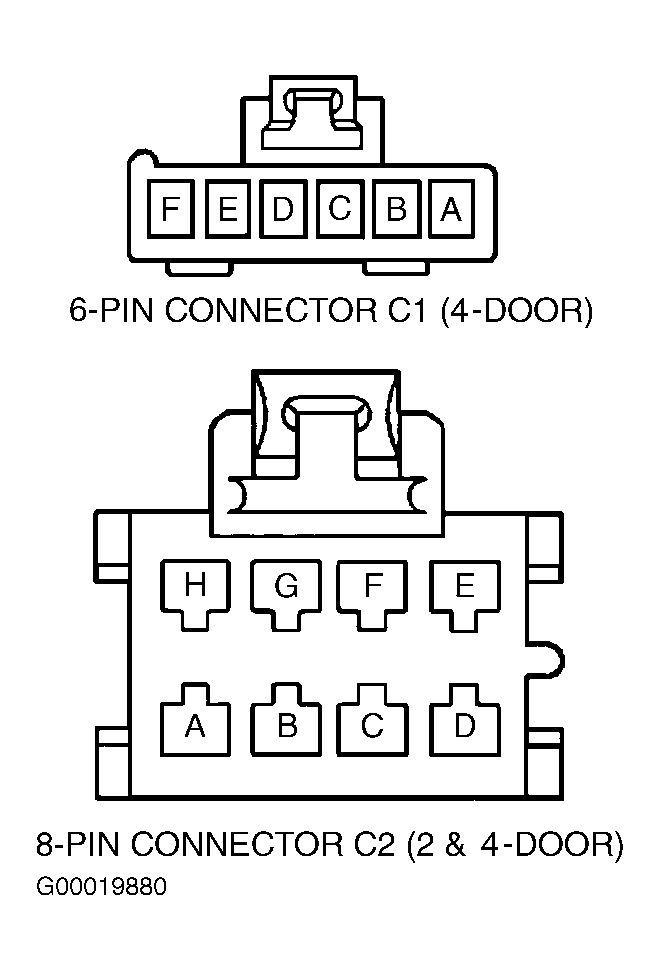 Courtesy of GENERAL MOTORS CORP.