Test 4: Right Front Window Inoperative
- Disconnect right front power window switch connector. Turn ignition switch to RUN position. Using a test light connected to ground, backprobe right front window switch connector terminal No. 4 (Black wire). See Fig 1
. If test light comes on, go to next step. If test light does not come on, check for open in Black wire between right front window switch connector terminal No. 4 and splice SP252. See WIRING DIAGRAMS
. If Black wire is okay, replace splice SP252 as necessary.
- Turn ignition switch to OFF position. Disconnect power window master switch connector. Check for open in Blue/White wire between right front window switch connector terminal No. 2 and power window master switch connector terminal No. 6. See WIRING DIAGRAMS
. If Blue/White wire is open, repair as necessary. If Blue/White wire is okay, go to next step.
- Check for open in Green/Red wire between right front window switch connector terminal No. 5 and power window master switch connector terminal No. 14. If Green/Red wire is open, repair as necessary. If Green/Red wire is okay, go to next step.
- Connect power window master switch connector. Turn ignition switch to ON position. Using a test light connected to ground, backprobe right front window switch connector terminal No. 2 (Blue/White wire). See Fig 1
. Press right front power window switch on power window master switch to DOWN position while observing test light. Using a test light connected to ground, backprobe right front window switch connector terminal No. 5 (Green/Red wire). Press right front power window switch on power window master switch to UP position while observing test light. If test light comes on in both cases, go to next step. If test light does not come on in both cases, replace power window master switch. See WINDOW SWITCH
under REMOVAL & INSTALLATION.
- Connect right front power window switch. Using a test light connected to ground, backprobe right front window switch connector terminal No. 1 (Green wire). See Fig 1
. Press right front power window switch on power window master switch to DOWN position while observing test light. Using a test light connected to ground, backprobe right front window switch connector terminal No. 3 (Yellow wire). Press right front power window switch on power window master switch to UP position while observing test light. If test light comes on in both cases, go to next step. If test light does not come on in both cases, replace right front power window switch. See WINDOW SWITCH
under REMOVAL & INSTALLATION.
- Disconnect right front power window motor connector. Check for open in Green wire between right front power window motor connector terminal No. 1 and right front power window switch connector terminal No. 1. If Green wire is okay, go to next step. If Green wire is open, repair as necessary.
- Check for open in Yellow wire between right front power window motor connector terminal No. 2 and right front power window switch connector terminal No. 3. If Yellow wire is okay, replace right front power window motor. See WINDOW MOTOR/REGULATOR ASSEMBLY
under REMOVAL & INSTALLATION. If Yellow wire is open, repair as necessary.
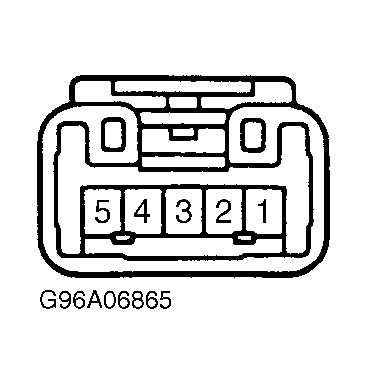 Courtesy of TOYOTA MOTOR SALES, U.S.A., INC.