Retrieving Diagnostic Trouble Codes
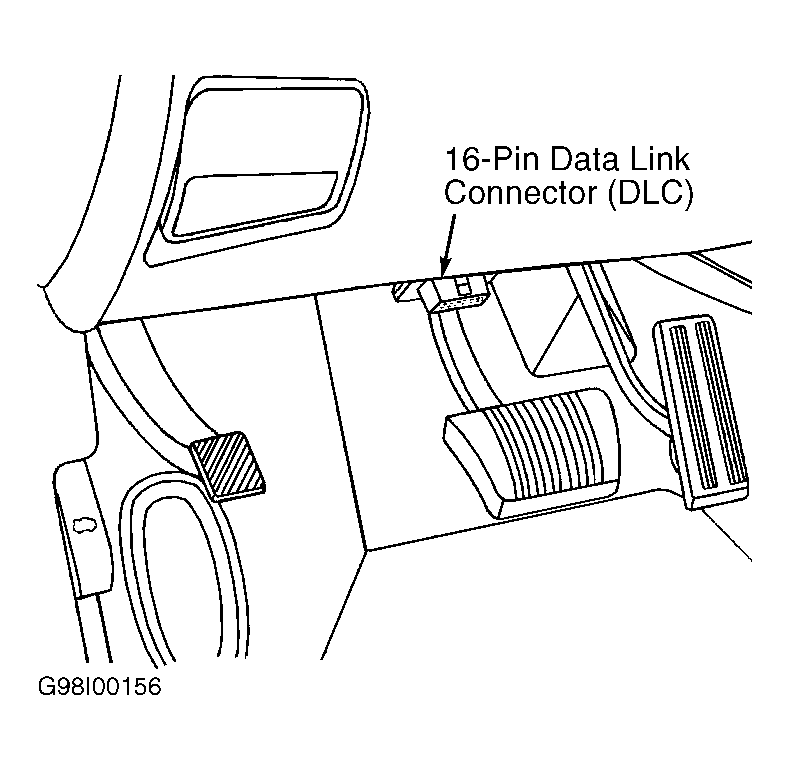
- Attempt to start engine. Crank engine for up to 10 seconds (if necessary). Diagnostic Trouble Codes (DTCs) are retrieved using a scan tool. Connect scan tool to Data Link Connector (DLC). DLC is located at lower edge of instrument panel, near steering column. Using scan tool manufacturer's instructions, read DTC message and code.
- If scan tool displays NO RESPONSE, go to TEST NS-6A: REPAIRING NO RESPONSE CONDITION under SELF-DIAGNOSTIC TESTS. If scan tool will not power up, check for loose cable connections or bad cable. If cable connections and cable are okay, check voltage at cavity No. 16 on 16-pin DLC. Voltage should be at least 11 volts. If voltage is not as specified, check wiring circuit and necessary fuses. See appropriate wiring diagram in
WIRING DIAGRAMS article.
- If scan tool displays an error message, (i.e. USER-REQUESTED COLD BOOT or USER-REQUESTED WARM BOOT), follow scan tool manufacturer's instructions. If any other error message is displayed, contact scan tool manufacturer for further instructions.
- If DTCs are displayed, perform appropriate diagnostic test(s). See DTC MESSAGES & CODES table. Once all repairs are made, clear DTCs from PCM. See CLEARING DIAGNOSTIC TROUBLE CODES . If no DTCs are displayed, refer to one of the following:
- For driveability problems, perform TEST NTC-1A: NO TROUBLE CODES (NTC) TESTS under SELF-DIAGNOSTIC TESTS.
- For No-Start problems, perform TEST NS-SEL: NO START SELECTION MENU under SELF-DIAGNOSTIC TESTS.
- For speed (cruise) control problems, perform TEST SC-1A in the
CRUISE CONTROL SYSTEM article in ACCESSORIES & EQUIPMENT.
- For charging system problems, perform TEST CH-1A in
GENERATORS & REGULATORS article in STARTING & CHARGING SYSTEMS.
 Courtesy of CHRYSLER CORP.