Traction Off Indicator Not Operating Properly
- Turn ignition off. Connect scan tool to Data Link Connector (DLC). Turn ignition on. Using scan tool, attempt to communicate with Controller Anti-Lock Brake (CAB) module. If communication was established, go to next step. If communication was not established, repair communication concern. See NO RESPONSE FROM CAB
under COMMUNICATIONS.
- Using scan tool, retrieve CAB DTCs. If no DTCs exist, go to next step. If any DTCs exist, repair anti-lock brake system as necessary. See appropriate ANTI-LOCK article in BRAKES.
- Turn ignition off. Turn ignition on. If traction off indicator illuminates for 3-10 seconds, go to next step. If traction off indicator does not illuminate for 3-10 seconds, replace instrument cluster.
- Turn ignition off. Turn ignition on. Turn traction control off. Wait 10 seconds. If traction off indicator is not illuminated, go to next step. If traction off indicator is illuminated, replace instrument cluster.
- Turn ignition off. Turn ignition on. Wait 10 seconds. Turn traction control on and off while observing traction off indicator. If traction off indicator does not operate properly, go to next step. If traction off indicator operates properly, problem is intermittent.
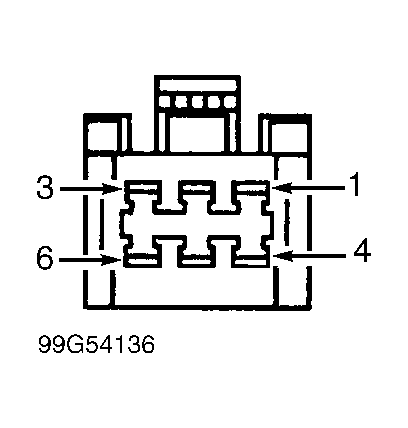
- Turn ignition off. Disconnect traction control switch harness connector. Measure resistance between ground and terminal No. 2 (Black/Light Green wire) at traction control switch harness connector. See Fig 1
. If resistance is 5 ohms or less, go to next step. If resistance is greater than 5 ohms, repair open in Black/Light Green wire between traction control switch and ground.
- Turn ignition on. Using a fused jumper wire, connect and disconnect terminals No. 2 (Black/Light Green wire) and No. 3 (Red/Yellow wire) at traction control switch harness connector while observing traction off indicator. If traction off indicator does not turn on and off, go to next step. If traction off indicator turns on and off, replace traction control switch.
- Turn ignition off. Disconnect instrument cluster harness connector C2. Measure resistance in Red/Yellow wire between terminal No. 3 at traction control switch harness connector and terminal No. 8 at instrument cluster harness connector C2. See Figure
and Fig 1
. If resistance is 5 ohms or less, go to next step. If resistance is greater than 5 ohms, repair open in Red/Yellow wire between traction control switch and instrument cluster.
- Measure resistance between ground and terminal No. 8 (Red/Yellow wire) at instrument cluster harness connector C2. If resistance is greater than 5 ohms, go to next step. If resistance is 5 ohms or less, repair short to ground in Red/Yellow wire between traction control switch and instrument cluster.
- Turn ignition on. Measure voltage at terminal No. 8 (Red/Yellow wire) at instrument cluster harness connector C2. If voltage is one volt or less, replace instrument cluster. If voltage is greater than one volt, repair short to voltage in Red/Yellow wire between traction control switch and instrument cluster.
 Courtesy of DAIMLERCHRYSLER CORP.