Using Scan Tool
- Turn ignition off. Connect scan tool to Data Link Connector (DLC), located under left side of instrument panel. See Fig 1
. Turn ignition on. Using scan tool manufacturer's instructions, read and record DTC (generic scan tool) or DTC message (DRBIII(R) scan tool), and freeze frame data.
- If scan tool will not power up, check for loose cable connections or bad cable. If cable connections and cable are okay, measure voltage at DLC power terminal No. 16 (Red/White wire). Voltage should be at least 11 volts. If voltage is not as specified, check wiring circuit and fuse No. 21 (20-amp) in Power Distribution Center (PDC). PDC is located in left front of engine compartment. Repair wiring or replace fuse as necessary.
- If scan tool displays USER-REQUESTED COLD BOOT error or USER-REQUESTED WARM BOOT error, or any other error message, record entire displayed error message and follow scan tool manufacturer's instructions.
- If scan tool displays a bus failure error message, this indicates a scan tool failure or a bus circuit failure. To diagnose and repair bus circuit failure, see BODY CONTROL MODULES - NEON article in ACCESSORIES & EQUIPMENT.
- If any DTCs are displayed, perform appropriate diagnostic test. See DIAGNOSTIC TROUBLE CODE DEFINITIONS
. After repair is complete, clear DTCs from PCM memory and perform appropriate verification test. Verification tests are located at the end of the diagnostic tests. If no DTCs are displayed, go to one of the following:
- For starting or driveability problems, go to appropriate TROUBLE SHOOTING - NO CODES article for diagnosis by symptom.
- For speed control problems and servicing information, refer to appropriate CRUISE CONTROL SYSTEMS article in ACCESSORIES & EQUIPMENT.
- For charging system problems, refer to appropriate GENERATORS & REGULATORS article in STARTING & CHARGING SYSTEMS.
- For transmission electronic controls system problems, refer to appropriate ELECTRONIC CONTROLS article in AUTOMATIC TRANSMISSIONS.
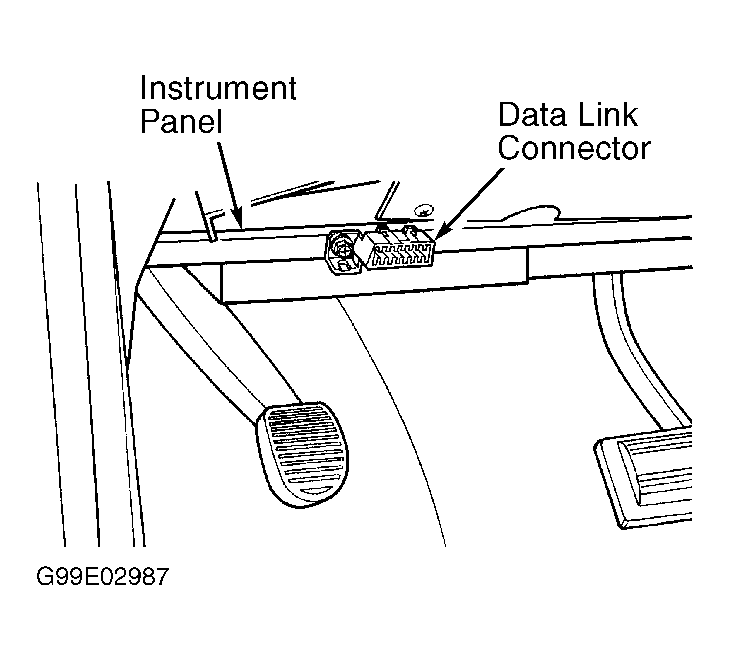 Courtesy of DAIMLERCHRYSLER CORP.