Ignition Timing
IGNITION TIMING SPECIFICATIONS (Degrees BTDC @ RPM)
| Application |
Man. Trans. |
Auto. Trans. |
| Metro |
5 @ |
5 @ |
- Warm engine to normal operating temperature. Turn engine off but keep ignition on for 5 seconds. Restart engine, and raise engine speed to 2000 RPM for 5 minutes. Return to idle. Ensure all accessories are off and idle speed is within specification. Adjust idle speed first if it is not within specification. See IDLE SPEED
under IDLE SPEED & MIXTURE.
- Connect timing light to No. 1 spark plug wire. Remove cap from duty check Data Link Connector (DLC), located in rear corner of engine compartment near left strut tower. Connect a jumper wire between terminals "D" (Black wire) and "E" (Purple/Green wire) of duty check DLC. See Fig 1
.
- Check timing mark alignment on crankshaft pulley with timing marks on timing belt cover. Ignition timing must be within specification. See IGNITION TIMING SPECIFICATIONS
.
- If ignition timing is not as specified, loosen distributor hold-down flange bolts, and rotate distributor to obtain correct ignition timing. Tighten distributor hold-down flange bolts to 11 ft. lbs. (15 N.m). Recheck ignition timing.
- Turn engine off. Remove jumper wire, and install cap on duty check DLC. Remove test equipment.
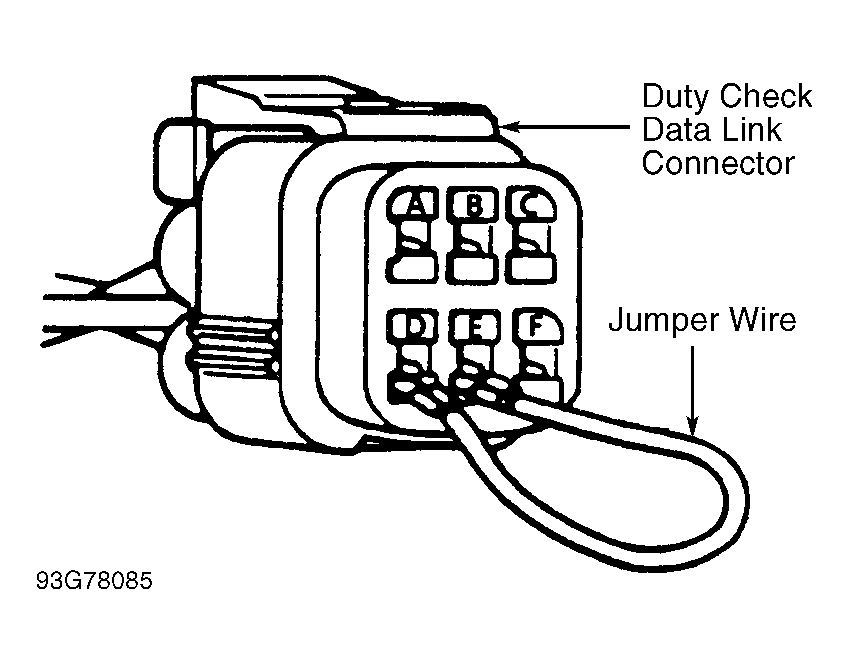 Courtesy of GENERAL MOTORS CORP.