Air Conditioning Signal Circuit: Civic
- Turn ignition on. Backprobing, use a jumper wire to connect PCM connector "A" (31-pin connector) terminal No. 24 (Brown/Yellow wire) to PCM connector "E" (31-pin connector) terminal No. 18 (Red wire). See Figure. If clicking sound is heard from A/C compressor clutch, go to next step. If clicking sound is not heard from A/C compressor clutch, go to step 3.
- Start engine. Turn blower switch and A/C switches on. If A/C system operates, A/C signal is okay. If A/C system does not operate, update PCM if latest software is not installed or substitute known-good PCM and retest. See POWERTRAIN CONTROL MODULE RESET PROCEDURE and SUBSTITUTING POWERTRAIN CONTROL MODULE under SELF-DIAGNOSTIC SYSTEM in SELF-DIAGNOSTICS - CIVIC (EXCEPT GX & HX MODELS) article. If symptom/indication goes away, replace original PCM.
- Backprobing, use a jumper wire to momentarily connect underhood fuse/relay box 14-pin connector terminal No. 10 (Red wire) to body ground, several times. See Fig 1. If clicking sound is heard from A/C compressor clutch, repair open in Red wire between A/C clutch relay and PCM connectors. See WIRING DIAGRAMS article. If clicking sound is not heard from A/C compressor clutch, inspect A/C system. See appropriate MANUAL or AUTOMATIC A/C-HEATER SYSTEMS article in AIR CONDITIONING & HEATING.
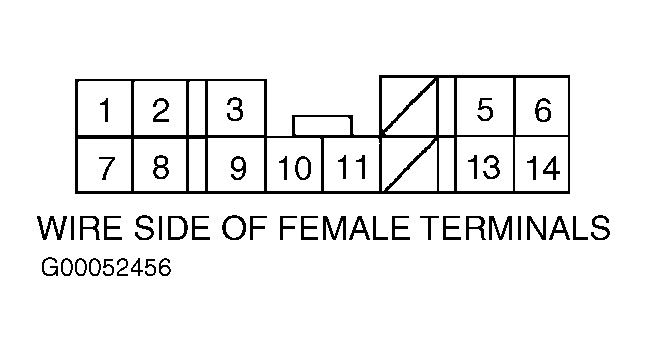 Courtesy of AMERICAN HONDA MOTOR CO., INC.