Park Pin Switch Replacement
- Remove the shift lever assembly (see
SHIFT LEVER REMOVAL ).
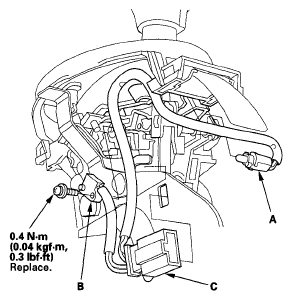
- Remove the A/T gear position indicator panel light socket (A).
 Courtesy of AMERICAN HONDA MOTOR CO., INC.
- Remove the park pin switch (B) and the switch connector (C).
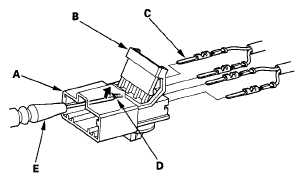
- Pry the lock tabs on the back of the park pin switch connector (A), and remove the back cover (B).
 Courtesy of AMERICAN HONDA MOTOR CO., INC.
- Remove the terminal (C) from the connector by pushing the lock tab (D) up in the connector using a thin blade screwdriver (E). Remove all four terminals.
- Replace the park pin switch with the new one.
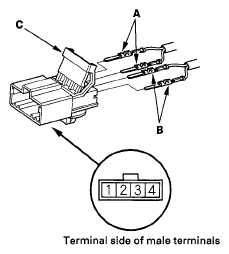
- Install the GRN harness terminals (A) of the park pin switch in the No. 1 and No. 2 cavities. Either park pin switch harness terminal can be installed in No. 1 and No. 2.
 Courtesy of AMERICAN HONDA MOTOR CO., INC.
- Install the RED/BLK harness terminals (B) in the No. 3 and No. 4 cavities. Either A/T gear position indicator panel light harness terminal can be installed in No. 3 and No. 4 cavities.
- Make sure that all four terminals lock securely, then install the back cover (C) securely in place.
- Install the park pin switch. Install a new screw, and secure the switch with the screw.
- Install the A/T gear position indicator panel light socket, and install the connector.
- Install the shift lever assembly (see
SHIFT LEVER INSTALLATION ).