Transmission Mount Replacement
- Remove the 12 volt battery (see
12 VOLT BATTERY REMOVAL AND INSTALLATION
).
- Turn the battery module switch OFF (see
DISCONNECTING THE MOTOR POWER CABLE CONNECTOR FROM THE MOTOR STATOR
).
- Remove the air cleaner (see
AIR CLEANER REMOVAL/INSTALLATION
).
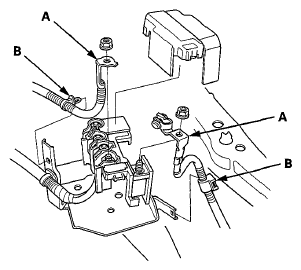
- Disconnect the battery cables (A) from the battery terminal fuse box.
 Courtesy of AMERICAN HONDA MOTOR CO., INC.
- Remove the harness clamps (B).
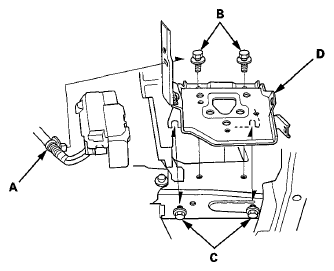
- Remove the harness clamp (A). Remove the two bolts (B) and loosen the two bolts (C), then remove the battery base (D).
 Courtesy of AMERICAN HONDA MOTOR CO., INC.
- Remove the powertrain control module (PCM) (see
PCM REPLACEMENT
).
- Disconnect the IMA power cable connector and the harness clamp (see step 41
).
- Support the transmission with a jack and a wood block under the transmission.
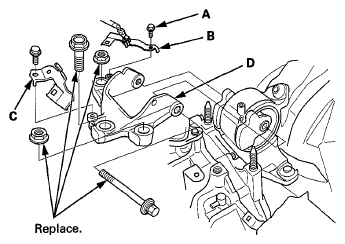
- Remove the harness holder mounting bolt (A) and the ground cable (B), then remove the harness holder (C).
 Courtesy of AMERICAN HONDA MOTOR CO., INC.
- Remove the transmission mount bracket (D).
- Remove the transmission mount.
 Courtesy of AMERICAN HONDA MOTOR CO., INC.
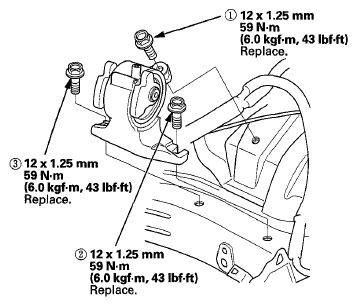
- Install the transmission mount, and loosely tighten the new transmission mount mounting bolts, then tighten the transmission mount mounting bolts in the numbered sequence shown.
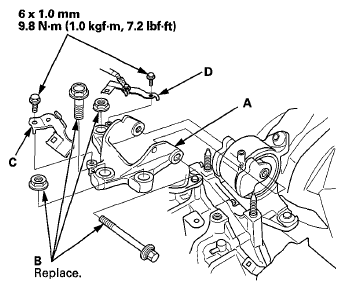
- Install the transmission mount bracket (A), and loosely tighten the new transmission mount bracket mounting bolts and nuts (B).
 Courtesy of AMERICAN HONDA MOTOR CO., INC.
- Install the harness holder (C) and the ground cable (D).
- Remove the jack and wood block from under the transmission.
- Raise the vehicle on the lift to full height.
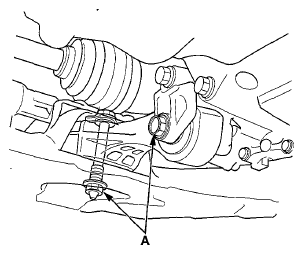
- Loosen the torque rod mounting bolt and nut (A).
 Courtesy of AMERICAN HONDA MOTOR CO., INC.
- Lower the vehicle on the lift.
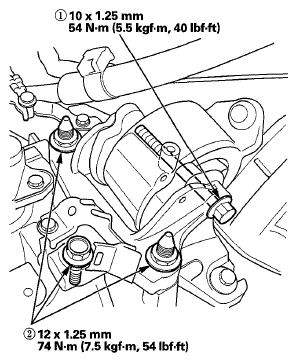
- Tighten the transmission mount mounting bolts and nuts in the numbered sequence shown.
 Courtesy of AMERICAN HONDA MOTOR CO., INC.
- Raise the vehicle on the lift to full height.
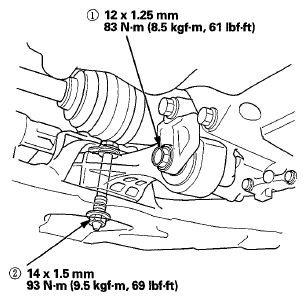
- Tighten the torque rod mounting bolt and nut in the numbered sequence shown.
 Courtesy of AMERICAN HONDA MOTOR CO., INC.
- Install the battery base (A), then install the harness clamp (B).
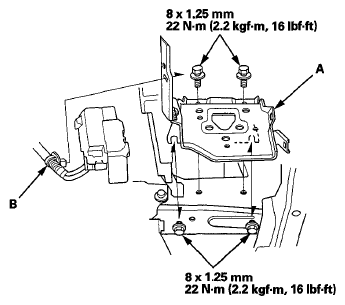 Courtesy of AMERICAN HONDA MOTOR CO., INC.
- Connect the battery cables (A) to the battery terminal fuse box.
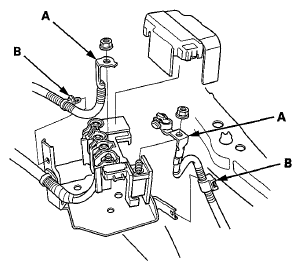 Courtesy of AMERICAN HONDA MOTOR CO., INC.
- Install the harness clamps (B).
- Install the PCM (see
PCM REPLACEMENT
).
- Connect the IMA power cable connector and the harness clamp (see step 31 under Engine Installation
).
- Turn the battery module switch ON (see
DISCONNECTING THE MOTOR POWER CABLE CONNECTOR FROM THE MOTOR STATOR
).
- Install the 12 volt battery (see
12 VOLT BATTERY REMOVAL AND INSTALLATION
).
- Install the air cleaner (see
AIR CLEANER REMOVAL/INSTALLATION
).