How to Use the HDS
- Connect the HDS to the DLC (A) located under the driver's side of the dashboard.
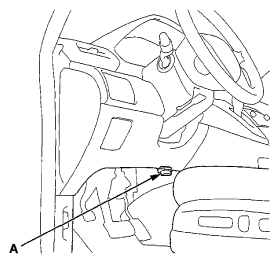 Courtesy of AMERICAN HONDA MOTOR CO., INC.
- Turn the ignition switch to ON (II).
- Make sure the HDS communicates with the vehicle and the PCM. If it does not communicate, troubleshoot the DLC circuit (see
DLC CIRCUIT TROUBLESHOOTING
).
- Check the DTC and note it. Also check the freeze data and/or the on-board snapshot data, and download any data found. Then refer to the INDICATED DTC'S TROUBLESHOOTING , and begin the appropriate troubleshooting procedure.
NOTE:
- Freeze data indicates the engine conditions when the first malfunction, was detected.
- The HDS can read the DTC, freeze data, on-board snapshot, and current data about the active control engine mount (ACM) system.
- For specific operations, refer to the user's manual that came with the HDS.