Driver's Door Lock/Unlock Switch Check
- Turn ignition switch to OFF position. Disconnect Smart Entrance Control Unit (SECU) 24-pin connector. Check continuity between ground and terminal No. 23 (Gray wire) on SECU connector. Continuity should only be present with driver's door lock/unlock switch in LOCK position. If continuity is as specified, go to next step. If continuity is not as specified, go to step 3
.
- Check continuity between ground and terminal No. 35 (Brown/Yellow wire) on SECU connector. Continuity should only be present with driver's door lock/unlock switch in UNLOCK position. If continuity is as specified, driver's door lock/unlock switch is operating correctly. If continuity is not as specified, go to next step.
- Disconnect driver's door lock/unlock switch connector. Check continuity between specified terminals. See Fig 1
. Replace switch as needed. If switch is okay, inspect the following:
- Ground circuit between terminal No. 5 (Black wire) and ground for open.
- Circuits between driver's door lock/unlock switch and SECU for open or short. See WIRING DIAGRAMS
.
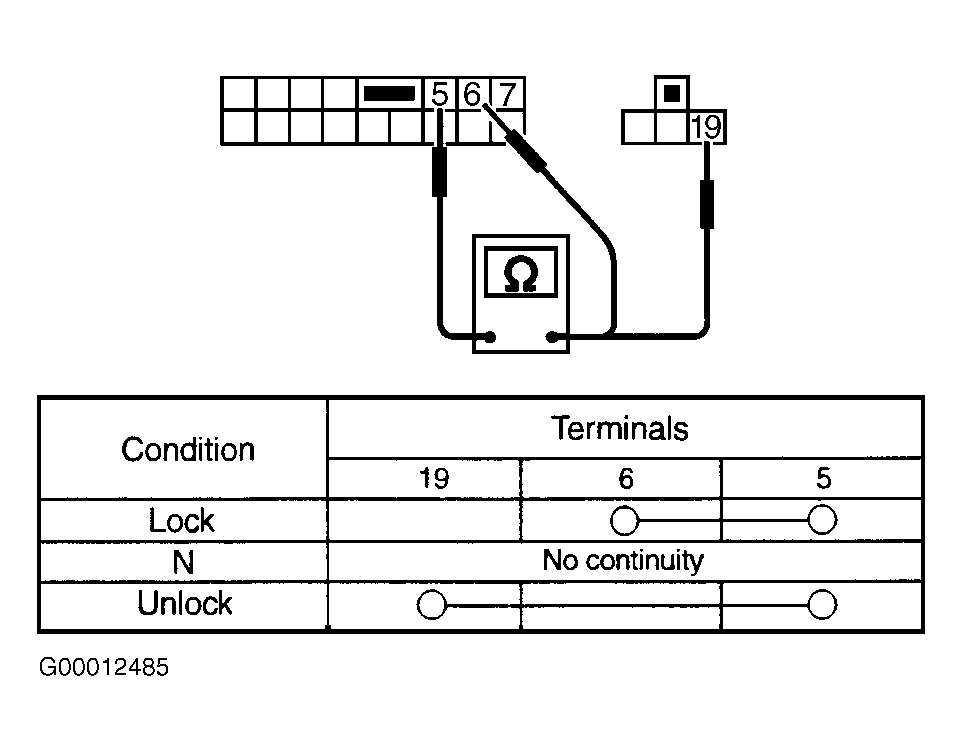 Courtesy of NISSAN MOTOR CO., U.S.A.