Defender 90
- Remove kickdown cable clevis pin and disconnect cable from throttle linkage. Loosen kickdown cable locknut and remove cable from bracket. Remove outer cable sleeve from retaining clip on rear of left cylinder head. Hold kickdown cable as straight as possible, pull inner cable to first detent and measure distance "A" between end of threads and crimped collar on cable. See Fig 1
. Distance "A" should be 1.54-1.77" (39.0-45.0 mm). Move crimped collar on cable or replace kickdown cable, if necessary.
- Connect kickdown cable to bracket without tightening locknut. Connect outer cable sleeve to retaining clip on rear of left cylinder head. Reconnect kickdown cable to throttle linkage and install clevis pin. Adjust kickdown cable sleeve until crimped collar is distance "B" from end of cable sleeve. See Fig 1
. Distance "B" should be 0.040" (1.0 mm).
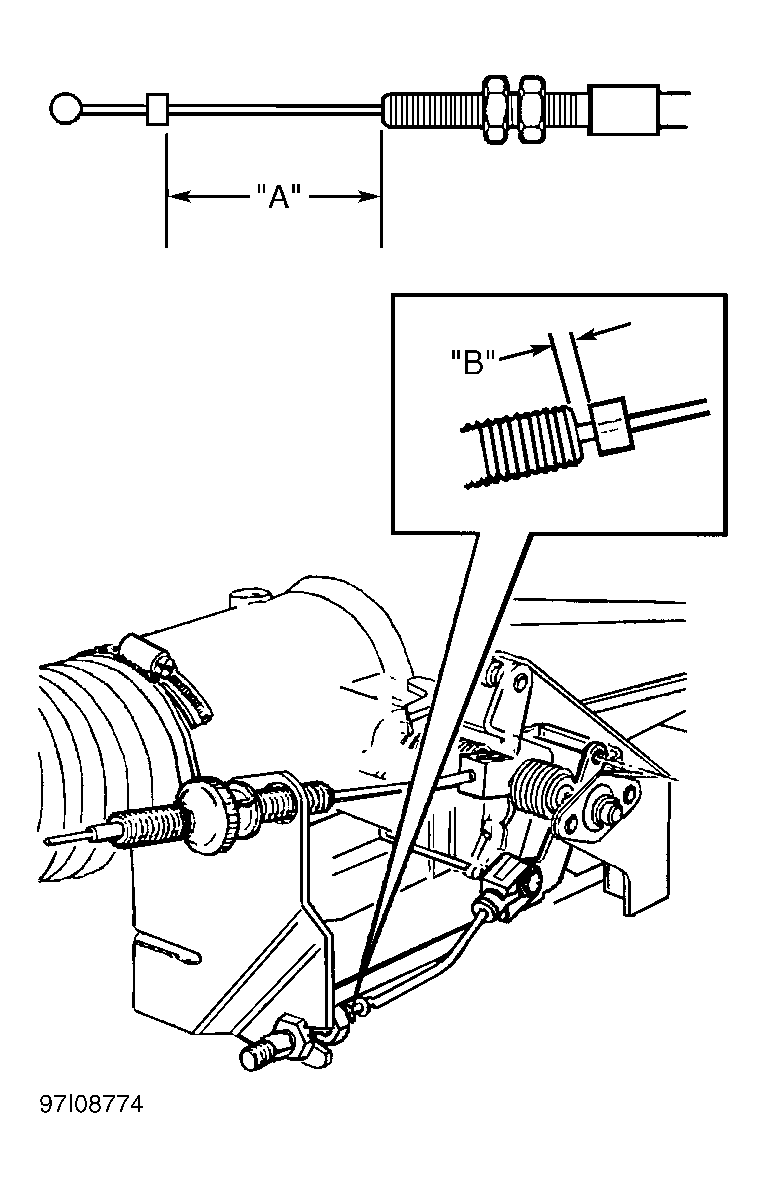 Courtesy of LAND ROVER NORTH AMERICA, INC.