Normal Mode
- Normal mode is used for routine testing of vehicle. Before retrieving trouble code(s), verify MIL on instrument panel comes on with ignition on and engine off. The MIL light should go off when engine is started.
- If MIL does not come on with ignition on and engine off, check bulb circuit on instrument panel and wiring circuit between MIL and ECM. See appropriate wiring diagram in WIRING DIAGRAMS
article. If MIL remains on, self-diagnostic system has detected a malfunction or abnormality.
- Ensure battery voltage is at least 11 volts, throttle valve is fully closed, transaxle/transmission is in Neutral, all accessories are off and parking brake is applied.
- All models are equipped with 2 Data Link Connectors (DLCs). Data Link Connector No. 1 (DLC1) is located in engine compartment. Data Link Connector No. 2 (DLC2) is located under left side of instrument panel. See Figure. Codes can be retrieved by using D LC1 or DLC2.
- To retrieve codes, turn ignition on. DO NOT
start engine. Using a jumper wire, connect terminals E1 and TE1 together either on DLC1 or DLC2. See Fig 1. Count number of flashes from Malfunction Indicator Light (MIL).
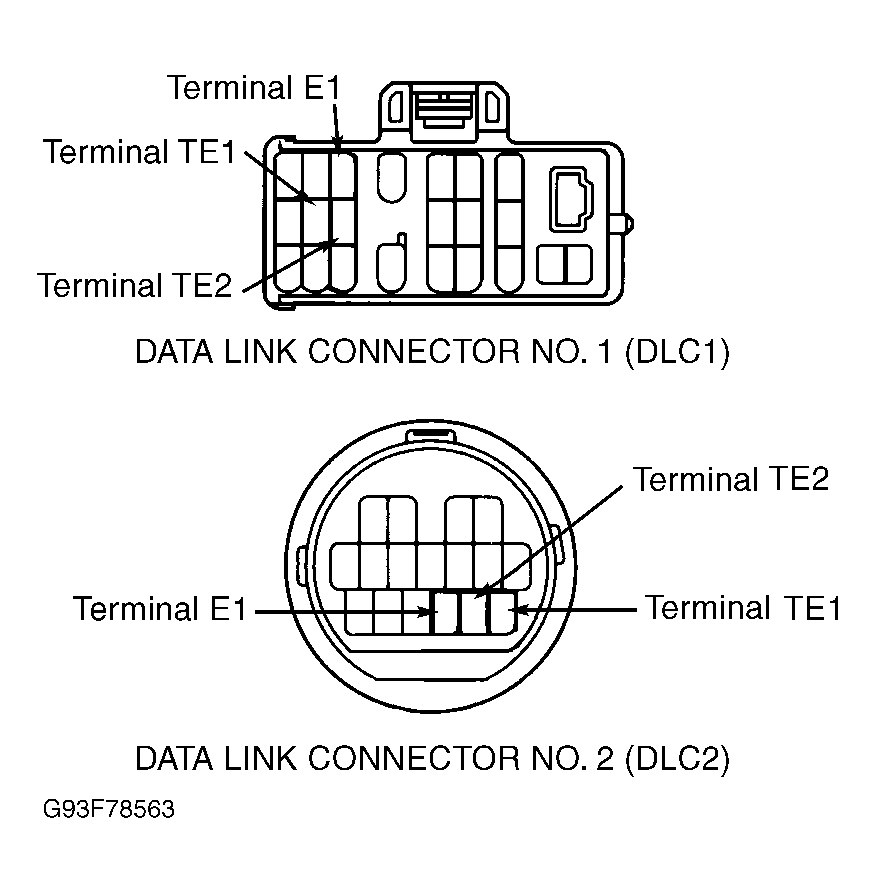 Courtesy of © TOYOTA, LICENSE AGREEMENT TMS1002
- If MIL flashes 2 times every second, system is functioning properly (no codes present). This is known as a normal condition. If a diagnostic code is displayed, first group of flashes will indicate first digit of a 2-digit diagnostic code. After a 1.5 second delay, second group of flashes will indicate second digit of diagnostic code.
- If more than one code is stored, a 2.5 second delay will occur between diagnostic codes. After all diagnostic codes have been displayed, a 4.5 second delay will occur and then codes will be repeated until jumper wire connecting terminals E1 and TE1 is disconnected. Diagnostic codes will display from smallest to largest number.
- Identify and record diagnostic trouble codes. After trouble codes are retrieved, remove jumper wire to exit Normal Mode. See NOTES ON TROUBLE CODES . For additional information on trouble codes, see DIAGNOSTIC TROUBLE CODE DEFINITIONS table and TROUBLE CODE IDENTIFICATION table. After reading diagnostic trouble code definition and identification, perform appropriate diagnostic trouble code chart. To clear codes, see CLEARING CODES .