NORMAL Mode Code Retrieval
- Connect scan tool to Data Link Connector (DLC) No. 3. See Fig 1. DLC No. 3 is located under left side of instrument panel. Turn ignition on with engine off. Turn scan tool on. Using scan tool manufacturer's instructions, check for DTCs and freeze-frame data.
- If scan tool displays UNABLE TO CONNECT TO VEHICLE, DLC No. 3 must be checked. See DLC NO. 3 INSPECTION under SCAN TOOL PROBLEMS. If scan tool does not display UNABLE TO CONNECT TO VEHICLE, go to next step.
- Record any DTCs and freeze-frame data displayed for system diagnosis. If driveability problem exists and no DTCs are present, go to TESTS W/O CODES
article for diagnosis by symptom.
- If any DTCs are present, perform appropriate circuit test(s) in this article. See DIAGNOSTIC TROUBLE CODE (DTC) IDENTIFICATION table. For more information on freeze-frame data, see FREEZE-FRAME DATA under INTRODUCTION. For information on 2-trip detection logic codes, see TWO-TRIP DETECTION LOGIC under INTRODUCTION.
- After repairs for DTC have been completed, DTCs must be cleared from ECM memory. See CLEARING DIAGNOSTIC TROUBLE CODES .
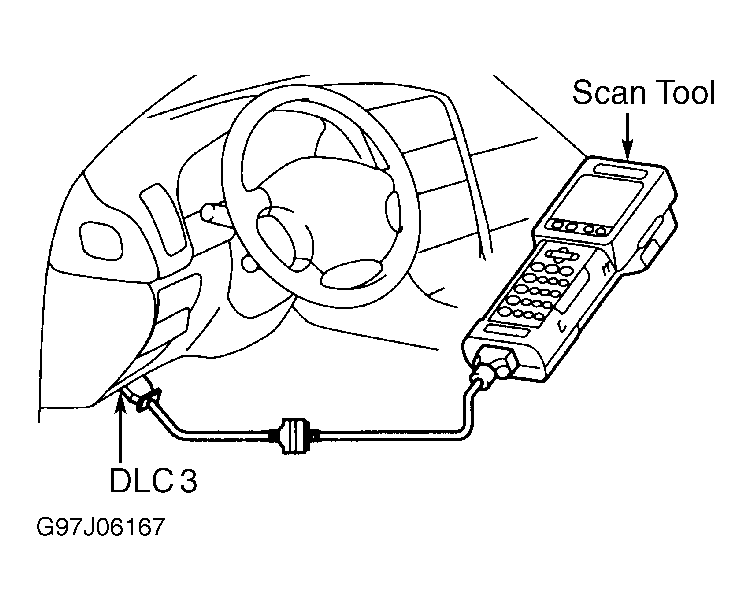 Courtesy of © TOYOTA, LICENSE AGREEMENT TMS1002