On-Board Diagnostic System DTC Inspection [FS5A-EL]
ON-BOARD DIAGNOSTIC SYSTEM DTC INSPECTION [FS5A-EL]
Reading DTCs Procedure
1. Connect the M-MDS to the DLC-2.
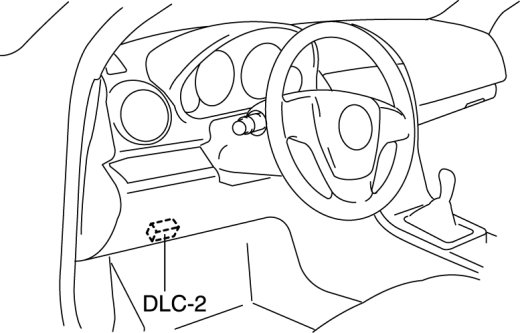
2. After the vehicle is identified, select the following items from the initialization screen of the M-MDS.
- When using the IDS (laptop PC)
- Select "Self Test".
- Select "Modules".
- Select "TCM".
- When using the PDS (Pocket PC)
- Select "Module Tests".
- Select "TCM".
- Select "Self Test".
3. Verify the DTC according to the directions on the M-MDS screen.
Clearing DTCs Procedure
1. Connect the M-MDS to the DLC-2.
2. After the vehicle is identified, select the following items from the initialization screen of the M-MDS.
- When using the IDS (laptop PC)
- Select "Self Test".
- Select "Modules".
- Select "TCM".
- When using the PDS (Pocket PC)
- Select "Module Tests".
- Select "TCM".
- Select "Self Test".
3. Verify the DTC according to the directions on the M-MDS screen.
4. Press the clear button on the DTC screen to clear the DTC.