DTC 12: Diagnostic System Check: Testing
- Turn ignition switch to RUN position. If SECURITY indicator comes on, go to next step. If SECURITY indicator does not come on, go to step 3
.
- Attempt to enter Body Control Module (BCM) diagnostic mode. See BODY CONTROL SYSTEM DIAGNOSTIC SYSTEM CHECK
under SELF-DIAGNOSTIC SYSTEM. If SECURITY indicator flashes DTCs, system is operating properly. Go to appropriate diagnostic procedure. See BCM DTC DEFINITIONS
table under SELF-DIAGNOSTIC SYSTEM. If SECURITY indicator does not flash DTCs, go to next step.
- Turn ignition switch to RUN position. Operate power windows. If power windows operate, go to step 7
. If power windows do not operate, go to next step.
- Turn ignition switch to OFF position. Disconnect BCM connector C2. Connect test light between BCM connector C2 terminal "C" (Dark Blue wire) and ground. See Figure
. If test light comes on, go to next step. If test light does not come on, go to step 6
.
- Repair short to ground in Dark Blue wire between BCM and instrument panel fuse block. After repairs, attempt to enter BCM diagnostic mode. If SECURITY indicator flashes DTCs, system is operating properly. Go to appropriate diagnostic procedure. See BCM DTC DEFINITIONS
table under SELF-DIAGNOSTIC SYSTEM. If SECURITY indicator does not flash DTCs, go to next step.
- Replace BCM. See BODY CONTROL MODULE (BCM)
under REMOVAL & INSTALLATION.
- Turn ignition switch to OFF position. Disconnect BCM connector C3. Connect a fused jumper wire between BCM connector C3 terminal C12 (Gray wire) and ground. If SECURITY indicator comes on, go to next step. If SECURITY indicator does not come on, go to step 9
.
- Check for a faulty connection at BCM connector C3 terminal C12 (Gray wire). Repair connection as necessary. If connection is okay, replace BCM. See BODY CONTROL MODULE (BCM)
under REMOVAL & INSTALLATION.
- Remove instrument cluster. See appropriate ANALOG INSTRUMENT PANELS article. Disconnect instrument cluster connector. Connect a test light between instrument cluster connector terminal A10 (Orange wire) and ground. See Fig 1
. If test light comes on, go to next step. If test light does not come on, go to step 11
.
- Check for an open circuit or faulty connection in Gray wire between instrument cluster and BCM. Repair circuit or connection as necessary. If circuit and connection are okay, replace instrument cluster IPC. See appropriate ANALOG INSTRUMENT PANELS article.
- Repair open in Orange wire between instrument cluster and instrument panel fuse block.
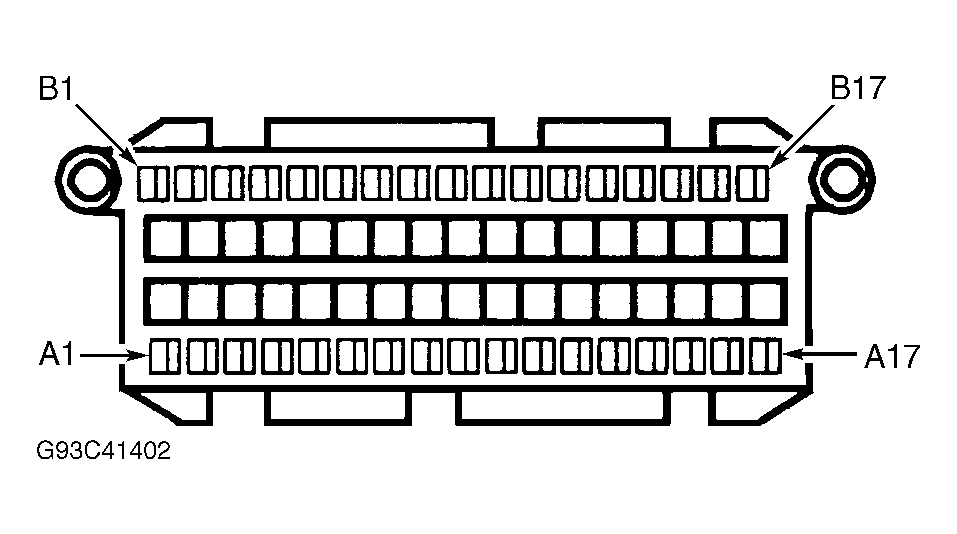 Courtesy of GENERAL MOTORS CORP.