Test B: Scan Tool Does Not Communicate With Class 2 Device: Testing
- Connect scan tool to Data Link Connector (DLC). DLC is located under left side of instrument panel. If scan tool powers up, go to next step. If scan tool does not power up, go to TEST A: SCAN TOOL DOES NOT POWER UP .
- Turn ignition switch to RUN position. Using scan tool, attempt to communicate with each module on class 2 serial data circuit. If using a Tech 2, obtain this information using class 2 message monitor feature. If scan tool communicates with any module, go to next step. If scan tool does not communicate with any module, go to step 7.
- Using scan tool, select DISPLAY DTCS function and retrieve DTCs for each module. Record DTCs, DTC status and which module stored the DTC(s). If DTCs in the range of U1000 to U1305 are retrieved, go to next step. If no DTCs were retrieved, go to DIAGNOSTIC AIDS .
- If DTCs U1300, U1301 or U1305 were set, go to next step. If any other DTCs were retrieved, go to step 6.
- Turn ignition switch to RUN position. Using DVOM set on MIN/MAX function, check for intermittent short to ground or short to voltage in class 2 serial data circuit (Purple wire). See WIRING DIAGRAMS . If no problem is found, go to next step. If problem is found, repair as necessary and go to step 31.
- If DTCs U1000 or U1255 were the only DTCs retrieved, perform appropriate test. See DTC B1000 & U1255 under DIAGNOSTIC TESTS. If any other DTCs were retrieved, perform appropriate test. See DIAGNOSTIC TROUBLE CODE DEFINITIONS .
- Turn ignition switch to OFF position. Disconnect scan tool from DLC. Check for poor, loose or corroded terminals in DLC connector. If no problem is found, go to next step. If problem is found, repair as necessary and perform diagnostic system check for non-communicating control module.
- Check for open in Black wire between ground and DLC harness connector terminal No. 5. See DATA LINK CONNECTOR article in WIRING DIAGRAMS. Ground point is located under left side of instrument panel on cross beam between parking brake assembly and steering column. If no problem is found, go to next step. If problem is found, repair as necessary and perform diagnostic system check for non-communicating control module.
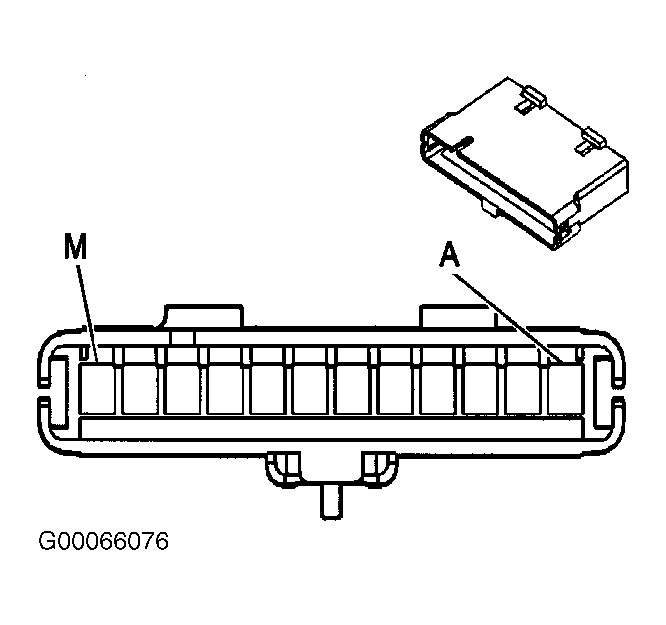
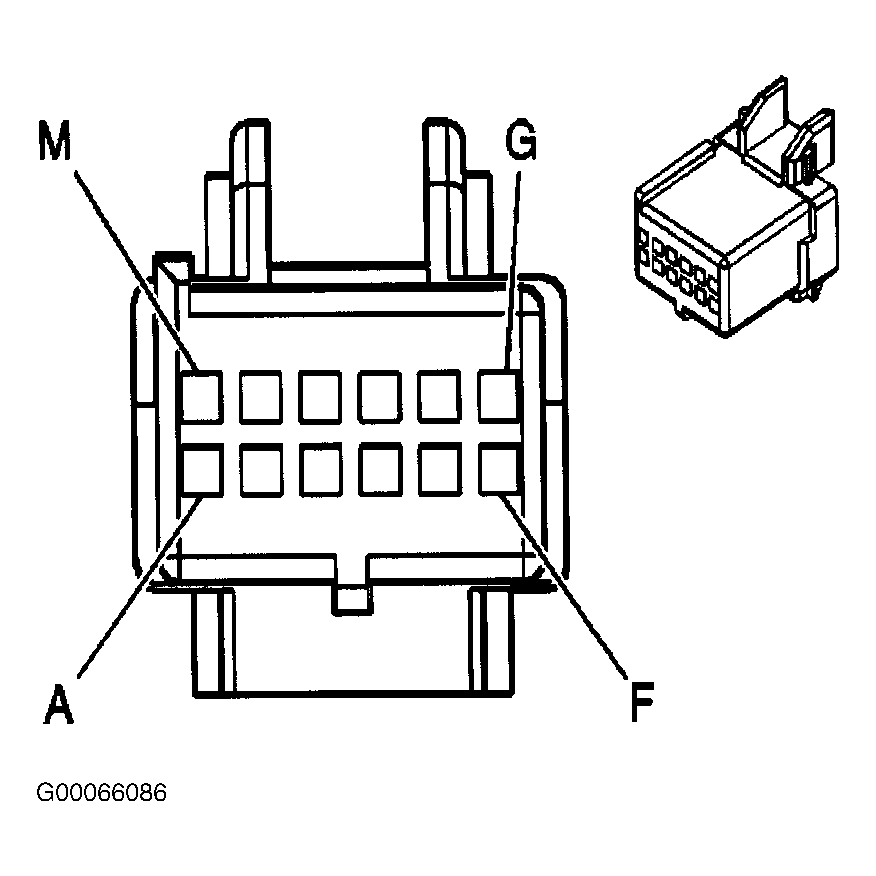
- Disconnect in-line 12-pin splice connector SP205. Connector is located on left side of instrument panel behind access panel. Check for poor, loose or corroded terminals in in-line harness connector. If no problem is found, go to next step. If problem is found, repair as necessary and perform diagnostic system check for non-communicating control module.
- Check for an open or short in Purple wire between DLC harness connector terminal No. 2 and in-line harness connector SP205 terminal "A". See Figure and Fig 1
. If no problem is found, go to next step. If problem is found, repair as necessary and perform diagnostic system check for non-communicating control module.
 Courtesy of GENERAL MOTORS CORP.
- Using a jumper wire, jumper in-line harness connector SP205 terminals "A" (Purple wire) and "M"(Light Green wire). Connect scan tool to DLC. DLC is located under left side of instrument panel. Turn ignition switch to RUN position. Attempt to communicate with BCM. If scan tool does not communicate with BCM, go to next step. If scan tool communicates with BCM, go to step 13.
- Turn ignition switch to OFF position. Disconnect BCM harness connector C1. BCM is located inside center console attached to center console fuse block. Check for an open, short to ground and short to voltage in Light Green wire between BCM harness connector C1 terminal A10 and in-line harness connector SP205 terminal "M". See Figure and Fig 1
. If problem is found, repair as necessary and go to step 31. If no problem is found, go to step 29.
- Leave jumper wire connected to in-line harness connector SP205 terminals "A" (Purple wire) and "M"(Light Green wire). See Fig 1. Using another jumper wire, jumper in-line harness connector SP205 terminals "A" (Purple wire) and "B"(Dark Green wire). Using scan tool attempt to communicate with the Powertrain Control Module (PCM). If scan tool does not communicate with PCM, go to next step. If scan tool communicates with PCM, go to step 15.
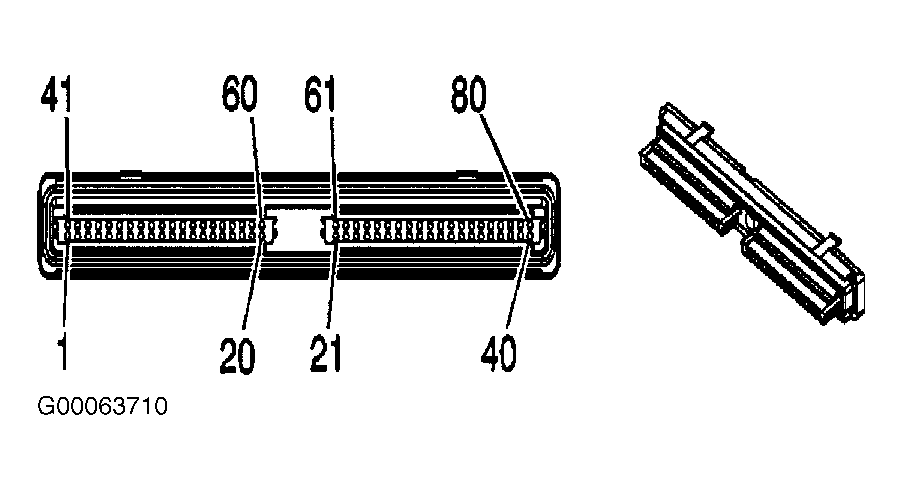
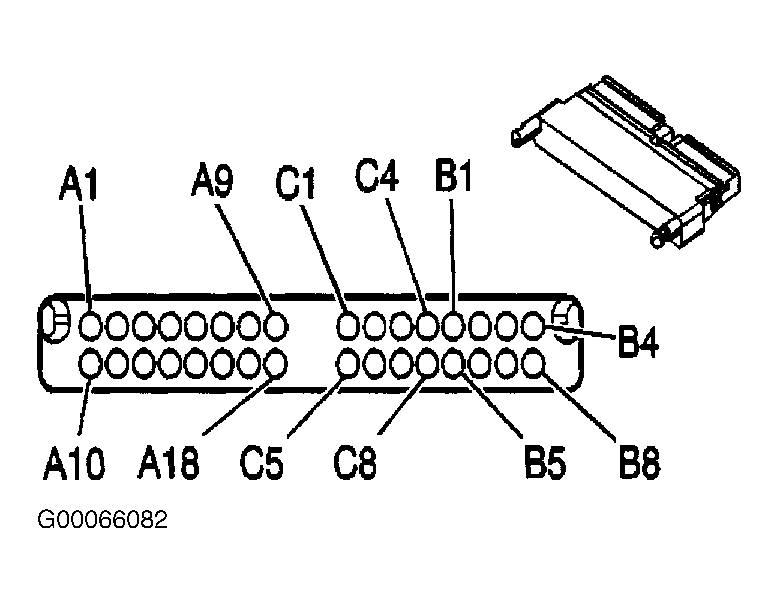
- Turn ignition switch to OFF position. Disconnect PCM 80-pin harness connector C1. PCM is located in engine compartment, inside air cleaner assembly. Check for short to ground or short to voltage in Dark Green wire between in-line harness connector SP205 terminal "B" and PCM harness connector C1 terminal 58. See Fig 1 and Fig 2
. If problem is found, repair as necessary and go to step 31. If no problem is found, go to step 29.
- Disconnect jumper wire from in-line harness connector terminal "B" (Dark Green wire) and connect it to terminal "D" (Orange wire). See Fig 1. Turn ignition switch to RUN position. Using scan tool, attempt to communicate with radio. If scan tool does not communicate with radio, go to next step. If scan tool communicates with radio, go to step 17.
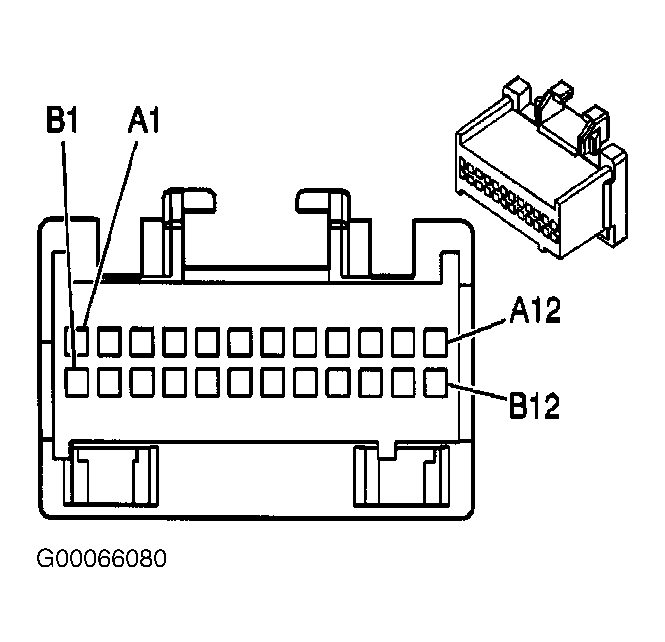
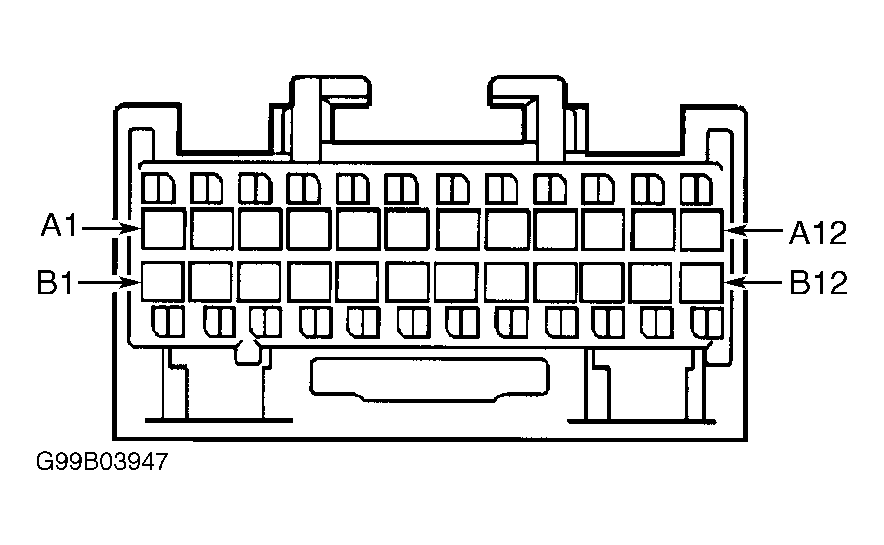
- Turn ignition switch to OFF position. Remove radio. See RADIO under REMOVAL & INSTALLATION. Disconnect radio 24-pin harness connector C1. Harness connector is located on rear of radio. Check for short to ground or short to voltage in Orange wire between radio harness connector C1 terminal A1 and in-line harness connector SP205 terminal "D". See Fig 1 and Fig 3
. If problem is found, repair as necessary and go to step 31. If no problem is found, go to step 29.
- Disconnect jumper wire from in-line harness connector SP205 terminal "D" (Orange wire) and connect it to terminal "E" (Light Blue wire). See Fig 1. Turn ignition switch to RUN position. Attempt to communicate with the Electronic Brake Control Module (EBCM). If scan tool does not communicate with ECBM, go to next step. If scan tool communicates with ECBM, go to step 19.
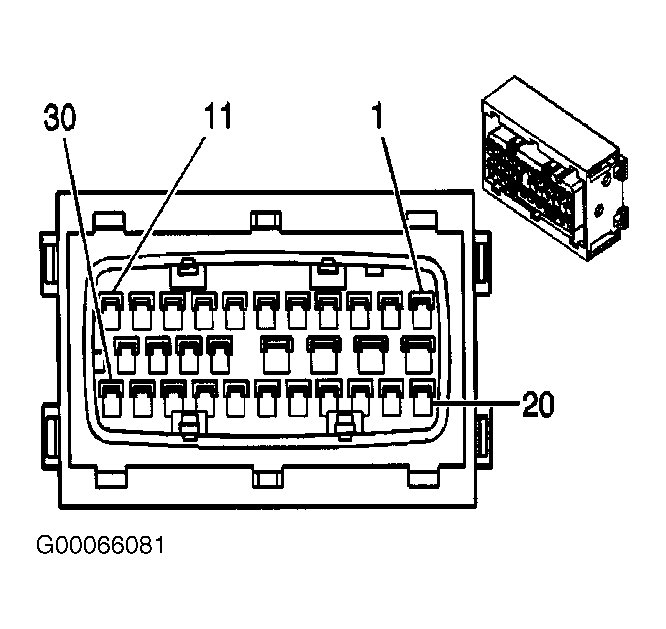
- Turn ignition switch to OFF position. Disconnect ECBM harness connector 30-pin harness connector. ECBM is located lower left side of engine compartment, mounted to strut tower. Check for short to ground or short to voltage in Light Blue wire between ECBM harness connector terminal No. 25 and in-line harness connector SP205 terminal "E". See Fig 1 and Fig 4
. If problem is found, repair as necessary and go to step 31. If no problem is found, go to step 29.
- Disconnect jumper wire from in-line harness connector SP205 terminal "D" (Orange wire) and connect it to terminal "F" (Dark Blue wire). See Fig 1. Turn ignition switch to RUN position. Attempt to communicate with the inflatable restraint Sensing and Diagnostic Module (SDM). If scan tool does not communicate with SDM, go to next step. If scan tool communicates with SDM, go to step 21.
- Turn ignition switch to OFF position. Disconnect SDM 34-pin harness connector. SDM is located under right front seat. Check for short to ground or short to voltage in Dark Blue wire between SDM harness connector A4 and in-line harness connector SP205 terminal "F". See Fig 1and Fig 5
. If problem is found, repair as necessary and go to step 31. If no problem is found, go to step 29.
- Disconnect jumper wire from in-line harness connector SP205 terminal "F" (Dark Blue wire) and connect it to terminal "G" (Gray wire). See Fig 1. Turn ignition switch to RUN position. Attempt to communicate with the Instrument Panel Cluster (IPC). If scan tool does not communicate with IPC, go to next step. If scan tool communicates with IPC, go to step 23.
- Turn ignition switch to OFF position. Disconnect IPC 24-pin harness connector. IPC is located in instrument panel. Check for short to ground or short to voltage in Gray Blue wire between IPC harness connector B9 and in-line harness connector SP205 terminal "G". See Fig 1 and Fig 6
. If problem is found, repair as necessary and go to step 31. If no problem is found, go to step 29.
- Disconnect jumper wire from in-line harness connector SP205 terminal "G" (Gray wire) and connect it to terminal "H" (Purple wire). See Fig 1. Turn ignition switch to RUN position. Attempt to communicate with the PASS-key® III module. If scan tool does not communicate with PASS-key® III module, go to next step. If scan tool communicates with PASS-key® III module, go to step 25.
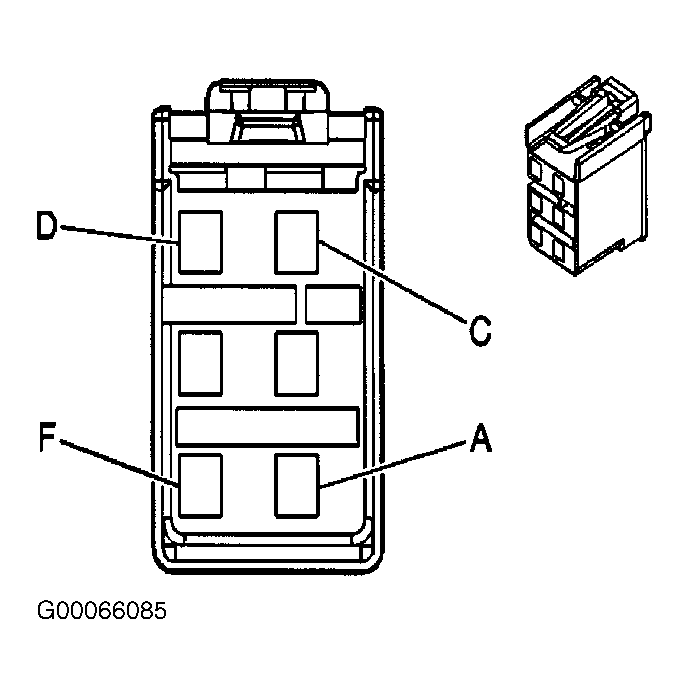
- Turn ignition switch to OFF position. Disconnect PASS-key® III module 24-pin harness connector. PASS-key® III module is located on ignition lock cylinder. Check for short to ground or short to voltage in Purple wire between PASS-key® III module` harness connector "D" and in-line harness connector SP205 terminal "H". See Fig 1 and Fig 7
. If problem is found, repair as necessary and go to step 31. If no problem is found, go to step 29.
- Disconnect jumper wire from in-line harness connector SP205 terminal "H" (Purple wire) and connect it to terminal "J" (Light Green wire). See Fig 1. Turn ignition switch to RUN position. Attempt to communicate with any components on auxiliary power drop connector. If no additional components are installed, communicate with BCM. If scan tool does not communicate with auxiliary power drop connector or BCM, go to next step. If scan tool communicates with auxiliary power drop connector or BCM, go to step 27.
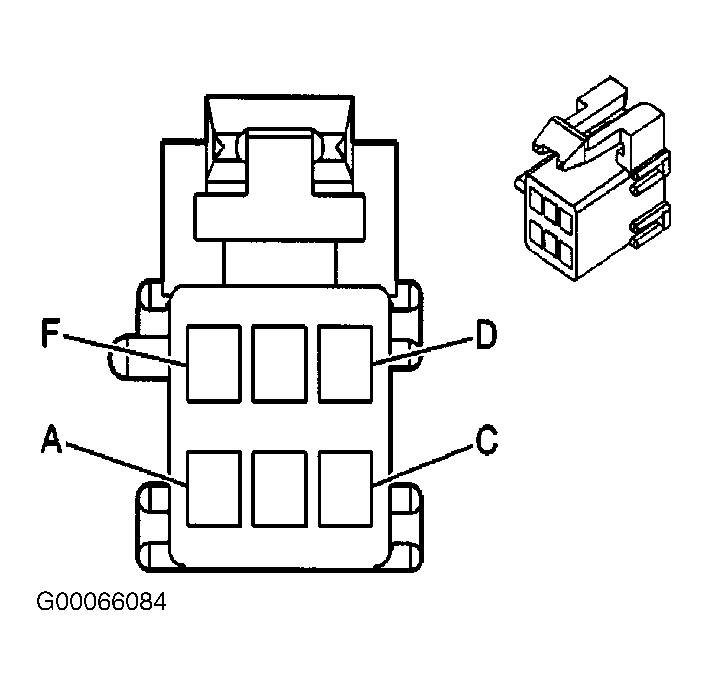
- Turn ignition switch to OFF position. Disconnect auxiliary power drop connector 6-pin harness connector. Auxiliary power drop connector is located under instrument panel, taped to instrument panel harness connector left of blower motor. Check for short to ground or short to voltage in Purple wire between PASS-key® III module` harness connector "D" and in-line harness connector SP205 terminal "H". See Fig 1 and Fig 8
. If problem is found, repair as necessary and go to step 31. If no problem is found, go to step 29.
- Disconnect jumper wire from in-line harness connector SP205 terminal "J" (Light Green wire) and connect it to terminal "K" (Black wire). See Fig 1. Turn ignition switch to RUN position. Attempt to communicate with Heads Up Display (HUD). If scan tool does not communicate with HUD, go to next step. If scan tool communicates with HUD, go to step 31.
- Turn ignition switch to OFF position. Disconnect HUD 12-pin harness connector. HUD is located at top of instrument panel, if front of instrument panel cluster. Check for short to ground or short to voltage in Black wire between HUD harness connector terminal "G" and in-line harness connector SP205 terminal "K". See Fig 1 and Fig 9
. If problem is found, repair as necessary and go to step 31. If no problem is found, go to step 29.
- Inspect for poor, loose or corroded terminals in harness connector of in non-communicating module. If no problem is found, go to next step. If problem is found, repair as necessary and go to step 31.
- Replace non-communicating module. See appropriate procedure under REMOVAL & INSTALLATION . After repairs are made, go to next step.
- Reconnect all disconnected modules. Reconnect any disconnected harness connectors. Turn ignition switch to RUN position, and wait for 10 seconds. Scan tool may require a power up reset before communication will occur due to a short on class 2 serial data circuit. Turn off or disconnect scan tool prior to performing test. Using scan tool, select DISPLAY DTCs function. Retrieve and record any DTCs, and their status, from all modules. If no DTCs were retrieved, or any other DTCs were retrieved, go to next step. If any DTCs which begin with a "U" and have a current status, go to step 33.
- If DTCs were retrieved which do not begin with a "U", go to next step. If no DTCs were retrieved, go to step 35.
- Perform appropriate test for any DTCs retrieved. See DIAGNOSTIC TROUBLE CODE DEFINITIONS . After testing is complete, go to next step.
- After all DTCs are diagnosed, go to next step. If all DTCs have not been diagnosed, go to step 33.
- Use scan tool to clear DTCs. Operate suspect system ensuring repairs are complete.
 Courtesy of GENERAL MOTORS CORP.
 Courtesy of GENERAL MOTORS CORP.
 Courtesy of GENERAL MOTORS CORP.
 Courtesy of GENERAL MOTORS CORP.
 Courtesy of GENERAL MOTORS CORP.
 Courtesy of GENERAL MOTORS CORP.
 Courtesy of GENERAL MOTORS CORP.
 Courtesy of GENERAL MOTORS CORP.