Retrieving DTC(S)
NOTE:
Subaru Select Monitor (SSM) or an OBD-II scan tool must be used to perform self-diagnostic tests. Follow scan tool manufacturer's instructions for proper operation. SSM can be plugged into either the OBD-II DLC or the dedicated SSM test connectors behind the dash.
- Enter specific test mode by connecting or disconnecting read memory and/or test mode connectors as shown in the RELATIONSHIP BETWEEN MODES & CONNECTORS table. Connectors are located behind left side of instrument panel. See Fig 1.
- Observe Malfunction Indicator Light (MIL) or oxygen sensor monitor light. Note any DTC(s). Long illumination periods of 1.2 seconds designate tens digit in numbered codes. Short illumination periods of .2 second designate ones digit in numbered codes.
- Tens and ones digits are separated by a .3-second interval of non-illumination. For example: 3 long flashes (1.2 seconds each) followed by 5 short flashes (.2 second each) designate code 35.
- After a 2-second break, the next stored code will be displayed. Once all existing DTCs have been displayed, sequence will repeat.
RELATIONSHIP BETWEEN MODES & CONNECTORS
| Mode |
Read Memory Connector |
Test Mode Connector |
| U-CHECK |
Disconnected |
Disconnected |
| READ MEMORY |
Connected |
Disconnected |
| D-CHECK |
Disconnected |
Connected |
| CLEAR MEMORY |
Connected |
Connected |
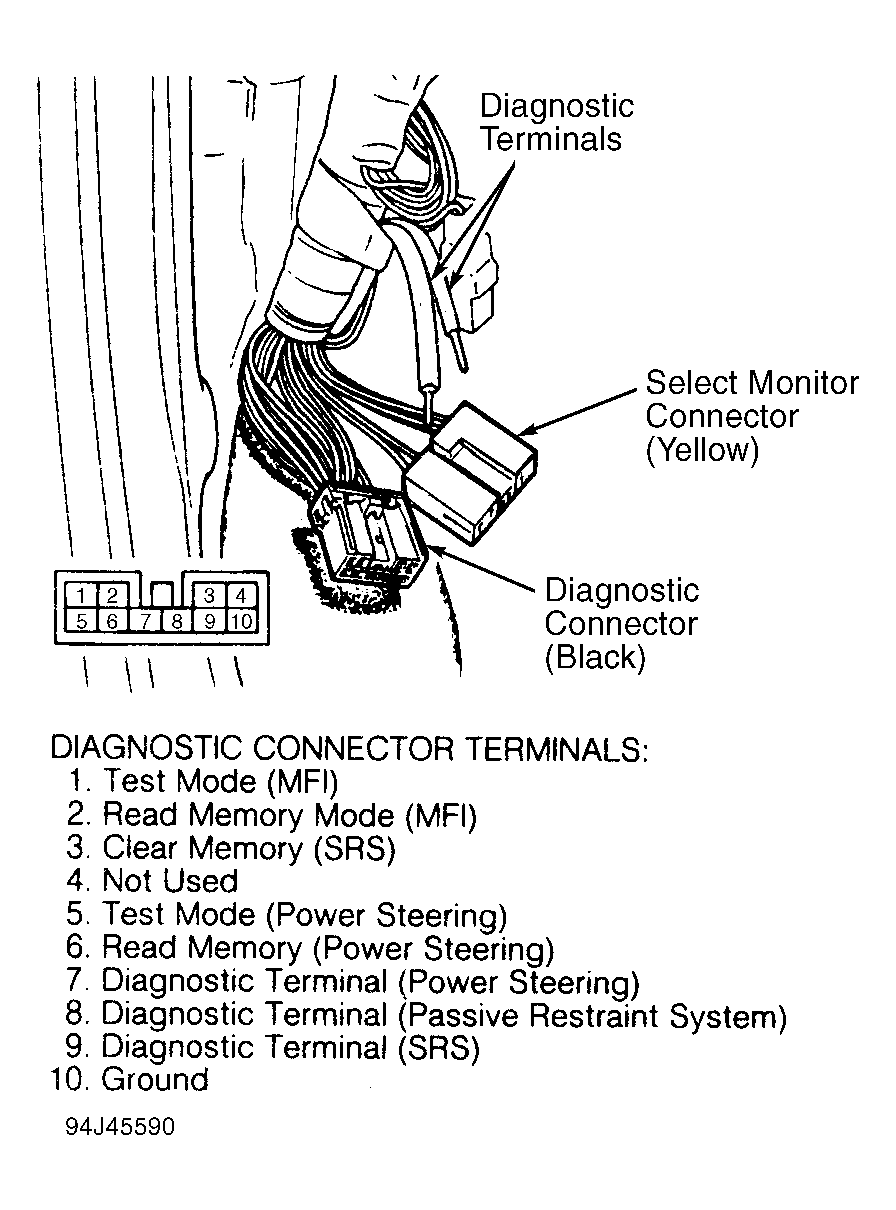 Courtesy of SUBARU OF AMERICA, INC.