Condition Based Service (CBS) Light Reset (7-Series)
Service reset is accomplished using instrument cluster. On future models, diagnostic tester will reset indicator:
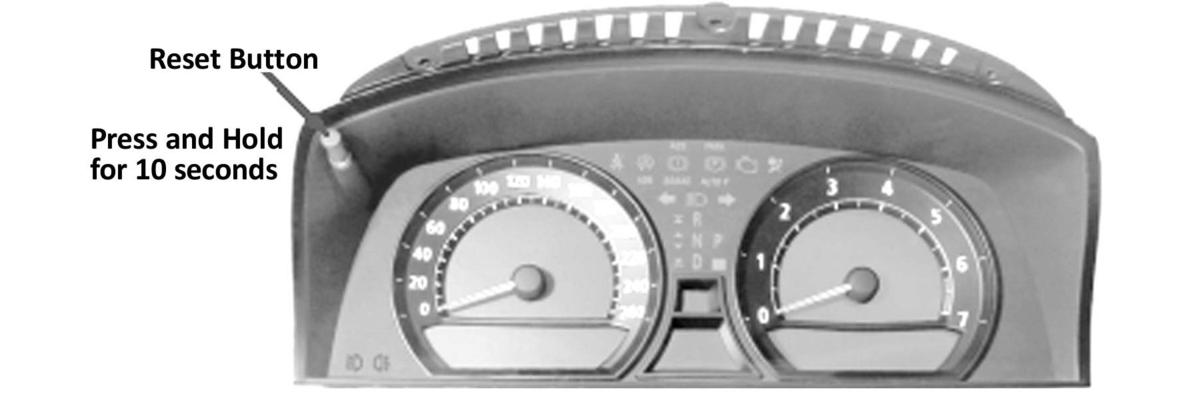
- To reset a service, press the reset button on the top left part of instrument cluster for more than 10 seconds with ignition ON. This brings you directly to reset mode.
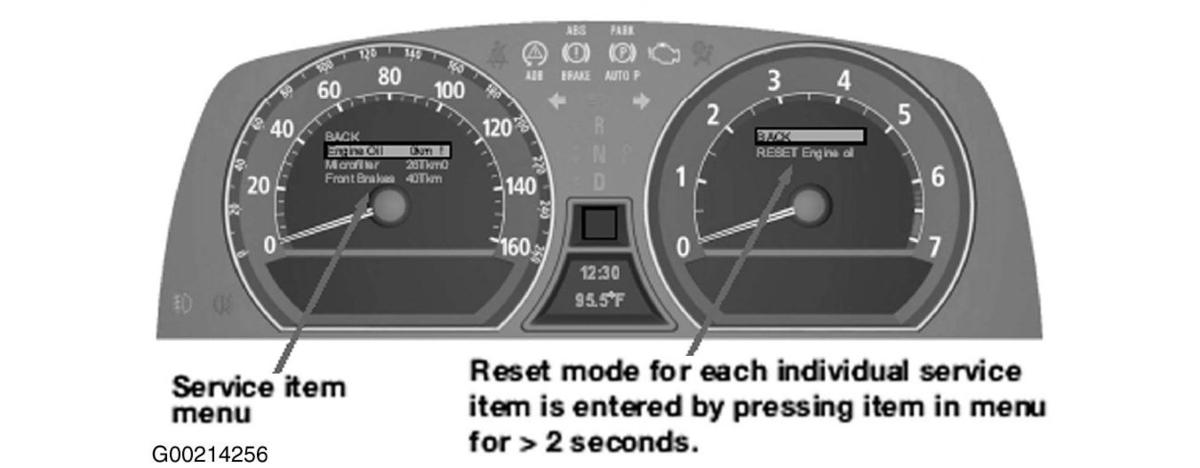
- A menu appears in the speedometer. At the top is the BACK function, then the first 3 service items. See Fig 1 and Fig 2.
Residual wear or remaining time are specified (possibly with a minus sign). The "1" symbol means that you can reset service operation (early production vehicles may show an "F"), while a "0" indicates it is not resettable (the first 20 percent of the service interval is also protected against accidental reset). You can scroll through the service items by pressing the reset button or the lower button (CC button) on turn signal switch. When you have selected a service item, press reset button for more than 2 seconds to display a 2-line menu in tachometer. "Back" function is at top, resettable service item is below. Now select service item with reset button (or CC button) and press and hold reset button again. In a third menu line, further down, system confirms that reset volume was successful. Whole interval for service operation is shown in SERVICE NEED INDICATOR using control display. For additional information about Condition Based Service (CBS), see
RESETTING & CORRECTING CONDITION BASED SERVICE
under PROGRAMMING in SELF-DIAGNOSTICS article.
 Courtesy of BMW OF NORTH AMERICA, INC.
 Courtesy of BMW OF NORTH AMERICA, INC.