September 30: LEMON manuals is back up on a temporary server! Slowness is possible
Oxygen Sensor System In Closed Loop Test
- Connect negative lead of voltmeter to ground and positive lead to Green wire of 6-pin connector of carburetor solenoid. Connect tachometer to engine. Disconnect and plug vacuum hose at computer. Connect an auxiliary vacuum supply to computer.
- Apply 14 in. Hg vacuum to computer. Start engine and wait 2 minutes for engine to stabilize. Raise engine speed to 2000 RPM. Voltmeter should read 10-14 volts variable. If voltage is zero, replace computer. If voltage is okay, go to step 3). If voltage is 1-10 volts go to step 10).
- With voltmeter and tachometer still connected and hose at computer still disconnected and plugged, apply 14 in. Hg vacuum to computer. Engine should be running at 2000 RPM. Remove air cleaner. Slowly close choke blade. Voltage should drop at least 3 volts and engine speed should drop.
- If voltage and speed drop are okay, oxygen sensor system in closed loop is okay. If voltage and speed drop are not okay, go to step 5). If voltage drop is okay, but engine speed does not drop, replace carburetor solenoid.
- Reinstall air cleaner cover. Connect a jumper wire between Green solenoid wire and ground. Voltmeter should read 0-1 volt and engine speed should drop. If voltage and speed do not drop, replace carburetor solenoid. Go to step 6) if voltage and speed drop are okay.
- Disconnect test connector and reconnect Green wire with White tracer only. Hold oxygen sensor wire (computer side) in one hand and with the other hand, touch battery positive terminal. See Fig 1
. Voltage should drop. If voltage drops, go to step 7). If voltage does not drop, go to step 8).
- Return engine speed to idle RPM. Turn engine off. Disconnect wiring harness at oxygen sensor. Connect ohmmeter between test connector Black wire and disconnected wire at oxygen sensor. See Fig 2
. Ohmmeter should show continuity. If there is continuity, replace carburetor solenoid. if there is no continuity, repair wiring harness for open circuit.
- Allow engine to idle. Turn engine off. Remove battery hold down nut and bracket. Move battery inward. Remove 12-pin connector at computer. connect ohmmeter between cavity No. 11 of 12-pin connector and Green solenoid wire at carburetor 6-pin connector. Ohmmeter should show continuity. If there is no continuity, repair harness for open circuit. If continuity exists, go to step 9).
- With battery moved inward and 12-pin connector removed from computer, connect ohmmeter between test connector Black wire (computer side) and cavity No. 9 of 12-pin connector. See Fig 3
. Ohmmeter should show continuity. If no continuity exists, repair harness for open circuit. If continuity exists, replace computer.
- With voltmeter connected to solenoid, hose at computer removed and plugged, 14 in. Hg vacuum applied to computer and engine running and 2000 RPM, remove hose from PCV valve and place finger over hose. Slowly move finger and allow air to enter hose. Voltage should increase. If voltage does not increase, go to step 11). If voltage increases, check for fuel in crankcase. If none is found, service carburetor.
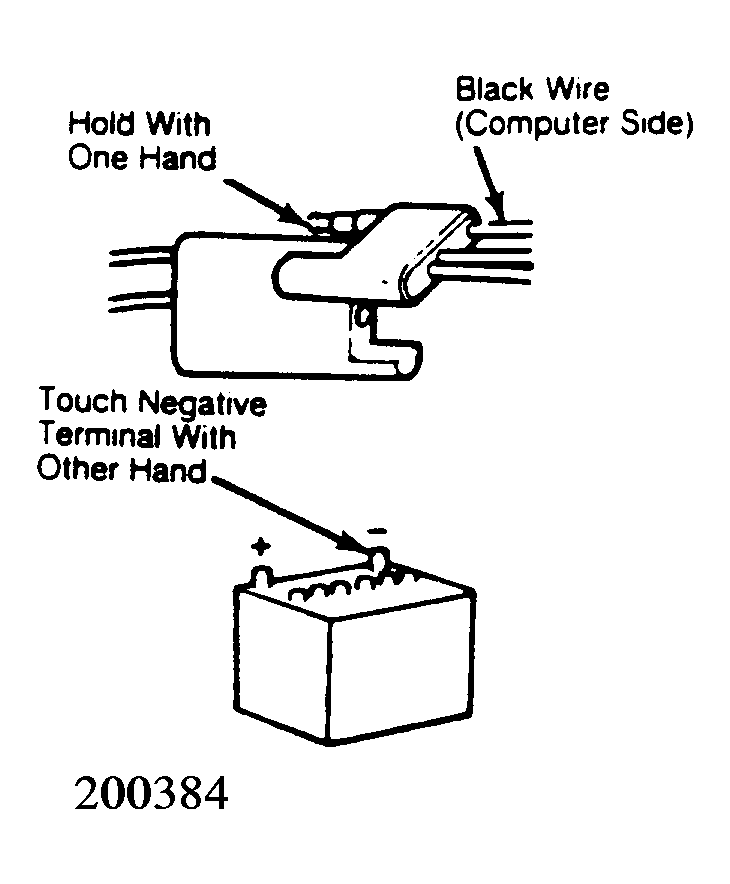
- Reconnect hose to PCV valve. Separate test connector and reconnect Green/White wire. Hold Black oxygen sensor wire (computer side) in one hand, with other hand touch battery negative terminal. See Fig 4
. Voltage and engine speed should increase. If voltage and speed are okay, replace oxygen sensor. If voltage and speed are not okay, replace computer.