Test H: No Communication With Central Timer Module
- Turn ignition switch to LOCK position. Disconnect CTM harness connector C1000. See Figure
. Visually inspect Central Junction Box (CJB) harness connector C15 and CTM connector C1000 for damage and correct seating. Measure resistance between terminal No. 20 (White/Blue wire) at CTM harness connector C1000 and terminal No. 7 at Data Link Connector C200 (White/Black wire). If connectors and connections are okay and resistance is 5 ohms or less, go to next step. If connectors or connections are not okay, and/or if resistance is more than 5 ohms, go to step 3
.
- Check for corrosion, pushed out pins, connector seated correctly. Connect all disconnected connectors. Ensure all other system connectors are fully seated. Operate system and verify problem is still present. If problem is still present, replace CTM and perform DATA-LINK DIAGNOSTIC TEST. See
MODULE COMMUNICATIONS NETWORK - FOCUS article. If problem is not still present, system is operating correctly at this time. Problem may have been caused by a loose or corroded connector. Clear DTCs and repeat CTM self-test.
- Disconnect CJB harness connector C15. See Fig 1
. Measure resistance between terminal No. 20 at CTM socket C1000 and terminal No. 5 at component side of CJB connector C15. If resistance is 5 ohms or less, perform DATA-LINK DIAGNOSTIC TEST. See
MODULE COMMUNICATIONS NETWORK - FOCUS article. If resistance is more than 5 ohms, repair open in CJB. Perform DATA-LINK DIAGNOSTIC TEST.
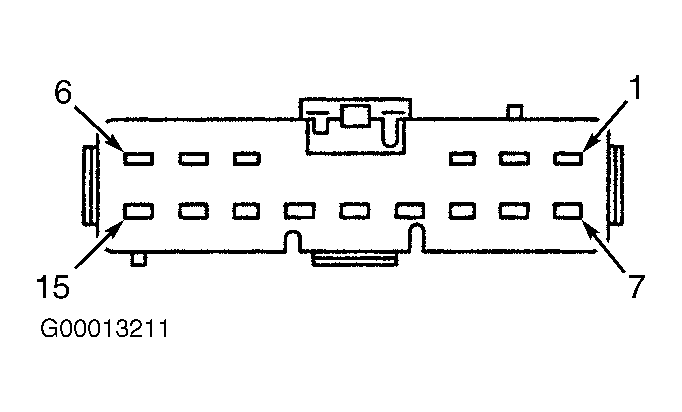 Courtesy of FORD MOTOR CO.