September 30: LEMON manuals is back up on a temporary server! Slowness is possible
Remote Keyless Entry System Inoperative
- Perform SYSTEM CHECK. If system check has been performed, go to next step.
- Press each button on transmitter one at a time. If system does not operate normally, go to next step. If system operates normally, check for intermittent problem. See WIRING DIAGRAMS T1 WIRING DIAGRAMS> .
- Attempt to lock and unlock doors using power door lock switches inside vehicle. If inside power door locks function properly, go to next step. If inside power door locks do not function properly, go to POWER DOOR LOCKS - BLAZER, BRAVADA, ENVOY, JIMMY, SONOMA, & S10 PICKUP article.
- Attempt to release endgate/liftgate window from inside vehicle (if equipped). If endgate/liftgate window operates properly, go to next step. If endgate/liftgate window does not operate properly, repair circuit as necessary. See appropriate wiring diagram in POWER REAR COMPARTMENT & FUEL DOOR RELEASE SYSTEMS article.
- Place transmitter on Keyless Entry Tester (J-43241) test pad. Turn keyless entry tester on. Press each button of transmitter, one at a time. Keyless entry tester should illuminate a Green light sound off with each button pushed on transmitter. If transmitter operates as specified, go to step 10). If transmitter does not operate as specified, go to next step.
- If keyless entry tester illuminates a Green light or sounds off when any of the transmitter buttons are pressed, go to step 9). If keyless entry tester does not illuminate a Green light or sound off when any of the transmitter buttons are pressed, go to next step.
- Replace transmitter battery. See TRANSMITTER BATTERY
under REMOVAL & INSTALLATION. After replacing transmitter battery, go to next step.
- Place transmitter on keyless entry tester test pad. Turn keyless entry tester on. Press each button of transmitter, one at a time. Keyless entry tester should illuminate a Green light and sound off with each button pushed on transmitter. If transmitter operates as specified, go to step 10). If transmitter does not operate as specified, go to next step.
- Replace transmitter. After replacing transmitter, go to next step.
- Press panic alarm button (horn symbol) on transmitter. If panic function operates normally, go to next step. If panic function does not operate normally, go to step 13).
- Perform synchronization procedure. See RESYNCHRONIZATION
under PROGRAMMING PROCEDURES. If door locks cycle to lock then unlock, go to next step. If door locks do not cycle to lock then unlock, go to step 13).
- Stand within 5 feet of vehicle and operate all functions of transmitter. If all transmitter functions operate properly, go to step 26). If any transmitter functions do not operate properly, go to next step.
- Perform reprogramming procedure. See TRANSMITTER PROGRAMMING
under PROGRAMMING PROCEDURES. If door locks cycle to lock then unlock, go to step 26). If door locks do not cycle to lock then unlock, go to next step.
- Turn ignition off. Disconnect receiver control module electrical connector. See COMPONENT LOCATIONS
. Using a test light connected to ground, backprobe receiver control module 4-pin connector terminal No. 1 (Orange wire). See Fig 1
. If test light illuminates, go to next step. If test light does not illuminate, go to step 24).
- Connect test light between receiver control module 4-pin connector terminals No. 1 (Orange wire) and No. 4 (Black/White wire). If test light illuminates, go to next step. If test light does not illuminate, go to step 25).
- Connect Red lead of DVOM to receiver control module 4-pin connector terminal No. 2 (Orange wire). Connect Black lead of DVOM to receiver control module 4-pin connector terminal No. 4 (Black wire). Turn ignition on. DVOM should display battery voltage. If battery voltage exists, disconnect DVOM and go to next step. If battery voltage does not exist, go to step 19).
- Ensure ignition is on. Using a test light connected to ground, backprobe receiver control module 4-pin connector terminal No. 2 (Orange wire). If test light illuminates, go to next step. If test light does not illuminate, go to step 20).
- Check for short to power in Orange wire (serial data circuit) between receiver control module 4-pin connector terminal No. 2 and BCM connector C1 terminal B4. See Fig 1
and Fig 2
. See WIRING DIAGRAMS T1 WIRING DIAGRAMS> . If short to power is found in Orange wire, repair as necessary and go to step 26). If Orange wire is not shorted to power, go to step 21).
- Check for open circuit, high resistance or short to ground in Orange wire (serial data circuit) between receiver control module 4-pin connector terminal No. 2 and BCM connector C1 terminal B4. See Fig 1
and Fig 2
. See WIRING DIAGRAMS T1 WIRING DIAGRAMS> . If open circuit, high resistance or short to ground is found in Orange wire, repair as necessary and go to step 26). If open, high resistance or short to power is not found in Orange wire, go to step 21).
- Check for poor connection at receiver control module 4-pin connector. If poor connection is found, repair as necessary and go to step 26). If connection at receiver control module 4-pin connector is okay, go to step 22).
- Check for poor connection at BCM. If poor BCM connection is found, repair as necessary and go to step 26). If BCM connection is okay, go to step 23).
- Replace receiver control module. See RECEIVER CONTROL MODULE
under REMOVAL & INSTALLATION. Go to step 26).
- Replace BCM. See BODY CONTROL MODULE (BCM) under REMOVAL & INSTALLATION in BODY CONTROL MODULES - BLAZER, BRAVADA, ENVOY, JIMMY, SONOMA, & S10 PICKUP article. Go to step 26).
- Repair open circuit, high resistance or short to ground in Orange wire between receiver control module 4-pin connector terminal No. 1 and TBC fuse (10-amp) located in Underhood Bussed Electrical Center (UBEC). See WIRING DIAGRAMS T1 WIRING DIAGRAMS> . Go to step 26).
- Repair open circuit or high resistance in Black/White wire between receiver control module 4-pin connector terminal No. 4 and ground. See WIRING DIAGRAMS T1 WIRING DIAGRAMS> . Go to next step.
- Recheck system operation. If system does not operate properly, go to step 3).
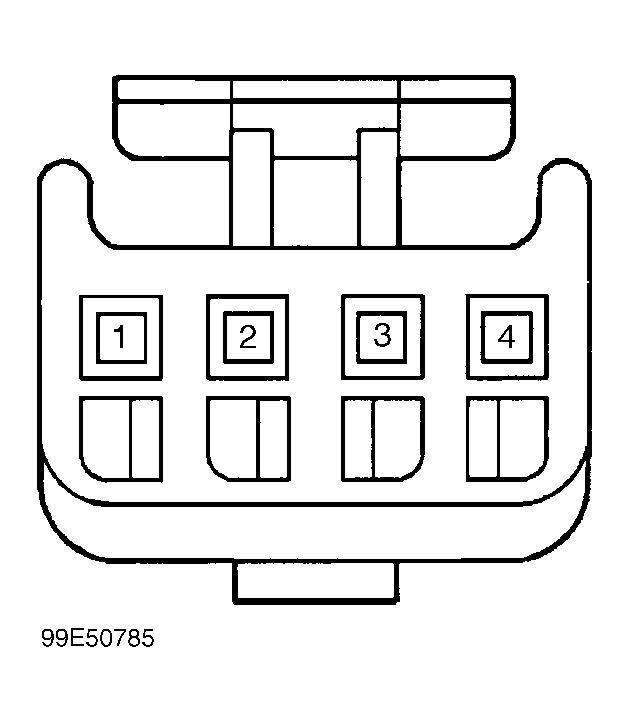 Courtesy of GENERAL MOTORS CORP.
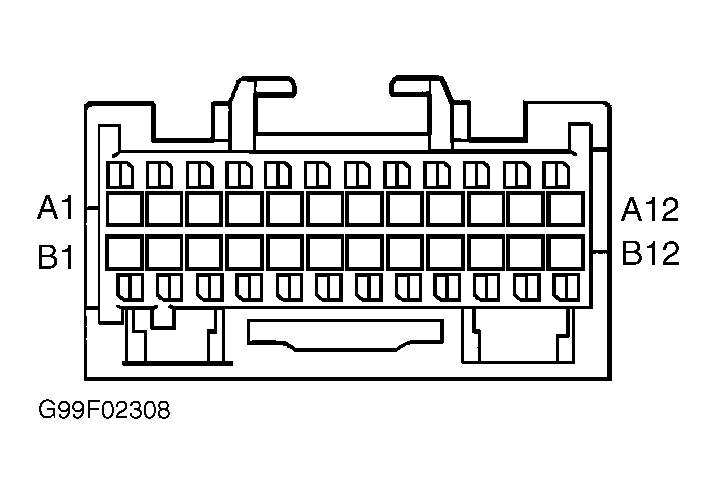 Courtesy of GENERAL MOTORS CORP.