Wipers Operate At Low Speed With Front Wiper/Washer Switch In HI Position
- Turn ignition switch to ON position. Move front wiper/washer switch lever to HI position. Using a voltmeter, measure voltage between wiper motor harness connector terminal No. 2 (Blue/Red wire) and ground. If voltage is 10 volts or less, go to next step. If voltage is more than 10 volts, replace front wiper motor.
- Using test light, backprobe between front wiper motor connector terminal No. 3 (Blue wire) and ground. If test light does not illuminate, go to next step. If test light illuminates, replace combination switch.
- Turn ignition switch to LOCK position. Disconnect front wiper/washer switch connector (combination switch Natural 8-pin connector). Disconnect junction block Natural 10-pin connector (located behind left kick panel). See Fig 1. See JUNCTION BLOCK 10-PIN CONNECTOR TERMINAL IDENTIFICATION table.
- Using an ohmmeter, backprobe between junction block 10-pin connector terminal No. 8 (Yellow/Blue wire) and switch side of front wiper/washer switch connector terminal No. 1 (Blue/Red wire). If resistance is greater than 5.0 ohms, replace combination switch. If resistance is 5.0 ohms or less, check for high resistance in Blue/Red wire between front wiper/washer switch and front wiper motor. If wire is okay, replace wiper motor.
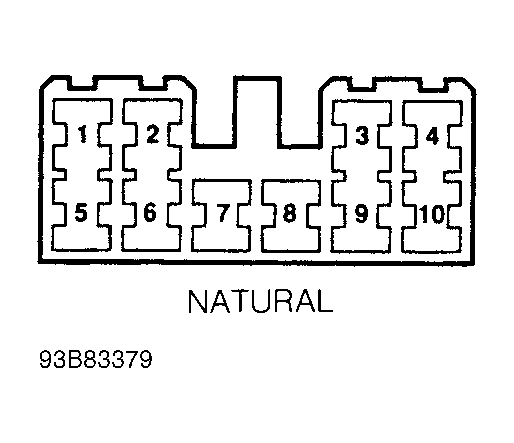 Courtesy of GENERAL MOTORS CORP.
 JUNCTION BLOCK 10-PIN CONNECTOR TERMINAL ID
| Terminal No. (Wire Color) |
Circuit |
| 1 (YEL/BLU) |
Turn/Hazard Flasher |
| 3 (RED) |
Headlight/High Beams |
| 7 (BLU/BLK) |
Horn Relay |
| 8 (YEL/BLU) |
WIP (15-Amp) Fuse |
| 9 (YEL) |
BACK (15-Amp) Fuse |
| 10 (RED/WHT) |
Headlights/Low Beams |