October 30: LEMON manuals on a temporary server, it is slow and having issues, download the manuals you need! Later in November we will switch back to the fast server.
Changing Camera Views
- When the rearview camera image is displayed, pressing the interface dial in (ENTER) sends a signal from the audio-navigation unit, to the navigation display unit using the GA-Net BUS to change the camera angle view.
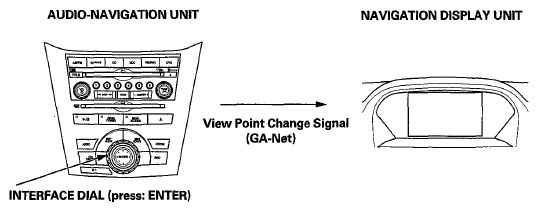 Courtesy of AMERICAN HONDA MOTOR CO., INC.
- The navigation display unit recognizes the signal, and sends a signal to the rearview camera using the CAMERA BIT0 and CAMERA BIT1 signal lines to change the rearview camera view.
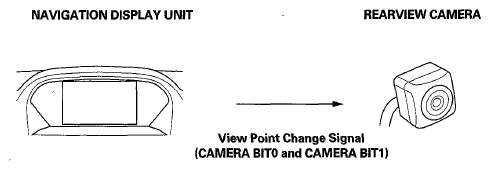 Courtesy of AMERICAN HONDA MOTOR CO., INC.
 REARVIEW CAMERA REFERENCE CHART
| |
Wide |
Normal |
Top Down |
| CAMERA BIT0 Signal |
OFF (0 V) |
ON (8 V) |
OFF (0V) |
| CAMERA BIT1 Signal |
OFF (0 V) |
OFF (0 V) |
ON (8 V) |
- The rearview camera takes the digital video using the input signal, then sends the rearview image to the navigation display unit using the NTSC lines. The rearview image appears on the navigation display unit.