September 30: LEMON manuals is back up on a temporary server! Slowness is possible
Hi-Scan Check
- Turn the ignition switch off.
- Connect the Hi-Scan Pro connector to the data link connector located under the crash pad.
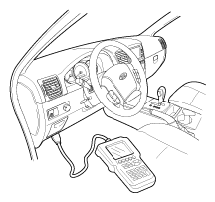 Courtesy of KIA MOTORS AMERICA, INC.
- Turn the ignition switch on and power on the Hi-Scan Pro.
- Read DTCs.
- Find and repair the trouble, and clear the DTCs using Hi-Scan Pro.
- Disconnect the Hi-Scan Pro.
- Confirm proper system operation;
- Turn the ignition switch ON; the SRS indicator light should be turned on for about six seconds and then go off.