Configuration Driving Pattern Related To DTC
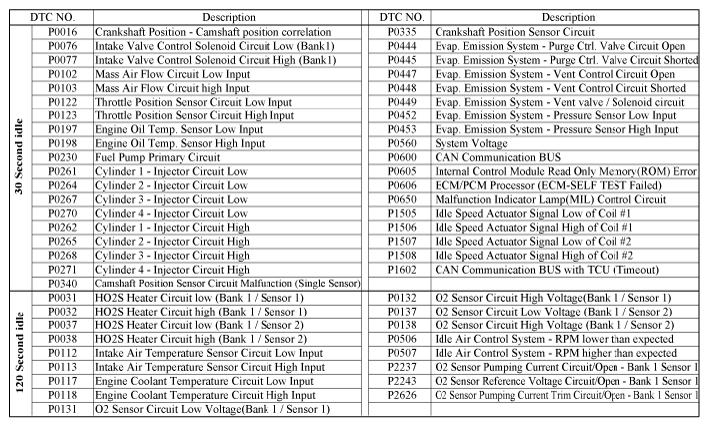
- Idle Test Mode (Comprehensive Component)
 Courtesy of KIA MOTORS AMERICA, INC.
NOTE:
- Connect Hi-Scan (Pro) to the Data Link Connector (DLC).
- Select the DTC function of Hi-Scan (Pro).
- Start the engine and let the engine at idle for 30 seconds or 120 seconds as mentioned in table above respectively.
- The given time in above table is the required time after starting the engine with warmed-up vehicle.
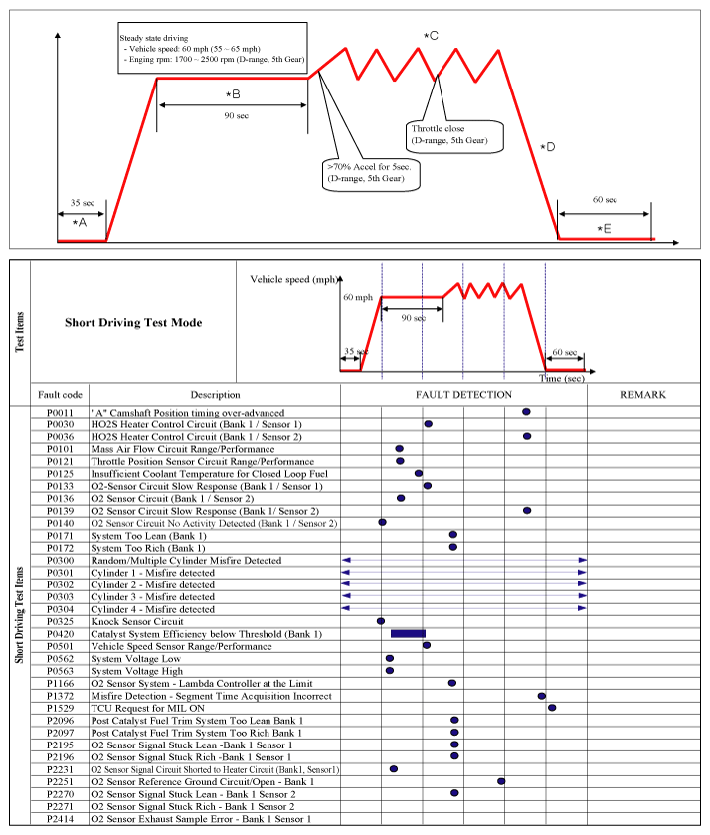
- Short Driving Test Mode
 Courtesy of KIA MOTORS AMERICA, INC.
NOTE:
- Connect Hi-Scan (Pro) to the Data Link Connector (DLC).
- Select the DTC function of Hi-Scan (Pro).
- Start the engine and let the engine at idle for 35 seconds or more (*A).
- Drive the vehicle at 60 mph (55-65 mph) for 90 seconds or more (*B).
- Accelerate the vehicle with high acceleration (more than 70% of TPS) for 5 seconds and decelerate with closed throttle for 7 seconds more than five times (*C), then decelerate the vehicle to stop (*D).
- Let the engine at idle for 60 seconds or more (*E).
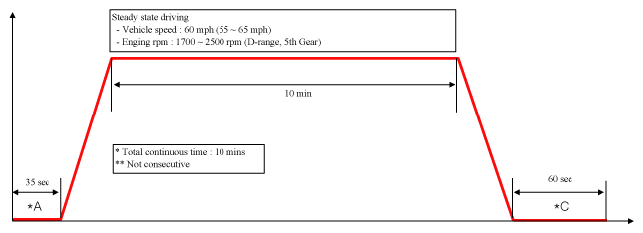
- Long Driving Test Mode
 Courtesy of KIA MOTORS AMERICA, INC.
 Courtesy of KIA MOTORS AMERICA, INC.
NOTE:
- Connect Hi-Scan (Pro) to the Data Link Connector (DLC).
- Select the DTC function of Hi-Scan (Pro).
- Start the engine and let the engine at idle for 35 seconds or more (*A).
- Drive the vehicle at 60 mph (55-65 mph) for 10 minutes or more and decrease the vehicle speed until it stops (*B).
- Let the engine at idle for 60 seconds or more (*C).
 Courtesy of KIA MOTORS AMERICA, INC.
NOTE:
- Connect Hi-Scan (Pro) to the Data Link Connector (DLC).
- Select "EVAP LEAKAGE TEST" mode of Hi-Scan (Pro).
- Check the same code reoccur.