Navigation System Traffic Module
Navigation System Traffic Module
Removal
1. Disconnect the battery ground cable.
2. Remove the access panel from the loadspace trim panel LH.
CAUTION: Cover fiber optic cable connectors to minimize dust ingress and avoid bending the cables in a radius of less than 30 mm.
3. Disconnect the navigation system traffic module optical connector.
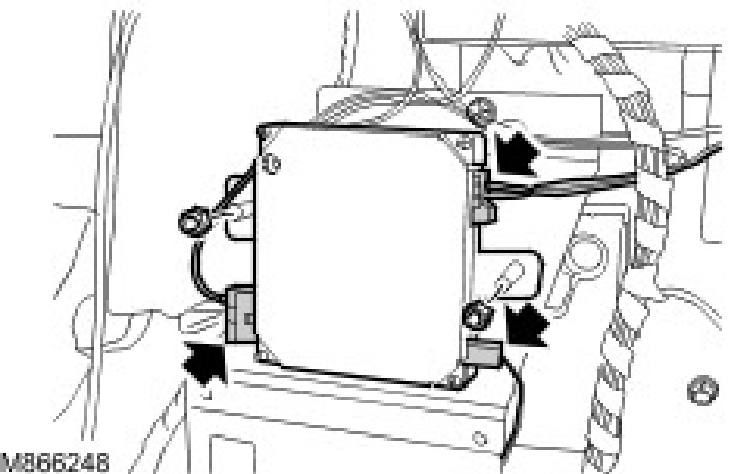
4. Disconnect the navigation system traffic module coaxial cable connector.
5. Disconnect the navigation system traffic module electrical connector.
6. Remove the navigation system traffic module.
^ Remove the 2 nuts.
Installation
1. Install the navigation system traffic module.
^ Tighten the 2 nuts to 10 Nm (7 ft. lbs.).
2. Connect the navigation system module optical connector.
3. Connect the navigation system traffic module coaxial cableconnector.
4. Connect the navigation system traffic module electrical connector.
5. Install the access panel to the loadspace trim panel LH.
6. Connect the battery ground cable.
7. Using the Land Rover approved diagnostic system, follow the on-screen instructions and configure the navigation system traffic module.