Display Check Mode (Panel Switch Check)
DISPLAY CHECK MODE (PANEL SWITCH CHECK)HINT:
- This mode checks the panel switch operation response on the radio and navigation assy.
- Illustrations may differ from the actual vehicle depending on the device settings and options. Therefore, some detailed areas may not be shown exactly the same as on the actual vehicle.
1. Enter diagnostic mode.
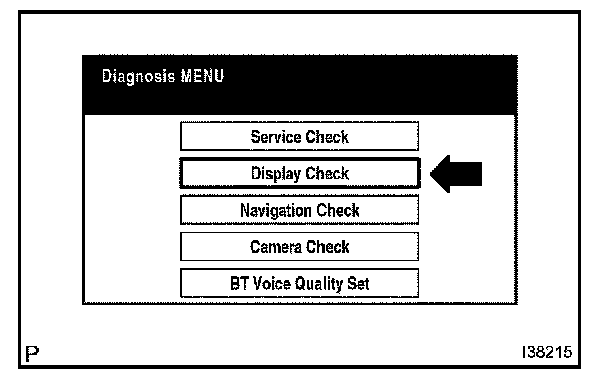
2. Select "Display Check" from the "Diagnosis Menu" screen.
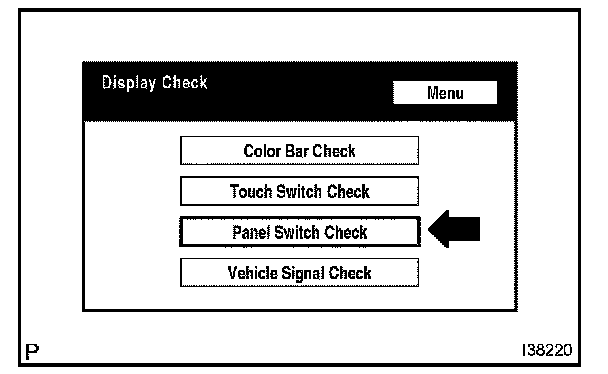
3. Select "Panel Switch Check" from the "Display Check" screen.
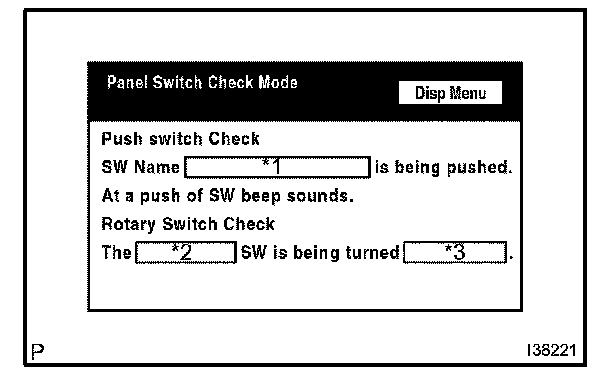

4. Operate each switch and check that the switch name and condition is correctly displayed.
HINT:
- Pressing the "DISPLAY" switch for 3 seconds will exit the diagnostic mode.
- "OPEN" and "TILT" switches are not displayed. To test these switches, they must be operated.