NGS (VER. 9.0 Card) 2001 Truck PCM Programmable Module Config.
(Programmable Parameters)1. Install NGS with Ver. 9.0 card to DLC connector using "flash cable" (P/N 007-00531)
2. Select "VEHICLE & ENGINE", press TRIGGER.
3. Select "NEW VEHICLE YEAR & MODEL", press TRIGGER.
4. Select correct year. Press TRIGGER.
5. Select correct model and transmission. Press TRIGGER to enter. Press TRIGGER again. Screen shows "Testing supervisor chip" then changes to menu.
6. Select "DIAGNOSTIC DATALINK", press TRIGGER.
7. Select "PCM", press TRIGGER.
8. Select "MODULE CONFIGURATION", press TRIGGER. Screen shows "Trying to establish communication link".
9. Screen shows "Attention: Mazda authorizes entry....", press TRIGGER.
10. Screen shows "Value is unauthorized....", press TRIGGER
11. Screen shows "Turn key OFF". Do this and press TRIGGER. "Please Wait".
12. Screen shows "Don't crank engine, Turn Key ON -Wait for authorization".
13. Screen shows a list of programmable parameters.
14. *Use dial to scroll to:
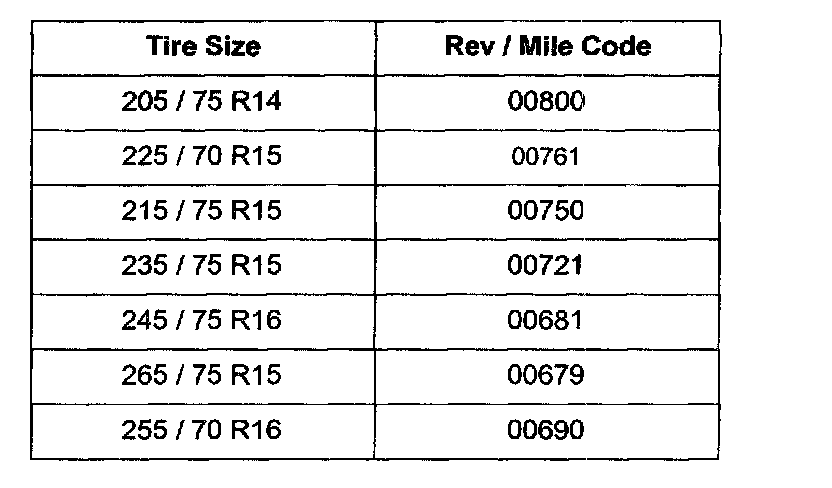
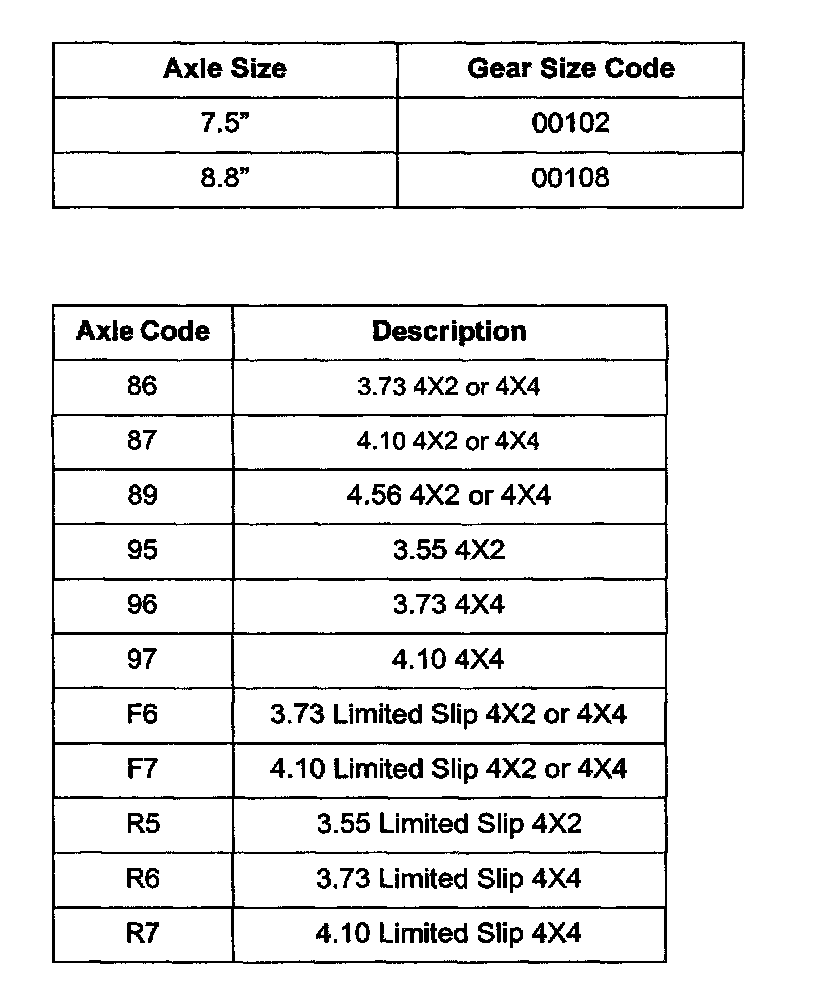
TIRE SIZE (See table for reference)
AXLE RATIO (See vehicle certification label (door sticker) for axle code, then see table for code definitions)
4X4 LOW RANGE SWITCH
TRANSFER CASE
15. To change parameters:
a. Use the dial to highlight the parameter, press TRIGGER.
b. Use the dial to highlight the correct value, press TRIGGER.
c. When finished setting parameters to correct values, press "Start".
16. Screen shows "Test" Function Successful". Press cancel.
17. Turn key OFF. Disconnect DLC cable.