Using World Diagnostic System (WDS) or Equivalent Scan Tool
- Read/Clear Continuous DTCs Self-Test
Start engine and idle. Allow engine to reach normal operating temperature. If engine will not start, turn ignition on with engine off during code retrieval. Perform visual inspection. Turn off all electrical accessories. Verify vehicle fluid levels are okay. Connect scan tool to 16-pin Data Link Connector (DLC) located left of center console assembly. See Fig 1
.
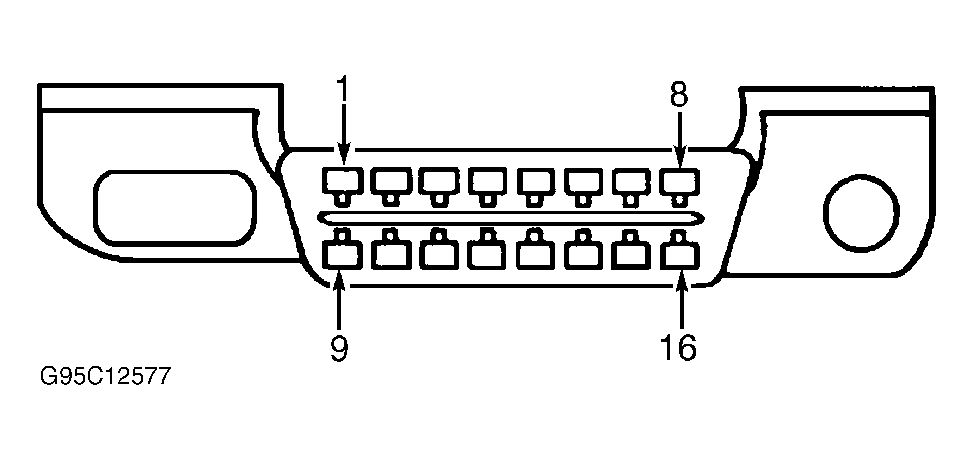 Courtesy of FORD MOTOR CO.
- The first test to run is Read/Clear Continuous DTC Self-Test. Record DTCs and proceed to the KOEO Self-Test. The purpose of recording the Continuous DTCs at this time is to make sure they are not unintentionally cleared during any KOEO or KOER service. KOEO and KOER codes are always addressed before Continuous codes.
- If DTCs are present, go to DIAGNOSTIC TROUBLE CODE DEFINITIONS
. If no DTCs are present, go to next step.
- Key On Engine Off (KOEO) Self-Test
Ensure A/C is off. If A/C is on during test, DTC P1464 will set. Follow equipment manufacturer's instructions for retrieving codes. Go to next step.
- Key On Engine Running (KOER) Self-Test
Ensure engine is at normal operating temperature before performing KOER Self-Test. Ensure A/C is off. If A/C is on during test, DTC P1464 will set. The brake pedal must be depressed and released after KOER Self-Test is initiated. If brake pedal is not activated, DTC P1703 will be set. The O/D OFF switch must be pushed and released after KOER Self-Test is united. If O/D OFF switch is not activated, DTC P1780 will be set. Observe and record data. Go to next step.
- Pending DTC Access
Follow equipment manufacturer's instructions for retrieving codes. Observe and record data. Go to next step.
- Freeze Frame PID Data Access
Follow equipment manufacturer's instructions for retrieving data. Observe and record data. Go to next step.
- On-Board System Readiness Tests Access
Follow equipment manufacturer's instructions for monitoring OBD-II systems operating status. Observe and record data. Go to next step.
- PID/DATA Monitor & Record Procedure
Follow equipment manufacturer's instructions for monitoring data. Observe and record data. Go to next step.
- Diagnostic Monitoring Test Results Access
Follow equipment manufacturer's instructions for monitoring data. Observe and record data. Go to DTC CONFIRMATION PROCEDURE
.