Single Drive Mode (Pcm Adaptive Memory Produce, EGR System, H02S Heater, H02S, TWC & EVAP System Repair Verification Drive Mode) (Cal: Except For AJ57EM060AJV5010 (M/T), AJ58EM060AJVN010 (A/T))
- Start the engine and warm it up completely.
- Clear the DTC from the PCM memory using the WDS or equivalent.
- Verify the following conditions and correct if necessary:
- All accessory loads (A/C, headlights, blower fan, rear window defroster) are off.
- Initial ignition timing and idle speed are within the specification.
- Verify that all of the following PIDs are within the following specifications. All PIDs must be within specifications from Step 5 to Step 6.
- BARO: 72.3 kPa {542 mmHg, 21.3 inHg} or higher
- IAT: 5-35 °C {41-95 °F}
- Fuel tank level: 15-85 %
- Battery positive voltage: 10.9-14.6 V
- With the vehicle stopped, race the engine at the engine speed indicated, and then drive the vehicle as shown in the graph. The driving conditions before driving at constant speed are not specified. If possible, monitor the RPM PID for engine speed during this procedure.
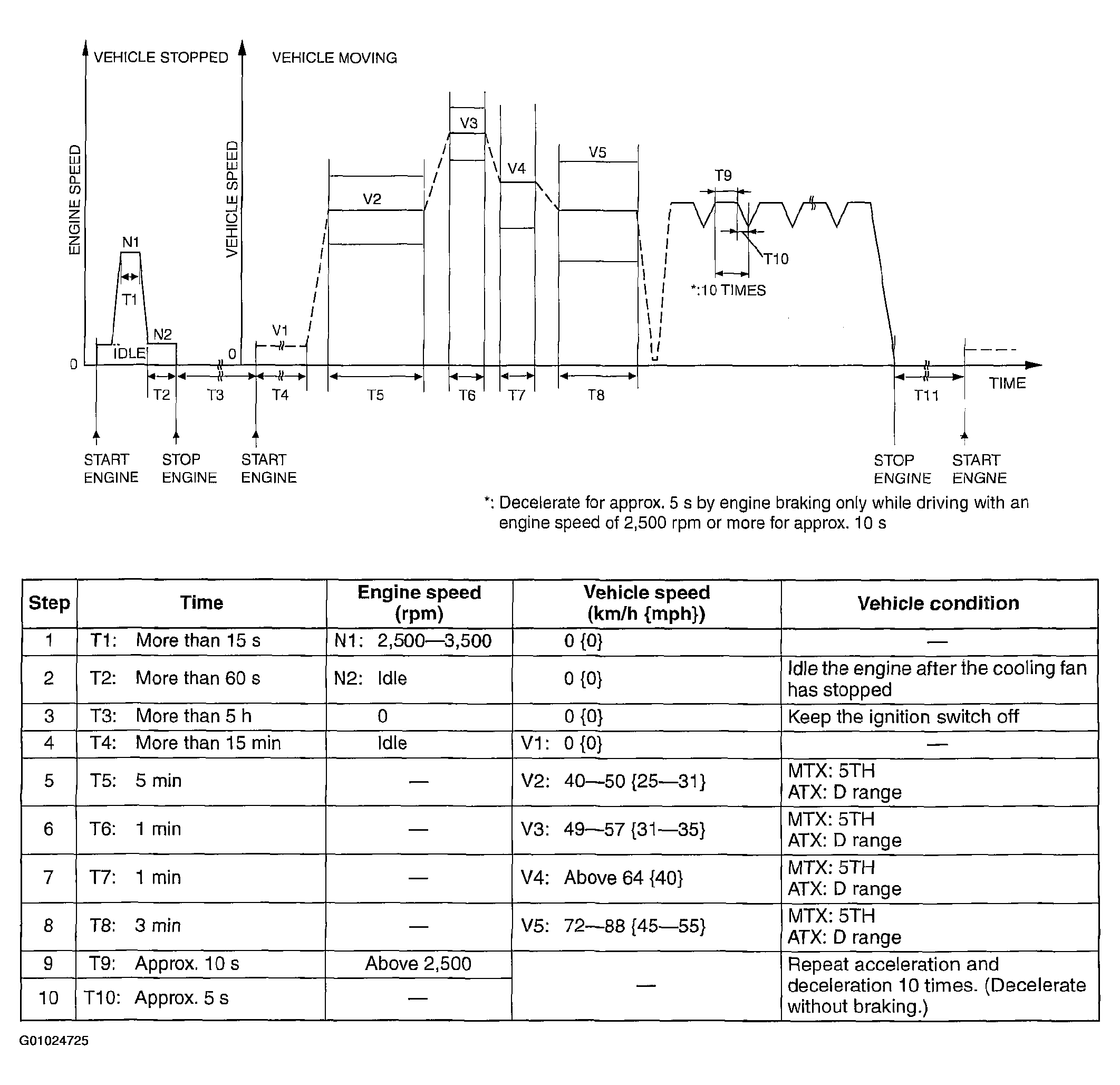 Courtesy of MAZDA MOTORS CORP.
 Courtesy of MAZDA MOTORS CORP.
- Turn the ignition switch off and leave the vehicle for 10 min or more
with the ignition switch off.
- Start and stop the engine.
- Access the ON BOARD SYSTEM READINESS menu of GENERIC OBD-II FUNCTION to verify the OBD monitoring status.
- If completed, all of the OBD monitoring status items change from non-completed to completed.
- If not completed, turn the ignition switch off, then perform the applicable specific drive mode for any monitoring item that was not in the detection condition.
- Access the DIAGNOSTIC MONITORING TEST RESULTS menu of GENERIC OBD-II FUNCTIONS to verify the monitor results.
- If the detected values are not within the specification, the repair has not been completed.