October 30: LEMON manuals on a temporary server, it is slow and having issues, download the manuals you need! Later in November we will switch back to the fast server.
EGR System Repair Verification Drive Mode
- Perform "PCM ADAPTIVE MEMORY PRODUCTION DRIVE MODE " first.
- Verify all accessory loads (A/C, headlights, blower fan, rear window defroster) are off.
- Drive the vehicle as shown in the graph.
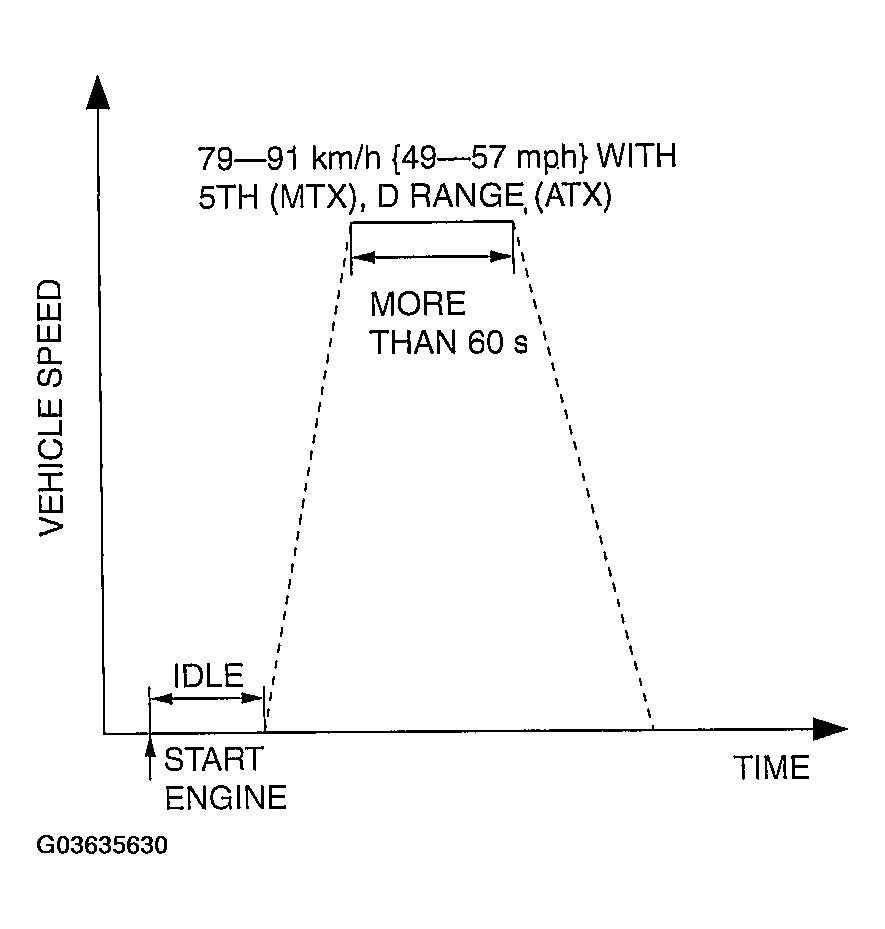 Courtesy of MAZDA MOTORS CORP.
- Stop the vehicle and access ON BOARD SYSTEM READINESS menu of GENERIC OBD-II FUNCTION to verify the OBD monitoring status.
- If completed, the OBD monitoring status items change from non-completed to completed.
- If not completed, turn the ignition switch off then repeat from Step 3.
- Access DIAGNOSTIC MONITORING TEST RESULTS menu of GENERIC OBD-II FUNCTIONS to verify the monitor results.
- If detected values are not within specification, repair has not been completed.
- Verify no DTCs are available.