September 30: LEMON manuals is back up on a temporary server! Slowness is possible
Pcm Configuration
- Connect the M-MDS to DLC-2.
- After the vehicle is identified, select the following items from the initialization screen of the M-MDS.
- When using the IDS (laptop PC)
- Select the "Module Programming".
- When using the PDS (Pocket PC)
- Select "Programming".
- Select "Module Programming".
- Then, select the "Programmable Module Installation" and "PCM" from the screen menu.
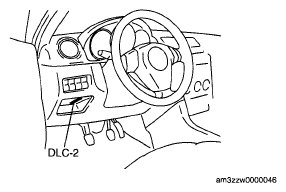 Courtesy of MAZDA MOTORS CORP.
- Select "Programmable Parameters", [with DSC HU/CM]
- Select "Tire Size/Axle Ratio", [with DSC HU/CM]
- Select "Body Type - (PCM)", then select the applicable body type on the M-MDS screen, [with DSC HU/CM]
- Retrieve DTCs using the M-MDS, then verify if DTCs are present.
- If a DTC is present, perform the applicable DTC inspection.