Pcm Configuration
- Connect the M-MDS to DLC-2.
- After the vehicle is identified, select the following items from the initial screen of the M-MDS.
- When using the IDS (notebook PC)
- Select the "Module Programming".
- When using the PDS (pocket PC)
- Select "Programming".
- Select "Module Programming".
- Then, select the "Programmable Module Installation", "PCM" from the screen menu.
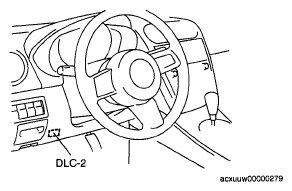 Courtesy of MAZDA MOTORS CORP.
NOTE:
- If the PCM is replaced with a new one, the PCM stores DTC P0602, illuminates the MIL even though no malfunction is detected. When the configuration is completed, DTC P0602 is cleared.
- Retrieve DTC's using the M-MDS, then verify that DTC are present.
- If a DTC is present, perform the applicable DTC inspection.