Clearing Card Key
CLEARING CARD KEY [ADVANCED KEYLESS SYSTEM]
1. Fully lower the driver-side door glass.
2. Connect the M-MDS to the DLC-2.
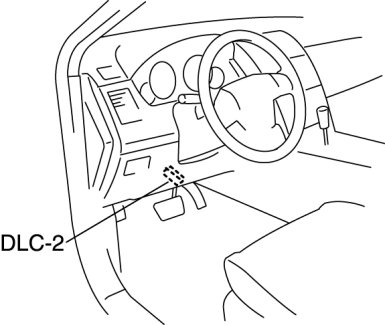
3. Pull out the M-MDS cable from the door glass opening and set the M-MDS outside the vehicle.
CAUTION:
- Protect the cable and body contact area with a clean rag, otherwise they could be damaged.
4. After the vehicle is identified, select the following items from the initialization screen of the M-MDS.
- When using the IDS (laptop PC)
- Select "Body".
- Select "Security".
- When using the PDS (Pocket PC)
- Select "Programming".
5. Then, select items from the screen menu in the following order.
- Select "PATS Functions".
- Select "Card Key Code Erase and Program".
6. Security access begins and the M-MDS displays the "OUT-CODE".
NOTE:
- When "OUT-CODE" is first displayed, turning the ignition switch from the LOCK to the ON position 5 times will change the "OUT-CODE".
7. Input the "IN-CODE" that corresponds to the "OUT-CODE" displayed in the M-MDS screen.
8. Select "CARD KEY CLEARING" from the M-MDS screen menu.