Commander Switch: Purpose/Function: R.H.D.
WARNING: This page is about a different car, the 2024 Mazda CX-90. However, it is still accessible from the selected car via links, so may be relevant.
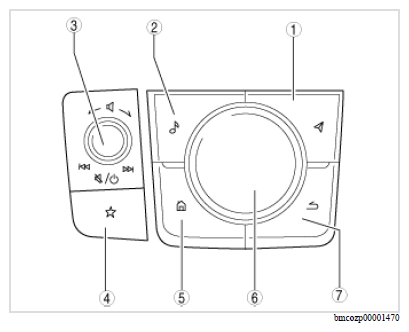 Courtesy of MAZDA Courtesy of MAZDA
|
COMPONENT OPERATIONS
| Component No. |
Refer to |
| 1 |
Map button |
| 2 |
Entertainment button |
| 3 |
Volume knob |
| 4 |
Favorites button |
| 5 |
Home button |
| 6 |
Commander knob |
| 7 |
Back button |
| Button/knob name |
Function |
| Map button (With car-navigation system) |
Switches the display screen of the center display to the navigation screen. |
| Entertainment button |
Switches the display screen of the center display to the entertainment screen. |
| Volume knob |
- When the volume knob is rotated, the volume can be adjusted.
- When the volume knob is pressed, the volume can be muted. Pressing again after muting returns to previous volume level.
- When Mazda Connect is on, press and hold the volume knob to turn it off. Press the volume knob again to turn Mazda Connect back on.
|
| Favorites button |
- Displays favorites in the center display.
- When the button is long-pressed with the screen to be added to the favorites displayed, the target is added to the favorites.
|
| Home button |
- Switches the display screen of the center display to the home screen.
- When the home button is pressed and held, the display screen of the center display switches to the Apple CarPlay™ home screen.
- When the home button is pressed and held, the display screen of the center display switches to the Android Auto™ home screen.
|
| Commander knob (tilt ) |
Moves the selection area on the center display screen. The selection area can be tilted in the lateral direction for left/right, and the longitudinal direction for forward/back. |
| Commander knob (rotation) |
Moves the selection area on the center display screen. The selection area moves according to the rotation direction. |
| Commander knob (click ) |
- Switches to the selected menu screen.
- Launches the selected menu.
- Mazda Connect can be turned on. (Some models)
|
| Back button |
Switches to the screen directly previous to the currently displayed screen. |