Removal and Installation
- Remove the LH and RH floor console finish mouldings. For additional information, refer to Console - Floor, MKZ in
INSTRUMENT PANEL & CONSOLE -- FUSION, MILAN & MKZ
article.
- Remove the instrument panel finish moulding. For additional information, refer to Instrument Panel - Exploded View in
INSTRUMENT PANEL & CONSOLE -- FUSION, MILAN & MKZ
article.
- Remove the 4 screws and the Front Controls Interface Module (FCIM).
- Disconnect the electrical connectors.
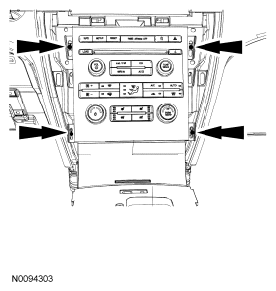 Courtesy of FORD MOTOR CO.
- Remove the 8 screws and separate the Audio Control Module (ACM) from the FCIM.
- To install, reverse the removal procedure.