September 30: LEMON manuals is back up on a temporary server! Slowness is possible
SUBARU Select Monitor
- After clearing the memory, check for any remaining unresolved trouble data. <Ref. to
CLEAR MEMORY MODE . >
- Warm up the engine.
- Prepare the Subaru Select Monitor kit. <Ref. to
PREPARATION TOOL , General Description. >
- Connect the diagnosis cable to the Subaru Select Monitor.
- Connect the test mode connector (A) at the lower portion of instrument panel (on the driver's side).
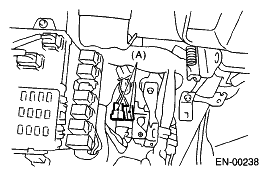 Courtesy of SUBARU OF AMERICA, INC.
- Connect the Subaru Select Monitor to the data link connector.
- Data link connector is located in the lower portion of instrument panel (on the driver's side).
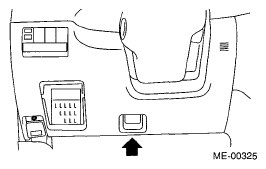 Courtesy of SUBARU OF AMERICA, INC.
- Connect the diagnosis cable to the data link connector.
CAUTION:
Do not connect the scan tools except for Subaru Select Monitor and general scan tool.
- Turn the ignition switch to ON (engine OFF) and run the Subaru Select Monitor.
- On the «Main Menu» display screen, select the {Each System Check}.
- On the «System Selection Menu» display screen, select the {Engine Control System}.
- Select the [OK] after the information of engine type has been displayed.
- On the «Engine Diagnosis» display screen, select the {Dealer Check Mode Procedure}.
- When the "Perform Inspection (Dealer Check) Mode" is shown on the screen, select the [OK].
- Perform subsequent procedures as instructed on the display screen.
- If trouble still remains in the memory, the corresponding DTC appears on the display screen.
NOTE:
- For detailed operation procedure, refer to the "SUBARU SELECT MONITOR OPERATION MANUAL ".
- For details concerning DTC, refer to "
LIST OF DIAGNOSTIC TROUBLE CODE (DTC) ".
- Release the parking brake.
- The speed difference between front and rear wheels may light the ABS warning light, but this indicates no malfunctions. When engine control diagnosis is finished, perform the ABS memory clearance procedure of self-diagnosis system.